 Author:



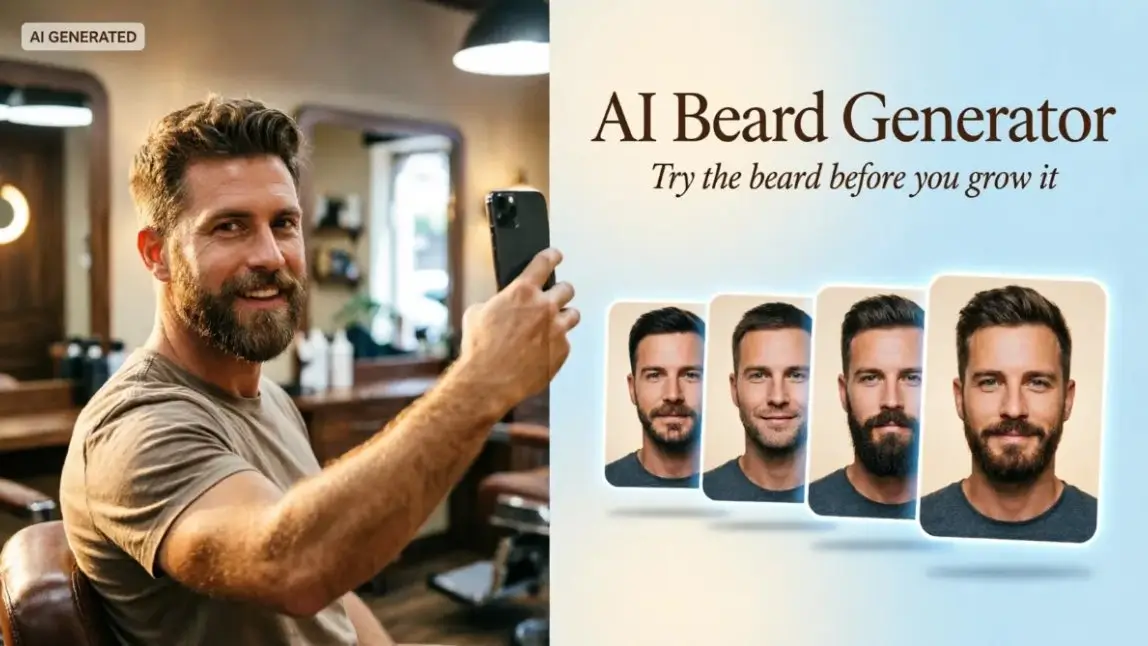
Images designed by YouCam AI
Growing a beard is a six-week commitment with a 50/50 chance of looking like a Renaissance poet or a man who lost his razor in 2019. That is exactly why the AI beard generator went from novelty filter to serious grooming tech.
Upload one selfie. Get a full beard, a sharp goatee, a gray "silver fox" look, or a clean shave, all mapped to your actual jawline in seconds. For shoppers, it removes the guesswork. For grooming brands, barbers, and beauty platforms, it is a conversion engine hiding in plain sight: the men's beard care market alone is projected at roughly US$22.7 billion in 2026 (Future Market Insights), and every one of those purchases starts with the same question: "Will this look good on me?"
Below, we break down what an AI beard generator can actually simulate, where it still struggles, and the playbook brands are using to turn a fun try-on into revenue.
Table of Contents
- What is an AI beard generator?
- How does an AI beard generator work?
- What can an AI beard generator simulate?
- How realistic are AI beard generators?
- Which beard style suits my face shape?
- How can brands use an AI beard generator?
- How do you add an AI beard generator to your site or app?
- Free AI beard filter vs. enterprise AI beard API: which do you need?
- FAQ: AI beard generator
What Is an AI Beard Generator?

An AI beard generator is a tool that adds, changes, or removes facial hair on a photo of a real face. Think of it as a fitting room for your chin.
Old-school beard filters slapped a flat, cartoonish sticker on your face. Modern generators are different. They detect your facial landmarks, read your skin tone and lighting, and then render individual hair strands that follow your jawline, cheek line, and mustache zone. The result looks grown, not glued.
You will see the same tech under several names: AI beard filter, beard simulator, virtual beard try-on, or beard style generator. Same idea, different marketing department.
How Does an AI Beard Generator Work?

Under the hood, a good beard generator runs a four-beat routine:
- Face detection. The model finds the face and dozens of landmarks: jaw angle, chin point, lip corners, nostril base, cheekbones.
- Beard-zone mapping. It builds a mask of where facial hair naturally grows, so a goatee lands on the chin instead of drifting onto the neck.
- Generative rendering. A trained generative model paints the chosen style strand by strand, with direction, density, and length baked in.
- Blending. Lighting, shadows, and color are matched to the original photo so the beard sits in the image, not on top of it.
Enterprise-grade engines add one more trick: beard removal. Before applying a new style, they can erase the existing beard and reconstruct the skin underneath. That is what lets a man with a full beard preview a clean goatee without shaving first.
What Can an AI Beard Generator Simulate?
 Original |  Goatee |  Circle |
 Anchor |  Ducktail |  Garibaldi |
Real outputs from the YouCam AI Beard Generator API on one test photo.
Short answer: a lot more than "add beard." Here is the full menu a modern AI beard generator can handle.
1. Beard Shapes and Named Styles
This is the headline feature. Perfect Corp.'s AI Beard Generator API ships with 15 predefined styles, from barely-there to full lumberjack:
| Style family | Styles included | Vibe |
|---|---|---|
| Clean / minimal | Shaved, Mustache, Soul Patch | Sharp, young, low-maintenance |
| Chin-focused | Goatee, Circle, Anchor, Chin Curtain | Defined, structured, office-friendly |
| Full & long | Garibaldi, Bandholz, Long Bandholz, Ducktail, French Fork | Bold, rugged, statement |
| Mustache-led | Walrus, Horse Shoe, Mutton Chops | Retro, character-heavy |
2. Beard Removal: The Clean-Shave Preview
 Before |  After: AI "Shaved" |
The most underrated feature. Bearded guys can see what is hiding underneath before they commit to a razor. It is gold for shaving brands, who finally get to sell to the half of the market that already has a beard.
3. Length, Density, and Patchiness
Stubble, 3-day shadow, short boxed, medium, and long all read very differently on the same face. Good generators also handle density, so a man with patchy growth can preview a fuller result. That opens the door for beard growth serums and minoxidil-style products to show an honest "goal" look.
4. Beard Color, Gray Coverage, and Dye

Beard color simulation lets shoppers test black, brown, auburn, or blended gray coverage. Perfect Corp. has powered exactly this for beard dye brands, and its AI Beard Dye and Beard Style Virtual Try-On combines shade and shape in one experience. Pair it with virtual hair color try-on so the beard and hair actually match.
5. The Full Look: Beard + Hairstyle
A beard never lives alone. The best experiences stack beard simulation with AR hairstyle virtual try-on, so a guy can test a buzz cut with a full beard, or a textured crop with stubble, in one session.
How Realistic Are AI Beard Generators?

Pretty realistic, as long as you feed it a good photo. The tech has jumped from "Snapchat sticker" to "wait, did you actually grow that?" in a few short years. Still, realism depends on input quality.
| Works great | Causes trouble |
|---|---|
| Front-facing selfie, full face visible | Heavy side profile (beyond ~30° head turn) |
| Even, soft lighting | Harsh backlight or deep shadows on the jaw |
| One person in frame | Group photos |
| Face fills a good chunk of the photo | Tiny face in a wide shot |
| Hands, masks, and scarves away from the chin | Anything covering the jawline |
For developers, the YouCam API documentation spells this out: one face, full face visible, head yaw within roughly ±30°, and a minimum face width. Follow those rules and results look convincingly natural.
Which Beard Style Suits My Face Shape?

This is the number one question men ask, and it is where AI quietly beats your barber's best guess. Combine a beard generator with an AI Face Analyzer and you can detect face shape automatically, then recommend styles that balance it.
| Face shape | Goal | Try these beard styles | Usually skip |
|---|---|---|---|
| Round | Add length, slim the cheeks | Short boxed, Goatee, Anchor, Ducktail | Wide, puffy full beards |
| Square | Soften a strong jaw | Circle, Stubble, rounded Garibaldi | Very angular chin curtains |
| Oval | Keep the balance | Almost anything: Bandholz, Full, Ducktail | Styles that hide the jaw entirely |
| Oblong / long | Add width, not length | Mutton Chops, short full beard, Horse Shoe | Long Bandholz, French Fork |
| Heart / triangle | Add volume at the chin | Garibaldi, Chin Curtain, full beard | Soul patch only |
How Can Brands Use an AI Beard Generator?

Here is where it gets interesting. Men's grooming has a classic problem: guys hate trial and error, and they hate wandering store aisles even more. A beard generator turns "maybe later" into "add to cart." Six plays that work:
1. Trimmer and Razor Brands: "Shop the Look"

Put the beard generator on the trimmer product page. The shopper picks a style, sees it on his face, and the page tells him exactly which guard length and attachments recreate it. You are no longer selling a tool; you are selling a finished look. Bonus: the "Shaved" simulation gives razor brands a reason to talk to bearded men at all.
2. Beard Dye Brands: Shade Matching Without the Panic
Dye is a high-anxiety purchase. Wrong shade, and it is visible from across the street. Letting men preview coverage on their own beard, then auto-recommending the closest shade, cuts returns and builds trust. This is exactly the use case Perfect Corp. has delivered for men's hair color brands.
3. Barbershops and Salons: The 60-Second Consultation

"A little shorter on the sides" means ten different things to ten different people. A tablet try-on at the chair aligns expectations before the clippers touch anything. Embed it in your booking app and clients arrive with a screenshot of the exact style they want.
4. Beard Care and Growth Products: Sell the Destination
Beard oil, balm, and growth serums are sold on a promise of the future. Show that future. A "your beard in 8 weeks" preview with a fuller, denser simulation is far more motivating than a stock photo of a random model. Bundle the visual with a starter kit or a subscription.
5. Social Campaigns, Movember, and No-Shave November

Beard try-on is inherently shareable. "Vote on my November beard" is a ready-made UGC hook. Brands can run seasonal campaigns, mustache challenges for charity months, or "pick my wedding beard" contests, each one collecting first-party engagement data along the way.
6. Apps, Dating Platforms, and Photo Tools: Build It In
Dating apps, avatar tools, photo editors, and men's lifestyle platforms can plug beard simulation straight into their product through an API. Instead of training a model from scratch, they call one endpoint and get a photorealistic result back. Explore more men's grooming and beauty tech ideas on the Perfect Corp. blog.
| Brand type | Where to place it | KPI to watch |
|---|---|---|
| Trimmer / razor | Product detail page | Add-to-cart rate, attachment upsell |
| Beard dye | Shade finder, PDP | Return rate, shade-match accuracy |
| Barbershop / salon | Booking app, in-chair tablet | Booking conversion, rebooking |
| Beard care / growth | Landing page, quiz funnel | Kit and subscription sign-ups |
| Social / campaign | Instagram, TikTok, microsite | Shares, time on experience |
| App / platform | In-app feature via API | Feature engagement, retention |
How Do You Add an AI Beard Generator to Your Site or App?

You have two routes: a ready-made experience, or the API. If you want to build, the YouCam API flow is refreshingly short:
- Upload a selfie (or pass a public image URL).
- Fetch the template list and pick a style, like
all_goateeorall_shaved. - Run the beard-style task and poll (or use a webhook) until it finishes.
- Get the result image URL and show it to your shopper.
Each run costs 2 units, and the full spec lives in the AI Beard Style Generator documentation.
Building with AI agents? All YouCam APIs support the Model Context Protocol, so tools like Claude or Cursor can call beard simulation with a plain-English request. See YouCam MCP and Agent Skills to connect in minutes. The beard generator also sits inside Perfect Corp.'s broader 11-API Hair & Beard suite, so you can add hair type, length, and density detection later without switching vendors.
Free AI Beard Filter vs. Enterprise AI Beard API: Which Do You Need?
Free online beard filters are fun for a quick laugh. Brands need something sturdier. Here is the honest comparison:
| Free AI beard filter / app | Enterprise AI beard API | |
|---|---|---|
| Best for | Individuals testing a look | Brands, retailers, apps, barbers |
| Style control | Text prompt or a few presets | Consistent predefined templates |
| Consistency | Can change face or background | Identity and background preserved |
| Beard removal | Rare | Built in ("Shaved") |
| Integration | None, manual uploads | REST API, webhooks, MCP |
| Data and privacy | Varies widely | Business terms and controls |
| Pairs with | Nothing | Face analysis, hair color, hairstyle try-on |
Curious how text prompts compare with templates? We tested ten of them in our guide to the best AI beard style prompts.
FAQ: AI Beard Generator
Is there a free AI beard generator?
Yes. Many tools let you try a beard on a photo for free, including Perfect Corp.'s online beard filter demo. Free tools are perfect for personal experimentation. Brands that need consistent, high-volume, integrated results usually move to an API.
How can I see what I would look like with a beard?
Take a front-facing selfie in soft, even light, upload it to an AI beard generator, and pick a style. In a few seconds you will see the beard mapped to your own jawline and skin tone. Try several styles back to back to compare.
Can AI remove a beard from a photo?
Yes. Advanced generators can erase an existing beard and reconstruct the skin underneath, giving you a realistic clean-shave preview. Perfect Corp.'s API includes this as its "Shaved" template.
What is the best AI beard filter app?
It depends on your goal. For a quick personal preview, any browser-based filter works. For realism, beard removal, and face-shape-aware recommendations, look for tools built on dedicated beard simulation rather than generic image generators.
Which beard style suits my face?
Round faces benefit from styles that add length, like a short boxed beard or goatee. Square faces look great with softer circle beards or stubble. Oval faces can pull off almost anything. Oblong faces should add width, not length. An AI face shape analyzer can make the call for you.
Is an AI beard generator accurate?
With a clear, front-facing photo, results are highly realistic. Accuracy drops with side profiles, harsh shadows, or anything covering the jaw. Real-world growth also depends on genetics, so treat the preview as a style guide, not a growth guarantee.
How do brands use AI beard try-on?
Trimmer brands use it for "shop the look" product pages, dye brands for shade matching, barbers for consultations, beard care brands to sell a growth goal, and apps to add a fun, sticky feature. Most integrate it through an API or a ready-made web module.
Can I add an AI beard generator to my app?
Yes. With the YouCam AI Beard Generator API you upload a photo, choose one of 15 templates, run the task, and receive a result URL. It also works with AI agents through MCP.