 Author:


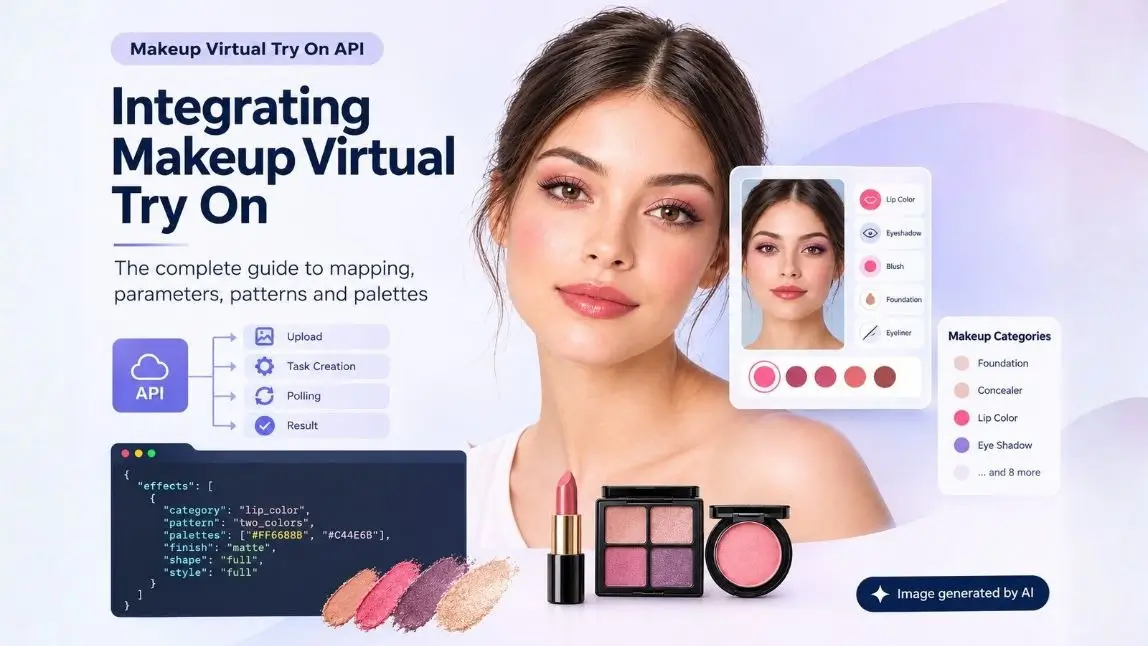
Images generated by YouCam AI
Makeup virtual try on looks like an image problem and is actually a parameter problem. The rendering is solved and sits behind an API call. What you are really building is a translation layer between your product catalogue and a fairly deep parameter model: 13 makeup categories, pattern catalogs whose palette counts must match exactly, and finish types that each demand their own extra fields. Get that mapping right and the try on works for every shade you sell. Get it wrong and it works beautifully for the three products you tested.
This is the walkthrough for the mapping, with the request shape, the call flow, the documented contradictions worth knowing about, and the gotchas that cost the most time. The Makeup Virtual Try On API is the one described throughout.
What this guide covers
What Are You Building?
An app where a user supplies a selfie, picks a product or a look, and gets back a rendered image of themselves wearing it. Underneath, that is an upload, a task creation call carrying an effects array, a polling loop, and a result view.
The upload and the polling are the same pattern as every other task based API in this family. The effects array is where this one differs, and it is the whole job.

Why Is Makeup Try On a Parameter Problem?
Because a lipstick is not a colour. It is a colour plus a finish plus a shape plus a style plus, depending on the finish, a shimmer colour and a shimmer density, or a metallic intensity. The engine exposes all of that so the render can match an actual product rather than approximate it. That expressiveness is the reason the output looks like the real thing, and it is also the reason integration takes longer than people budget for.
The practical consequence is that your integration effort scales with your catalogue, not with your code. One foundation shade and one lipstick take an afternoon. Four hundred SKUs across eight categories is a data modelling exercise, and the teams that treat it as one ship faster than the teams that treat it as a frontend task.
What Are the Makeup Categories?
Thirteen, each with its own parameter set.
| Category | Takes a pattern? | Notable parameters |
|---|---|---|
| foundation | No | color, colorIntensity, glowIntensity, coverageIntensity |
| concealer | No | coverageLevel, colorUnderEyeIntensity |
| lip_color | Yes, lip shape | 7 finishes, shape, style full, ombre or twoTone, optional morphology |
| lip_liner | No | matte or satin, thickness, smoothness |
| blush | Yes | matte, satin or shimmer, with finish specific fields |
| bronzer | No | color and intensity only |
| contour | No | color and intensity only |
| highlighter | No | glow, shimmer, size and density controls, no finish enum |
| eye_shadow | Yes | matte, shimmer or metallic |
| eye_liner | Yes | matte, shimmer or metallic |
| eyebrows | Yes | matte or shimmer, with shimmer size and density |
| eyelashes | Yes | color and intensity only |
| skin_smooth | No | Defaults to strength 50 if omitted |
That last row is a quiet one worth knowing. If you leave skin_smooth out entirely, smoothing is still applied at a default strength of 50. If you want a genuinely untouched base, you have to say so explicitly, and the documentation advises against setting it to zero.
How Do Patterns and Palettes Work?
Pattern based categories take a pattern name that must match a label in that category's catalog JSON, for example blush.json, eyeshadow.json or lipshape.json. Each pattern declares a colorNum, and this is where the single most common integration error lives.
The number of palettes you supply must equal the pattern's colorNum. A pattern named two colours expects exactly two palettes. Supply one, or three, and the request fails. This is not inferred or padded for you.
The implication for your data model is that pattern and palette count are a unit. If you store a pattern name in one table and a colour array somewhere else, you will eventually ship a combination where they disagree. Validate the pairing before the request leaves your server, because a local validation failure is free and an API rejection is a round trip and a confused user.
How Do Finishes Work?
Finish is an enum, and choosing a value switches on additional required fields. This conditional structure is the second place integrations break, usually when someone adds a new product with a finish that was not in the original test set.
| Category | Finish options | What the finish additionally requires |
|---|---|---|
| blush | matte, satin, shimmer | satin needs glowStrength. shimmer needs shimmerColor and shimmerDensity |
| eyebrows | matte, shimmer | shimmer needs colour, intensity, size and density |
| eye_liner and eye_shadow | matte, shimmer, metallic | shimmer needs shimmer colour and intensity. metallic also needs metallicIntensity |
| lip_color | matte, gloss, holographic, metallic, satin, sheer, shimmer | Each has its own required set. Seven branches to handle |
| lip_liner | matte, satin | Plus thickness and smoothness regardless of finish |
Model this as a discriminated union rather than as an object with optional fields everywhere. If your types allow a shimmer blush without a shimmerDensity, that bug will reach production via a product someone adds in six months, not via your test suite today.
What Does the Request Actually Look Like?
A task creation call with an effects array. One request can carry several categories at once, which is how a complete look is applied in a single unit of work:
POST /s2s/v2.0/task/makeup-vto
Content-Type: application/json
Authorization: Bearer YOUR_API_KEY

{
  "version": "1.0",
  "src_file_url": "https://your-cdn.example/selfie.jpg",
  "effects": [
    {
      "category": "lip_color",
      "finish": "satin",
      "colors": ["#C0392B"],
      "shape": { "name": "natural" },
      "style": { "type": "full" },
      "intensity": 85
    },
    {
      "category": "blush",
      "pattern": { "name": "2colors1" },
      "colors": ["#E8A0A0", "#D98080"],
      "finish": "matte",
      "intensity": 60
    },
    {
      "category": "skin_smooth",
      "intensity": 30
    }
  ]
}
Note the blush entry. The pattern declares two colours, so exactly two hex values are supplied. Colours are hex strings in the form shown, and intensity fields are integers from 0 to 100 throughout.
How Does the Call Flow Work?
| Step | Call | What comes back |
|---|---|---|
| 1. Provide the image | Either a publicly reachable URL, or register the file and upload the bytes | A file id and an upload URL on the registration path |
| 2. Upload the bytes | Send the image to the returned upload URL | Nothing useful, but skipping it is fatal |
| 3. Create the task | POST to the makeup task endpoint with the effects array | A task_id, not an image |
| 4. Poll | GET the task by id until the status resolves | A result download URL on success |
Step two deserves a warning. If you register a file and then call the task endpoint without actually uploading the bytes, the failure surfaces as a 500 internal error or a 404, neither of which points at the real cause. An agent that writes this flow from memory frequently skips the upload, and the resulting error message sends you debugging the wrong thing entirely.
Two documentation inconsistencies worth knowing before they confuse you. The base path appears in places as /v2.0 and in others as /s2s/v2.0. And the success example shows results as an object while the schema declares it an array, so parse defensively rather than assuming either shape.
What Are the Image Requirements?
| Requirement | Value | Error if violated |
|---|---|---|
| Format | JPG, JPEG or PNG | Input rejected |
| File size | Under 10 MB | error_exceed_max_image_size |
| Minimum dimensions | 100 px width and height, face at least 100 px wide | error_below_min_image_size, error_face_position_too_small |
| Maximum dimensions | Documented inconsistently as long side under 1920 px, or 1920 by 1080 | Validate to the stricter reading |
| Face visibility | Whole face in frame, not cropped by the edge | error_face_position_out_of_boundary |
| Head angle | Front facing within 10 degrees of rotation. Side facing needs more than 15 | error_face_angle_invalid |
Map those six errors to specific user facing messages before you ship. "Try another photo" trains people to upload the same unusable selfie repeatedly, while "move back slightly so your whole face is in frame" gets a usable image on the second attempt.
Per Category Control or 350+ Looks?
There are two integration shapes, and picking the wrong one costs weeks.
| Per category effects | Look try on | |
|---|---|---|
| What it is | You compose the effects array yourself | Over 350 curated looks applied in a single call |
| Right when | You are selling specific SKUs and shades | You want inspiration, discovery or editorial content |
| Catalogue work | Substantial. Every SKU needs mapping | Essentially none |
| Commercial link | Direct. Each render maps to something buyable | Indirect. A look is not a basket |
| Time to first demo | Days to weeks | Hours |
A realistic plan for a brand is both, in order. Ship looks first, because it demonstrates the experience to stakeholders in an afternoon and gives you something to test capture and UX against. Then do the catalogue work for the SKU level try on that actually drives the basket.
How Do You Map Your SKU Catalogue?
This is the project. Treat it as data work with an owner, not as something the frontend engineer does while building the UI.
| Task | What it involves | Who should own it |
|---|---|---|
| Category assignment | Map every SKU to one of the 13 categories | Merchandising, not engineering |
| Shade to hex | Convert each shade to a hex value that renders correctly, not just the pack colour | Needs someone who can judge the render |
| Finish assignment | Map product finish language to the engine's enum | Product data, with a documented glossary |
| Finish specific fields | Shimmer colour, density, metallic intensity where the finish demands them | The same owner, same pass |
| Pattern and palette pairing | Choose the pattern, then supply exactly colorNum palettes | Engineering, with a validation rule |
| Visual QA | Render every SKU on several skin tones and compare against the real product | Nobody skips this twice |
Two process notes that save real time. Build the validation into your product data pipeline rather than at request time, so a mis-mapped SKU fails when someone saves it rather than when a customer tries it. And render your QA set across a range of skin tones rather than on one model, because a hex value that reads correctly on light skin can read very differently on deep skin, and that is a catalogue bug rather than an engine one.
What About Live Camera?
The API documented here is an asynchronous image task: you send a photo, you poll, you get an image back. For in browser capture there is a JavaScript Camera Kit that handles the camera and quality checks before an image reaches the API.
It loads from the Perfect Corp CDN, performs checks for distance, angle and lighting, and returns the captured image through an event as base64 or a Blob. It needs getUserMedia support, HTTPS except on localhost, and a mount point element in your page.
<div id="YMK-module"></div>
<script src="https://plugins-media.makeupar.com/v2.5-camera-kit/sdk.js"></script>
Using the kit rather than a raw file input is worth it mostly for the quality checks, because the six image errors above are far cheaper to prevent at capture than to explain afterwards.
What Does the Coding Agent Usually Get Wrong?
| Mistake | What you see | The fix |
|---|---|---|
| Registering the file but never uploading the bytes | A 500 internal error or a 404 that looks like an endpoint problem | Upload to the returned URL before creating the task |
| Palette count not matching colorNum | Rejected request, usually after adding a new pattern | Validate the pairing locally. Treat them as one unit |
| Treating finish fields as optional | Works for matte, fails the first time someone picks shimmer | Model finishes as a discriminated union |
| Treating the task as synchronous | A task_id rendered where an image should be | Poll until the status resolves |
| Assuming results is an object | Parser breaks on a response shaped the other way | Handle both. The docs disagree with themselves here |
| Forgetting skin_smooth defaults to 50 | Renders look smoother than the brand intended | Set it explicitly whenever the base matters |
| One generic error message | Users resubmit the same unusable selfie | Map all six image errors to specific guidance |
How Much Does It Cost?
Each version 1.0 task consumes one unit, and the documentation states that no units are consumed when an error occurs, covering both query errors and engine errors. That second part is more useful than it sounds: it means thorough error path testing during development is free, so there is no reason to skip it.
The cost model also rewards batching. Because one request carries an effects array, applying a full look of six products is one unit rather than six. If your UI renders each product individually as the user taps, you are paying per tap. If it composes a look and renders once, you are not. That is a UX decision with a direct line to the invoice.
You can test behaviour against real images in the YouCam API Playground before writing integration code, which is also the fastest way to find the hex values that render correctly for your shades.

Makeup Try On API FAQ
What is the makeup virtual try on API?
An asynchronous image API that applies makeup to a photograph. You send a selfie and an effects array describing categories, colours, finishes and intensities, and it returns a rendered image. It covers 13 makeup categories and also offers over 350 curated looks applied in a single call.
How do I apply a specific brand shade?
Supply the shade as a hex colour on the relevant category, along with the finish and any fields that finish requires. Matching a real product well is a data exercise: the pack colour is rarely the right hex, so each shade needs checking against a render.
Why is my request being rejected after I added a new pattern?
Almost certainly a palette count mismatch. Each pattern declares a colorNum and you must supply exactly that many palettes. A pattern expecting two colours fails with one or three.
Can I apply several makeup products in one call?
Yes, and you should. The effects array accepts multiple categories, so a complete look is one task and one unit rather than one per product. Rendering per tap in the UI multiplies your cost for no benefit.
Is the makeup try on synchronous?
No. Creating a task returns a task id, and you poll until it resolves and returns a result URL. An agent that writes a synchronous call will render the identifier where the image should be.
What image requirements does it have?
JPG, JPEG or PNG under 10 MB, at least 100 px in each dimension with a face at least 100 px wide, the whole face visible, and head rotation within 10 degrees for front facing photos. The documented maximum dimensions are inconsistent, so validate to the stricter reading.
Why am I getting a 500 error when creating a task?
Check that you actually uploaded the image bytes to the URL returned by the file registration call. Registering a file and then creating a task without uploading produces a 500 or a 404 that does not indicate the real cause.
Does it support live camera try on?
The API itself is an asynchronous image task. For in browser capture there is a JavaScript Camera Kit that handles the camera and runs distance, angle and lighting checks before an image is sent, which prevents most of the documented image errors.
How much does each try on cost?
One unit per version 1.0 task, with no units consumed when an error occurs. Because one request can carry a whole look, composing the effects array rather than rendering product by product is the main lever on cost.
How long does a catalogue integration take?
A demo takes an afternoon using the curated looks. SKU level try on scales with your catalogue, because every product needs a category, a hex value, a finish and any finish specific fields, plus visual QA across skin tones. Plan it as data work with an owner.
Model the Catalogue, Not the Call
The makeup try on call itself is short. What makes an integration succeed is the data model underneath it: finishes as a discriminated union rather than optional fields, pattern and palette count treated as a single unit, every SKU mapped by someone who can judge whether the render matches the product, and visual QA across a real range of skin tones.
Start with the curated looks to get something real in front of people this week, then do the catalogue work properly for the SKU level try on that actually sells. And compose whole looks in one request rather than rendering product by product, because that single decision shows up in both the experience and the bill.
Get a free API key and test the makeup try on in the YouCam AI Playground, see live examples in the Perfect Corp. makeup virtual try-on showcase, or contact Perfect Corp to talk through a catalogue integration.