Author:


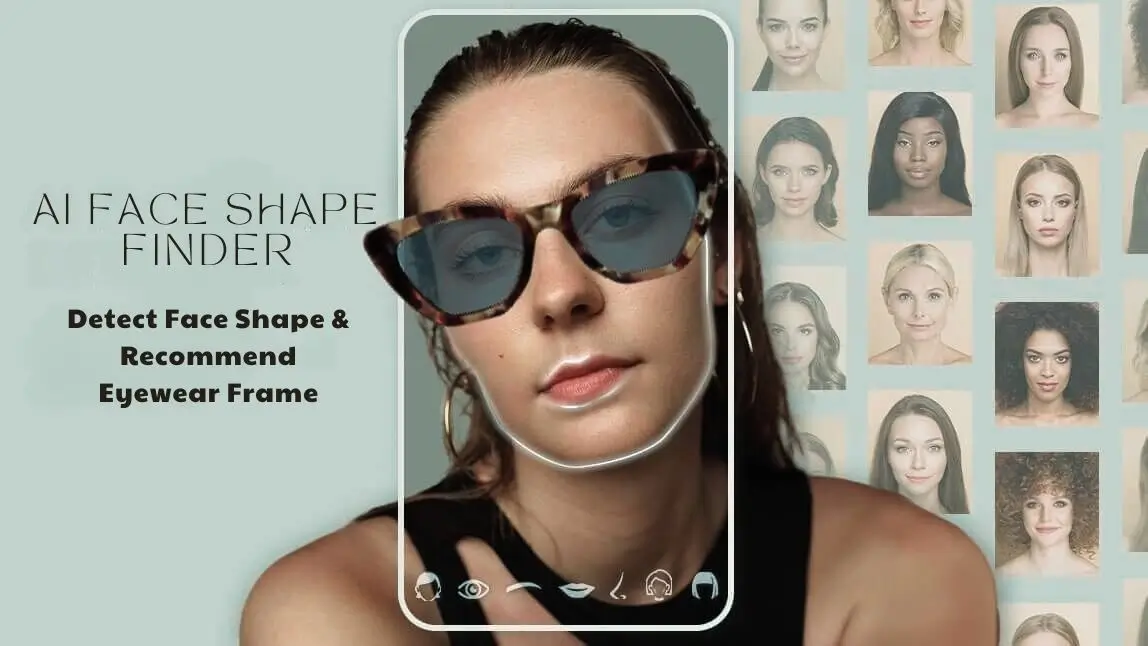
A face shape finder for glasses is an AI tool that reads a shopper's face from a selfie or live camera view, identifies their face shape, and suggests frame styles that tend to complement it. For eyewear retailers, it turns the shopper's most common question, "what glasses suit my face?", into a guided path: scan, get matching frame styles, then try them on virtually before buying.
This guide is for eyewear brands, optical retailers and e-commerce teams. It covers the three-step process for adding a face shape finder to your store, the frame-matching rules behind useful recommendations, and the privacy points to settle before launch. If you want the technical side of how AI measures facial proportions, see our guide to how an AI face shape detector measures faces for glasses.
At a Glance
- A face shape finder answers "what glasses suit my face?" at the moment a shopper is browsing frames.
- The core retail workflow has three steps: capture a face scan, return a face shape with matching frame styles, and let shoppers virtually try on those frames.
- Recommendations work best as a starting point that narrows the catalog, not as a rule that hides other frames.
- Face scans can count as biometric data in some places, so plan consent and data handling before launch.
Why Eyewear Shoppers Want a Face Shape Finder
Frames sit in the middle of the face, so shoppers judge them by how they look on their own features. Online, they can't hold a pair up to a mirror, which is why many hesitate or order several pairs to compare at home.
Virtual tools are becoming a normal part of that decision. In a January 2025 Episto survey of 339 glasses shoppers in France and the US, 67% of online eyewear buyers said they had used virtual try-on, and 81% found the combination of a 3D viewer and virtual try-on useful (Optician). A face shape finder adds the step before try-on: it tells the shopper which styles to try first, so a large catalog feels manageable.
How to Add a Face Shape Finder for Glasses in 3 Steps
Most retail implementations follow the same three-step flow, whether the tool sits on a product page, in a mobile app or on an in-store tablet.
Step 1: Capture a Face Scan Where Shoppers Browse
Shoppers open the finder from a frame category page, a product page or an app menu and allow camera access or upload a front-facing photo. No extra hardware is needed on a smartphone. Keep the prompt short, explain why the camera is needed, and give clear guidance on lighting and pulling hair back from the face for a cleaner read.
Step 2: Return the Face Shape and Matching Frame Styles
The AI identifies the shopper's face shape (for example round, oval, square, heart, diamond or oblong) and your recommendation logic maps that result to frame styles in your catalog. Present the result in neutral, descriptive language, such as "Your face shape reads as oval. These styles are a good place to start," and link straight to a filtered product list.
Step 3: Let Shoppers Virtually Try On the Recommended Frames
Connect the recommendations to virtual glasses try-on so shoppers can see each suggested frame on their own face in real time, switch colors and compare pairs. This closes the loop between "this style should suit you" and "this is how it looks on you," which is the question the shopper started with.

Frame-Matching Rules Behind Good Recommendations
A face shape result is only as useful as the frame rules attached to it. Common styling guidance uses contrast: frames tend to balance a face when their shape differs from its dominant lines. Use the table below as a starting rule set, then refine it with your own catalog and merchandising data.
| Face shape | Frame styles to recommend first |
|---|---|
| Round | Rectangular, square, geometric and cat-eye frames that add definition |
| Square | Round, oval and cat-eye frames that soften strong angles |
| Oblong | Wide or deep frames, bold browlines and two-tone styles that add width |
| Oval | Most styles; frames about as wide as the broadest part of the face |
| Heart | Light, rimless or bottom-heavy frames that balance a wider forehead |
| Diamond | Oval, cat-eye and rimless frames that soften the cheekbones |
For shoppers with fuller cheeks, our guide to glasses for round faces with chubby cheeks covers best-selling styles in more detail. Treat every rule as a suggestion: personal taste, prescription needs and frame fit still matter, so keep the full catalog one tap away.
Explore our articles on different face shapes for glasses:
- Glasses for round faces
- Glasses for square faces
- Glasses for oblong faces
- Men's glasses by face shape
- Men's glasses by face shape
Where to Place the Finder in the Customer Journey
- E-commerce sites: Add an entry point on frame category pages and the homepage so shoppers can filter a large range by face shape instead of scrolling through hundreds of products.
- Mobile apps: Build the finder into the app through an SDK so the phone camera becomes a personal frame stylist, with saved results for repeat visits.
- In-store: Run the finder on a tablet or smart mirror so staff can start a consultation with a shortlist and spend their time on fit and lens advice.
Responsible Use: Consent, Privacy and Respectful Results
A face scan is personal data, and in some jurisdictions face geometry is treated as biometric information. The US Federal Trade Commission has warned businesses against collecting biometric information covertly or without assessing foreseeable risks first (FTC). Before launch:
- Tell shoppers what the camera is used for and get clear consent before the scan starts.
- Decide whether images are processed and discarded or stored, and say so in plain language.
- Check local biometric and privacy laws with your legal team for each market you serve.
- Describe face shapes neutrally. Avoid scoring, "flaw" language or anything that suggests one face shape is better than another.
How Perfect Corp Supports Face Shape Finders for Eyewear
Perfect Corp's AI Face Analyzer can detect face shape alongside other facial attributes such as eye, brow and lip shape, and is available as a web module, API, mobile app SDK or in-store consultation tool. It can provide Step 2 of the workflow above, feeding your frame-matching rules.
For Step 3, Perfect Corp's virtual try-on for glasses can show frames in real-time 3D on web and app, with adjustable frame color and size, lens tint, and automatic pupillary distance detection. Retailers can create virtual SKUs by uploading three flat product images, and a ready-to-use Shopify plugin is available.
Turn Face Shape Results into Confident Frame Choices
Perfect Corp can help your eyewear team connect face shape detection, frame recommendations and virtual try-on in one shopping flow across web, app and store. Talk to our team about the setup that fits your catalog and channels.