 Author:



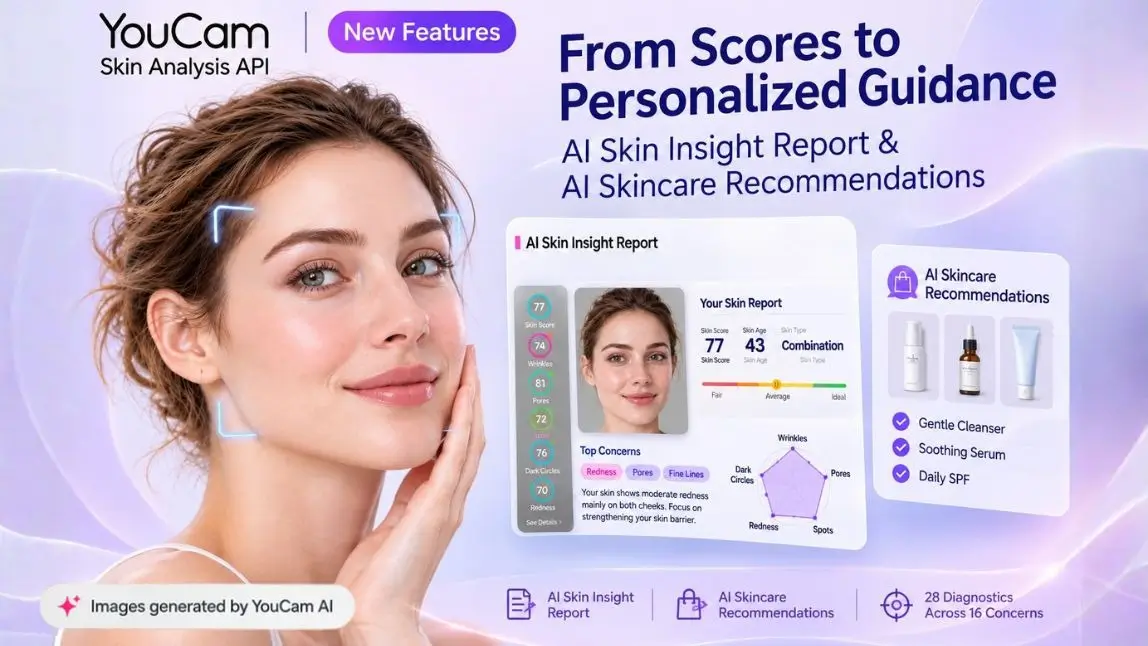
A skin score on its own is a number. It tells a customer that their redness is 68, and then leaves them to work out whether that is good, what caused it, and what to buy. Two new additions to the YouCam Skin Analysis API close that gap in the same response: the AI Skin Insight Report, which turns scores into a written explanation of what they mean, and AI Skincare Recommendations, which maps that explanation onto your own product catalogue.
Both are available now through the YouCam API Console, on top of the existing 28 diagnostics across 16 skin concerns. No new integration pattern to learn. The same analysis request, with more in the response.
What Is New in the Skin Analysis API
The analysis engine has not changed. What has changed is how much interpretation the API does before the data reaches your interface.
| Layer | Before | Now |
|---|---|---|
| Scores | 28 diagnostics across 16 concerns, 0 to 100 | Unchanged |
| Visual output | Detection masks and overlays per region | Unchanged, plus a focus map per concern |
| Explanation | Built by you, from the numbers | AI Skin Insight Report, written per person |
| Causes | Not returned | Contributing factors, ranked by relative likelihood |
| Next steps | Built by you, from your own rules | Daily care guidance per concern |
| Products | Mapped by you, in your own logic | AI Skincare Recommendations from your catalogue |
If you have already built a scoring interface, nothing breaks. The report and the recommendations arrive alongside what you were already consuming.
AI Skin Insight Report: From Scores to Clear Answers
The Insight Report is written for the individual rather than selected from a library of canned paragraphs. Two customers with a redness score of 68 get different text, because the report reads redness against their moisture, their skin type, their flush pattern and the areas the detection actually flagged.

The overall summary
The top level of the report opens with three headline values and a paragraph that reconciles them. A sample report reads Skin Score 75, Skin Age 43, Skin Type Combination, then explains the combination pattern in plain language: a shiny T zone across the forehead and nose bridge, a drier U zone with localised redness on the cheeks, and the three concerns that deserve priority attention. Below it, a radar chart places the individual scores against each other, so a customer can see at a glance that their eye bags at 83 are a strength and their redness at 68 is not.
The useful part is the ranking. Most skin interfaces show every score with equal weight, which leaves the customer to decide what matters. The summary names the top areas to improve, which is the decision most people were going to get wrong on their own.
The concern detail page
Every concern then gets its own page, organised into three tabs. This is where the report stops being a summary and starts being useful.
| Tab | What it contains | What the customer does with it |
|---|---|---|
| Analysis | Score, severity label, main affected area, a written overall summary, and up to five key points | Understands what was actually observed, and where |
| Contributing Factors | Ranked drivers with relative weighting, high to low | Understands why, without being handed a diagnosis |
| Daily Care | Numbered care steps specific to this concern | Knows what to change tomorrow morning |
The concern header carries more than a number. For redness it returns Score 68, Severity Moderate and Main area Both Cheeks, with the score plotted on a Fair to Average to Ideal scale rather than as a bare figure. The accompanying image can be toggled between the original photo and a focus map that shows exactly which regions drove the result.
Key points, including the honest one
The Analysis tab returns a set of short labelled cards rather than one block of prose. For a redness result these cover the flush pattern, related factors, observed features and care focus. One card is worth calling out separately.
| Key point | Example content |
|---|---|
| Flush Pattern | Concentrated across both cheeks, the nose bridge, forehead and chin |
| Related Factors | May relate to vascular reactivity, skin barrier status, and heat exposure |
| Observed Features | No clear deep cystic lesions or severe structural swelling observed |
| Care Focus | Gentle, barrier focused care with soap free cleansing and daily SPF helps calm visible flushing |
| Photo Limitation | Lighting and resolution limit precise visual assessment of fine capillaries |
The Photo Limitation card is the one most vendors would leave out. It states, in the customer's own report, what the photograph could not resolve. That is unusual, and it is the right call: a customer who is told where the analysis is uncertain trusts the parts that are confident. It also protects the brand from being held to a precision the capture conditions never supported.
Why contributing factors are ranked, not diagnosed
The Contributing Factors tab returns drivers in relative order with a weighting attached. A moderate redness result might come back as High 45% higher vascular reactivity, Medium 35% skin barrier compromise and Low 20% environmental and lifestyle triggers, each with a short explanation.
Read the footnote that ships with it: relative likelihood is inferred from appearance, this is not a clinical diagnosis, and no probability figures are implied. That distinction matters commercially as well as legally. Ranking lets you route a recommendation with confidence. Diagnosing would put a cosmetic tool into regulated territory it has no business being in.
Visible skin signs correlate strongly with underlying condition, but a photograph records appearance rather than pathology, and an interpretation layer should be explicit about which of the two it is reporting.Flament, F. et al., Facial skin aging and its perception, International Journal of Cosmetic Science
Daily care, as numbered steps
The third tab converts the analysis into an ordered routine. For redness that reads as four steps: gentle cleansing with a mild non foaming product to minimise mechanical and thermal stress, barrier repair using formulations rich in ceramides or niacinamide, routine simplification that temporarily pauses strong active ingredients such as alpha hydroxy acids and salicylic acid to avoid further irritation, and protection and trigger avoidance covering broad spectrum sunscreen daily alongside hot baths, saunas, spicy foods and alcohol.
Four steps, in order, specific to one concern. That is a routine a person can actually follow, which is the difference between a report that gets read and a report that gets closed.
AI Skincare Recommendations: From Report to Basket
The second feature picks up where the report ends. Each concern page carries a See the matching products action, and the recommendation engine resolves that into items from your own catalogue rather than a generic ingredient list.

Configuring it against your portfolio
Recommendations are configured by the brand, not fixed by the API. You decide which products map to which concerns, score bands and contributing factors, and the same applies to in clinic treatments if you sell those. The practical consequences are worth spelling out.
| What you control | Why it matters |
|---|---|
| Which products map to which concerns | A customer never sees a recommendation you do not stock |
| Score band thresholds | A redness of 68 and a redness of 32 can route to different tiers |
| Treatment offerings | Clinics can surface procedures alongside or instead of products |
| Business rules | Margin, stock, launch priority and regional availability stay yours |
| Presentation | The API returns structured data, so the interface remains your design |
Why a recommendation lands differently after a report
This is the part that is easy to underestimate. A product finder that asks three questions and produces a shortlist is a quiz, and customers treat it as one. A recommendation that arrives after a written explanation of why their cheeks are flushed, which factors are most likely driving it, and what their morning routine should change to, is an answer to a question the customer is already invested in.
The conversion case for measurement is well established. Benefit Cosmetics reported almost a 14x uplift in sales attributed to its AI pore analysis tool built on this technology. The Insight Report extends that logic one step further, from measuring to explaining before recommending.
How the Two Features Fit Together
1. Analyse
Send one image to the Skin Analysis API as you already do. The engine returns 28 diagnostics across 16 concerns, with masks and focus maps.
2. Explain
The Insight Report generates the overall summary and a per concern page with analysis, contributing factors and daily care, written for this person rather than selected from a template.
3. Recommend
The recommendation layer resolves each concern against your configured catalogue and returns the matching products or treatments as structured data.
What You Can Build With It
| Use case | What the new features add |
|---|---|
| Ecommerce product finder | A written reason for every recommendation, which reduces returns and support contacts |
| Brand app with a skin diary | A report per scan, so month to month change is explained rather than just plotted |
| Retail counter tablet | An associate reads the summary aloud instead of inventing one, which makes advice consistent across staff |
| Clinic or medspa intake | Contributing factors give a practitioner a structured starting point for a consultation |
| Salon and spa software | Treatment recommendations configured against the menu actually offered at that location |
| Email and CRM automation | Report text becomes the body of a follow up, personalised without a copywriter |
If you are building any of these from scratch, the guide to building a skin analysis app on the API covers the integration basics first.
What You Need Before You Start
| Requirement | Detail |
|---|---|
| API key | Free from the YouCam API Console, with 40 free units for testing |
| An image | An uploaded photo or a live camera capture, front facing, bare face, even indirect light, no flash |
| A product catalogue | Required only for recommendations. Concern mapping is configured by you |
| An async pattern | Analysis returns a task id, then you poll for the result. Unchanged from before |
| A retention policy | Results are held for 24 hours and then removed. Store what you need within that window |
Full field definitions are in the YouCam API documentation, and unit costs are on the pricing page.
Using the Insight Report Responsibly
Three rules, and they are not boilerplate.
Keep the disclaimer visible. The report ships with language stating that it is not a clinical diagnosis. Do not strip it out when you restyle the interface. A cosmetic assessment presented as a medical one is a regulatory problem and an ethical one.
Keep the photo limitation card. It is tempting to remove the one card that admits uncertainty. Resist it. Capture quality genuinely does limit what can be resolved, and a customer who later notices something the analysis missed will remember whether you warned them.
Do not infer health. Contributing factors describe visible appearance and its likely drivers. They are not conditions, and they should never be presented as a reason to start or stop a medical treatment. Anything persistent, painful or changing belongs with a clinician.
How to Get Started
1. Get a free API key
Sign up at the YouCam API Console. Forty free units are enough to run the full report and recommendation flow end to end.
2. Run it in the playground first
The skin analysis playground lets you see how is your skin analyzed before writing an integration.
3. Map your catalogue
Configure which products and treatments correspond to which concerns and score bands. This is the step that decides whether recommendations feel relevant or generic, so give it more thought than the integration itself.
4. Ship the report before the recommendations
Launch the Insight Report on its own first and measure engagement. If customers are reading the concern pages, the recommendation layer will convert. If they are not, fix the report before adding a basket.
Working inside a terminal or an AI coding agent? The YouCam CLI and the YouCam API Agent Skills both reach the same endpoints.
FAQ
Do I need a new integration to use the Insight Report?
No. It arrives alongside the existing analysis response. If you already consume scores from the Skin Analysis API, the report and recommendations are additional fields rather than a separate endpoint pattern.
Is the report really generated per person, or selected from templates?
It is generated for the individual. The text reconciles the full score set rather than describing one concern in isolation, which is why two customers with the same redness score receive different summaries.
What does the contributing factor percentage mean?
It is a relative weighting between the listed drivers, inferred from visible appearance. It is not a probability, not a measurement, and not a diagnosis. The report says so explicitly, and that line should stay in your interface.
Can we use our own product catalogue?
Yes, and you should. Recommendations are configured against your portfolio, your treatment menu and your business rules. The API returns structured data, so the presentation layer stays entirely yours.
Does the report work for every concern?
Each of the 16 concerns gets its own detail page with the same three tab structure. The overall summary ranks them and highlights the areas worth prioritising rather than giving all of them equal prominence.
How much does it cost?
Units are consumed per successful analysis, with volume based pricing and 40 free units to start. See the pricing page or the unit calculator for a figure against your expected volume.
Can the report be translated or restyled?
The response is structured data, so the wording can be presented in your own typography, layout and brand voice. The disclaimer and the photo limitation card should survive that restyling.
Is this a medical diagnosis?
No. It is a cosmetic skin assessment that interprets visible signs. It does not replace evaluation by a healthcare professional, and anything persistent or painful belongs with a clinician.
Conclusion
The gap between a skin score and a purchase has always been filled by someone: a copywriter writing generic blurbs, a developer writing mapping rules, or a customer guessing. The AI Skin Insight Report and AI Skincare Recommendations fill it in the API response instead, with text written for the individual and products drawn from your own catalogue.
The part worth noticing is the restraint. Ranked contributing factors rather than diagnoses, a visible photo limitation card, an explicit disclaimer. Those choices make the report something a regulated brand can actually ship, which is a more useful property than any amount of additional output would have been.
Get a free API key and run the full flow, or talk to our team about catalogue configuration and deployment.