 Author:


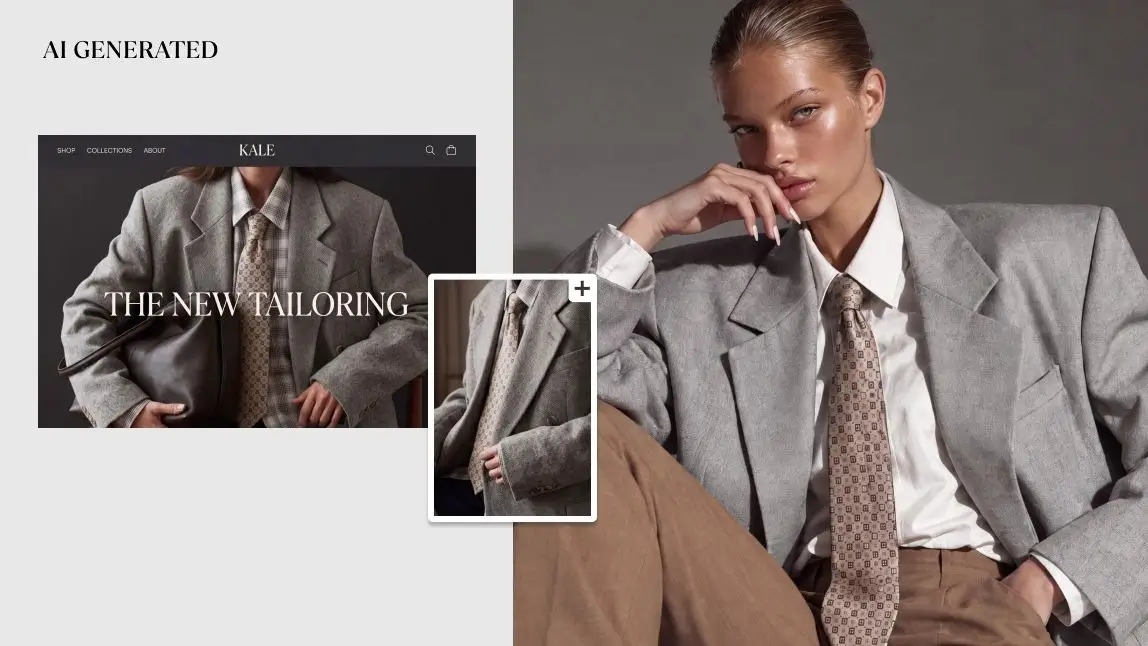
On-model photography shows a garment worn by a real person, so shoppers can judge drape, length and proportion in a way a flat lay can't. The traditional route is a studio shoot for every new product, which gets expensive fast. AI changes the math: a brand photographs a small set of its own models once, then uses virtual try-on to place each new product image onto those model photos.
This guide explains how that workflow runs on the AI Clothes Changer API, how it compares with flat lay, ghost mannequin and traditional shoots, which model photos and product images to prepare, and which limits to plan for before you build it into your catalog.
Table of Contents
- What Is On-Model Photography?
- Traditional Shoots vs. Flat Lay, Ghost Mannequin and AI Try-On
- How AI On-Model Photography Works with the API
- Model Photo Guidelines: What to Shoot Once
- Product Image Guidelines
- Where AI On-Model Photos Fit in Your Catalog Workflow
- Limits to Plan For
- Getting Started with the AI Clothes Changer API
- FAQ
- Conclusion
What Is On-Model Photography?

On-model photography is product photography in which a model wears the garment. In fashion ecommerce it usually takes two forms: clean studio shots on a white or neutral background for product detail pages, and lifestyle shots in a real location for campaigns, category pages, lookbooks and social media.
Brands use it because a body answers the questions a flat garment can't: where a hem falls, how a waistband sits, how a fabric moves, and how a piece looks styled with the rest of an outfit. Using the same models across a catalog also builds a recognizable brand look.
The cost comes from repetition. Every new product, colorway or restock typically means booking models, a photographer, a studio or location, styling, samples and retouching again. That is why many brands reserve on-model images for best-sellers and show the rest of the catalog as flat lays or packshots.
AI on-model photography closes that gap by creating the on-model image from photos the brand already has: a product image and a model photo. With virtual try-on, the garment is placed on the model photo instead of being shot on set.
Traditional Shoots vs. Flat Lay, Ghost Mannequin and AI Try-On
Most apparel catalogs mix several image types. The table below compares the common methods by what each one shows and what it takes every time a new product arrives.
| Method | What the shopper sees | Best for | What each new product needs |
|---|---|---|---|
| Flat lay | The garment laid flat, shot from above | Large assortments, basics, accessories, collection grids | Styling and a quick shoot; no fit information |
| Ghost mannequin | The garment's 3D shape with the mannequin edited out | Structured pieces and marketplaces that prefer isolated products | A mannequin shoot plus compositing and retouching |
| Studio on-model shoot | A real person wearing the garment on a clean background | Hero products, fit-sensitive garments, product detail pages | Models, photographer, studio, styling and retouching every time |
| Lifestyle on-model shoot | The garment worn in a real setting | Campaigns, lookbooks, social media, brand storytelling | All of the above, plus locations and art direction |
| AI try-on on your own model photos | Your model wearing the new garment, in the pose and setting of the original model photo | New drops, colorways, long-tail SKUs, one-off items, consistent catalogs | A product image and an API request; the model photos are shot once and reused |
The verdict: AI try-on doesn't replace campaign photography, and it isn't a ghost mannequin tool. Its job is to extend on-model coverage to products that would otherwise never get it, using the same faces and settings your brand already shoots. The flat lays and packshots you already produce don't go to waste either: a front-facing product-only image is exactly the garment input the try-on needs.
How AI On-Model Photography Works with the AI Clothes Changer API
The workflow has two parts: a one-time model shoot, and a repeatable try-on step for every new product.
- Build a model photo library once. Photograph your own models in the poses, framing and settings you want across the catalog. Perfect Corp. doesn't supply model avatars, so the faces in your catalog stay your brand's own. The API Playground includes sample model photos for testing before your shoot.
- Prepare the product image. Use a front-facing product-only image, such as a flat lay, packshot or ghost mannequin image, or a garment photo that features a model. Standard JPG or PNG files up to 10MB are supported.
- Send a try-on request. The API is RESTful, uses Bearer authentication and returns JSON. Your request pairs a model photo with the garment image, and generative AI maps the clothing onto the person, adjusting for body shape, proportions and lighting.
- Review and publish. The API returns a photorealistic try-on image URL and a result ID. Review the image, then send it to your product detail page, marketplace listing or content library.


Actual results from Perfect Corp.'s AI clothes virtual try-on tool.
The API covers tops, bottoms, dresses, outerwear, swimwear, lingerie, shoes and more, as full or partial outfits. Jackets, coats and vests are placed as an outer layer over the clothing already in the model photo; the AI Clothes Try-On API v4 outerwear update covers that release in more detail.
Because it works from standard product images, there are no 3D garment models to build. Teams can call it from backend systems such as a product information or digital asset management pipeline, an internal content tool, a website or a mobile app, with code samples for JavaScript, Java, Flutter, Python, PHP, Node.js and cURL.
Ownership is simple: brands own the images they upload and the results they generate. Perfect Corp. provides the try-on technology.
Sample model photos included
Upload a product image and place it on a sample model before you write any code.
Model Photo Guidelines: What to Shoot Once

The model library is the foundation of every image that follows. The try-on result keeps the pose, angle and setting of the model photo, so decisions made on this one shoot decide how the whole catalog looks. A practical shot list:
| Item | Guideline | Why it matters |
|---|---|---|
| Framing | Full-body shots for dresses, bottoms, full outfits and shoes; half-body shots work for tops | The area the garment will cover has to be fully visible in the photo, so trousers need full legs in frame |
| Pose | Natural, mostly front-facing poses with arms clear of the torso | The result keeps the pose, and arms crossing the body hide the area where the garment goes |
| Base outfit | Simple, fitted pieces in neutral colors | A clean silhouette is easier to dress; for outerwear, the base outfit stays visible under the layer |
| Lighting and setting | The same lighting and background you use on product pages, or a real location for lifestyle sets | Consistent model photos give a consistent catalog without extra editing |
| Resolution | Shoot at the largest size your channels need, then export JPG or PNG under 10MB | The output follows the resolution of the input photo |
| Range | Several models who reflect your customers' sizes, ages and styles, each in two or three poses | Shoppers see the product on someone like them, and the library covers most product types |
| Usage rights | Agreements that cover ongoing commercial use of each model's photos with new garments | The photos will be reused for many products and seasons; confirm the terms with your legal team |
Product Image Guidelines
The product image tells the AI what the garment looks like, so its quality shows up directly in the result. Most brands already have suitable files from their packshot or flat lay workflow.
| Do | Avoid |
|---|---|
| Front-facing images with the full garment visible | Cropped hems, folded sleeves or partial views |
| A clean, uncluttered background | Busy flat lay styling with props over the garment |
| Even lighting and true-to-life color | Heavy filters or strong color casts |
| One garment per image, or a full outfit when you want a full look | Several unrelated items in one frame |
| Sharp detail on prints, logos and trims | Low-resolution or heavily compressed files |
Garment photos that already feature a model also work as input, which helps when the only existing image of a product is an older on-model shot with a different model.
Where AI On-Model Photos Fit in Your Catalog Workflow
The most effective setups treat AI try-on as one tier in the image strategy rather than a replacement for everything else:
- Campaigns and hero products: keep traditional shoots for launch imagery, motion and detailed styling.
- New drops, colorways and long-tail SKUs: place each new product image on the model library so every listing gets an on-model view.
- Marketplaces and one-off items: secondhand and resale items are often single units that never justify a shoot. The guide to virtual try-on for resale and secondhand marketplaces covers that use case.
- New and small brands: a single model shoot can supply on-model imagery for an entire first collection.
- Lookbooks and social content: the same faces across posts, emails and lookbooks keep the brand recognizable.

A typical production loop looks like this: the product team photographs the new item, the pipeline sends the product image and selected model photos to the API, a reviewer checks each result, and approved images go live next to the flat lay and close-up detail shots. Keep those detail shots on the product page, since they show texture and construction up close.
The review step matters. Check that prints and logos read correctly, hems and sleeves sit at the right length, and colors match the physical product. Teams that build this check into the workflow, rather than publishing results automatically, keep catalog quality consistent.
Limits to Plan For
Knowing what virtual try-on does and doesn't do helps you plan the model shoot and set expectations with merchandising and creative teams.
| Limit | What it means | How to plan for it |
|---|---|---|
| Pose follows the model photo | The garment is placed on the person in that photo's pose and angle. It isn't a 3D or multi-angle generator, and it doesn't create new poses | Shoot every pose and angle you'll need during the one-time model shoot |
| Back views | Each view comes from its own model photo. A back-view model photo paired with a back-view garment image can show back details such as open backs, crossed straps and ties | Shoot back poses for the model library, keep a back-view packshot for every product, and check back details and length closely during review |
| Resolution follows the input | Results match the resolution of the photo you send | Shoot model photos at the largest size your channels need. To reuse a result in other formats, such as wide banners or square social posts, the AI Image Extender can expand it to a new aspect ratio |
| Visual, not sizing | Try-on shows how a garment looks; it doesn't tell shoppers which size to buy | Keep size charts, fit notes and model measurements on product pages |
| Results need review | Generative output can vary with the input images | Add a human review step before publishing |
| Models come from the brand | There's no built-in avatar library; Playground sample models are for testing | Budget for one well-planned model shoot before rollout |
Getting Started with the AI Clothes Changer API
Everything in this guide runs on the AI Clothes Changer API. Most teams go from a first test to a working integration in four steps:
- Get a free API key in the API Console.
- Test with sample models in the API Playground, then repeat with a few of your own model photos and product images.
- Read the integration details in the AI Clothes API documentation. Teams working with AI agents can also check the MCP documentation, and developers who want a build walkthrough can follow the guide to building an AI clothes changer app with Cursor and the YouCam API.
- Estimate volume against the pay-per-use plans on the API pricing page.
For catalog-scale rollouts, such as high monthly volumes, a custom workflow or integration support, contact the Perfect Corp. sales team. It's the same API; the sales team helps you plan the rollout.
Perfect Corp. technology has been used by 800+ global brands and draws on more than 10 years of AI and AR development. The platform is ISO/IEC 27001:2022 certified, and GDPR is applied company-wide.
FAQ
What is on-model photography?
On-model photography is product photography in which a model wears the item. Fashion brands use it on product pages, category pages, lookbooks and social media because it shows fit, drape and proportion better than a flat lay.
What's the difference between on-model and ghost mannequin photography?
On-model photos show a real person wearing the garment. Ghost mannequin photos show the garment's 3D shape with the mannequin edited out, so the product is the only subject. Many brands use both: on-model for fit and styling, ghost mannequin or flat lay for construction and detail.
Can AI turn flat lay images into on-model photos?
Yes, when it's paired with a model photo. The AI Clothes Changer API takes a front-facing product-only image, such as a flat lay or packshot, and places the garment on a model photo you provide.
Does Perfect Corp. provide AI fashion models?
No. Brands use photos of their own models, which keeps the catalog's faces consistent and on-brand. The API Playground includes sample model photos for testing.
Who owns the AI on-model images?
The brand does. Brands own the images they upload and the results they generate; Perfect Corp. provides the try-on technology.
Can I change the model's pose or camera angle?
No. The result keeps the pose and angle of the model photo. To show different poses or angles, include them in your model photo library.
Can AI on-model photography show the back of a garment?
Yes, when the inputs match. Pair a back-view model photo with a back-view image of the garment, and the result can show back details such as straps, cutouts and ties. A front-view garment image only describes the front, so keep back packshots for products whose back matters.
What resolution are the results?
The output follows the resolution of the input photo, so high-resolution model photos produce high-resolution results.
Does AI on-model photography replace photoshoots?
Not entirely. Most brands keep shoots for campaigns and hero products, and use AI try-on to extend on-model images to new drops, colorways and long-tail items using the same models.
Conclusion
On-model photography sells clothes because shoppers can see how a garment looks on a body, but shooting every product doesn't scale. With a well-planned model library and the AI Clothes Changer API, a brand can shoot its models once and give every new product an on-model image in the same faces, poses and settings. Plan the model shoot carefully, feed the API clean product images, keep a review step, and reserve traditional shoots for the images where they matter most.
For fashion catalogs of any size
Talk to Perfect Corp. about rolling out the AI Clothes Changer API across your catalog.
This article was edited and reviewed by the Perfect Corp. editorial team. Welcome to contact us or give us more suggestions.