Author:


Struggling with a red face in your photos? Whether it's from a sunburn, blemishes, or skin irritation, taking the red out of sunburn or removing redness from photos is easier than you think. With AI face editing tools, you can smooth out uneven skin tone and fix facial redness in just a few taps.
From eliminating blotchy patches to reducing the appearance of rosacea, YouCam Makeup uses smart AI technology to pinpoint red areas and create a flawless, natural finish—no Photoshop skills needed.

Best App to Remove Redness and Sunburn From Photos

Looking for the best way to remove redness from face in photos or figure out how to edit out sunburn from your selfies?
YouCam Makeup is the best free face editing app for fixing red or sunburned skin in pictures. Available for both iPhone and Android, the app uses AI technology to automatically detect red areas on your face and edit them out in seconds. Just use the intuitive slide bar to tone down redness and reveal a flawless, even complexion.
How to Remove Redness From Face

YouCam Makeup has several features that are specifically tailored toward removing redness from photos.
The Redness feature helps reduce the red areas on the face and even out your skin tone so that it looks natural and flawless in photos. The tool uses AI to detect areas of redness on the skin and automatically evens the skin tone for a natural result.
Remove Redness From Photos in 4 Easy Steps
- Step 1: Download the best redness remover app YouCam Makeup.
- Step 2: Tap "Photo Edit".
- Step 3: Tap "Retouch".
- Step 4: Tap "Redness" to watch the app detect any redness in your photo and remove it instantly.
How to Take the Red Out of Sunburn in Photos

Whether it’s from a sunny vacation or forgetting to reapply sunscreen, sunburn can sneak up on anyone. If you're wondering how to edit out sunburn before posting, YouCam Makeup is the go-to photo editor for sunburn fixes.
Its powerful Skin Tone tool uses AI to instantly detect sunburned or flushed areas, allowing you to remove a red face from your photo or edit sunburn out of your body in just seconds.
Edit Sunburn Out of Photos in 4 Easy Steps
- Step 1: Download the best sunburn remover YouCam Makeup.
- Step 2: Tap "Photo Edit".
- Step 3: Tap "Retouch", then "AI Skin Tone".
- Step 4: Choose your skin tone and watch as your sunburn vanishes from your photo.
Remove Redness From Face in Photos Online
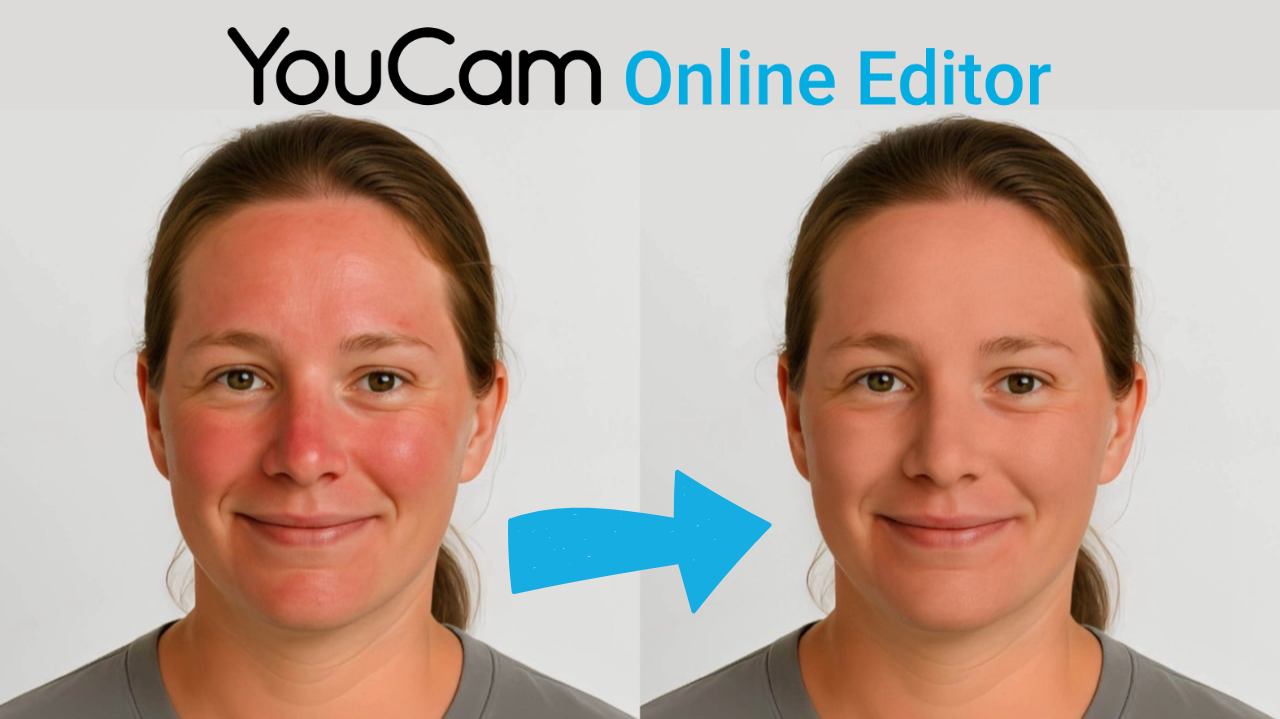
If you’re looking to remove redness or take the red out of sunburn in your photos, YouCam Online Editor is a fast and easy solution—no app download needed. You can smooth your skin and even out your tone right from your browser. Just follow these simple steps:
- Open YouCam Online Editor in your browser
- Choose the Photo Retouch option
- Upload your photo
- Remove redness or edit out sunburn from your face using the available tools
- Save your result and enjoy a flawless finish
It’s a convenient way to get smooth, natural-looking skin in just a few clicks.
Download the Best App to Remove Redness From Photos
So, whether you're dealing with a sunburn selfie or trying to tone down redness in a close-up, YouCam Makeup has your back. Forget the stress of learning complicated tools like Photoshop—this app makes it insanely easy to remove redness from photos, edit out sunburn, and smooth out any blotchy areas in just a few taps.
From quick fixes to flawless finishes, it's the go-to photo editor for red face corrections. Ready to glow, not show the burn? Try it out and see the difference for yourself!

More Face Retouch Ideas
- Best 10 Skin Smoothing Apps in 2025
- Red Eye Remover: How to Remove Red Eye in Photos
- AI Smile Filter: Get the Perfect Smile in Photos for Free
- 6 Free Wrinkle Removers to Remove Wrinkles From Photo