Author:


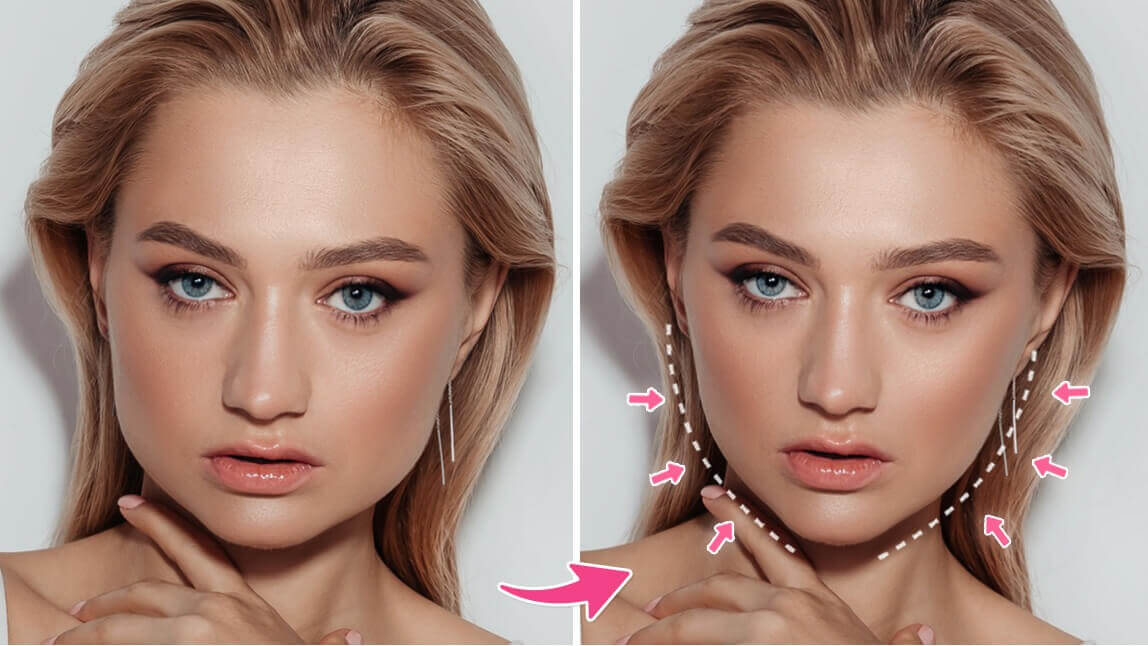
Notice a double chin in your favorite photo? It’s totally normal—angles and lighting can be tricky. The good news is that you can easily remove double chin from photos and get a naturally defined jawline.
Wanna say goodbye to your double chin? YouCam Makeup is the best app to get rid of double chin in photos, giving you smooth, realistic results with just one tap.
Want to edit from your browser? Try YouCam Online Editor, an online double chin remover tool that works right in your browser. No apps, no downloads, just instant edits that boost your confidence.

Summary
Get rid of a double chin in photos easily! YouCam Makeup is the best app for AI-powered, natural jawline slimming. Includes tips on angles and posture for better selfies.
Why Do I Get Double Chins in My Photos?
If your photos keep catching a double chin that you swear doesn’t show up in the mirror, you’re not alone. It’s not always about weight. A lot of the time, it comes down to angles, posture, and lighting. Here’s what might be causing it:
- Low camera angles make your neck compress and your chin stand out
- Harsh or uneven lighting creates shadows that exaggerate your jawline
- Slouching hides your neck and makes your face look fuller
How to Hide a Double Chin When Taking a Photo
If you want to capture photos without worrying about a double chin, learn how to not have a double chin in photos is important, try these pro tips to get rid of double chin when taking a photo:
- Find the right angle – Hold your phone slightly above eye level and tilt your chin forward. This elongates your neck and minimizes shadows under your jawline.
- Use good posture – Keep your shoulders back and spine straight. Standing tall naturally makes your jawline more defined.
- Push your tongue to the roof of your mouth – This subtle trick tightens your jawline and instantly reduces the look of a double chin in pictures.
- Avoid harsh lighting from below – Light coming from under your face creates shadows that emphasize fullness under the chin. Stick to natural light or soft lighting from above.
Discover the best double chin remover app >>>
How to Remove Double Chin in Photo with YouCam Makeup?
Removing a double chin from a photo is easier than you think. Follow the steps below to contour your jawline with YouCam Makeup's double chin remover:
- Step 1: Download the Best Double Chin Removal App
- Step 2: Upload a Photo
- Step 3: Try Face Retouch Features
- Step 4: Remove Double Chin in Photos Naturally
- Step 5: Save Your Photo Without Double Chin
Step 1: Download Double Chin Remover App
YouCam Makeup is free to download for iPhone and Android. Download the app and get access to all kinds of photo retouch and face reshape features.

Step 2: Upload Your Photo
YouCam Makeup's Double Chin Removal is a great option to edit out a double chin naturally in selfies. Tap Photo Edit and upload the photo that you want to get rid of your double chin in.
Step 3: Try Double Chin Removal Tool
Go to "Retouch" in the toolbar. Here, you’ll find tools to retouch and reshape any area of your face, including your eyes, nose, mouth, and jawline. For double chin removal, you’ll want the Double Chin tool.
Step 4: Get Rid of Double Chin in Photo
With YouCam Makeup’s AI-powered face editing, you can erase a double chin instantly without any awkward distortions or background warping.
The double chin remover works its magic by automatically detecting and refining your jawline, so you get a natural, sculpted look without any manual effort.

Step 5: Share Your Double Chin-Free Selfie
Voila! You’ve just transformed your selfie into a flawless, double chin-free masterpiece. You can save the photo as is or use the app to add more effects and filters, or even make it part of your next collage.
Learn how to reshape your face shape on photos>>>
How to Remove Double Chin in Photo Online Free?
Want to smooth out your jawline or get rid of a double chin in your photos without using Photoshop? With YouCam Online Editor, you can remove a double chin from any photo online for free in just a few easy steps.

Step 1: Go to YouCam Online Editor
Open the YouCam Online Editor in any browser. There is no need to download anything or create an account.
Step 2: Find the Double Chin Photo Editor
Click on “Face” and select the Chin Shape feature. Use the slider to subtly slim your chin, enhance your jawline, and smooth the lower face area for a naturally contoured look.
Step 3: Preview and Save
Take a look at your edits, then save your photo with a more defined jawline and no double chin.
How to Edit Out a Double Chin? YouCam Makep
Ready to say goodbye to double chin struggles in your selfies? With the YouCam Makeup app, you can smooth and shape your jawline in seconds for a more confident look.
Whether you want to touch up a quick selfie or give your portrait a polished finish, this free double chin remover app makes it easy.
Find out how attractive you are with the best AI tool>>>

More Face Editing Tips:
- 5 Best Remove Double Chin Apps to Lose Double Chin on Photos
- Free Face Editor: Best Face Reshaper App in 2025
- 5 Best Free AI Face Editors For AI Reshape & Retouch
- Click to see How I finally Got Rid of My Double Chin