


 Author:


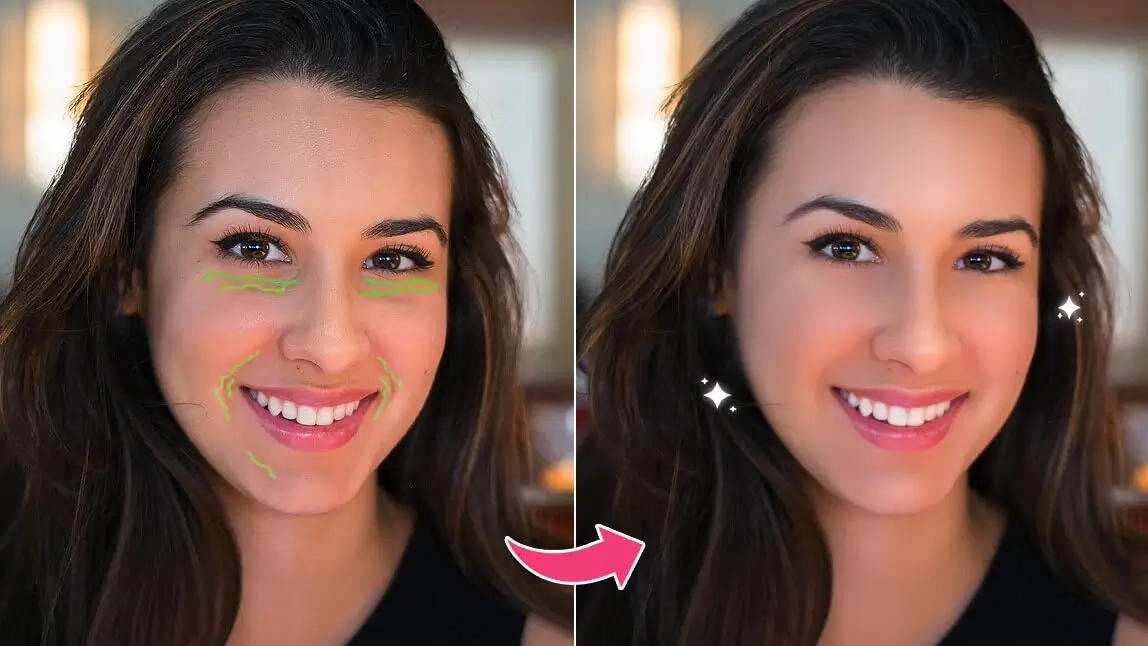
Want to remove wrinkles from photos in seconds? The easiest way is with a wrinkle remover app that uses AI to smooth out lines and refresh your look. Whether you want to erase forehead wrinkles, under-eye lines, or smile creases, a smart wrinkle removal photo editor can help you get flawless skin instantly.
Keep reading to discover the best app to remove wrinkles from photos and see how easy it is to retouch your pictures with natural-looking results.
Best Wrinkle Remover App to Remove Wrinkles From Photo
YouCam Makeup is the best free wrinkle remover app designed to enhance your selfies with AI face retouch tools. Whether you're looking to erase smile lines, forehead wrinkles, under-eye lines, or nasolabial folds, the AI wrinkle remover ensures a seamless, natural-looking retouch.

With an easy-to-use slider tool, you can instantly remove wrinkles from photos while maintaining a realistic and polished appearance.
For even more precision, the Removal feature lets you refine and focus on specific areas with a brush tool. Say goodbye to wrinkles and hello to flawless, youthful-looking portraits!
How to Remove Wrinkles from Photo with AI
YouCam Makeup makes it easy to remove unwanted wrinkles from your selfies. Follow these simple steps to get rid of wrinkles easily:
- Step 1: Download the Best Wrinkle Remover App
- Step 2: Try AI Wrinkle Remover
- Step 3: Remove Face Wrinkles with a Slider
- Step 4: Remove Forehead Wrinkles, Under Eyes Wrinkles, and Nasolabial Folds
- Step 5: Save Your Photo
Step 1: Download the Best Wrinkle Remover App
Start by downloading YouCam Makeup for iOS and Android to start your portrait retouch.

Step 2: Try AI Wrinkle Remover
Tap Photo Makeup to choose the photo you want to edit. Tap Retouch and find the Wrinkles feature.

Step 3: Remove Wrinkles from Photo

When you choose Wrinkle, the app will automatically identify the wrinkles on your face, so you don’t have to do any extra work.
You don’t have to completely remove your wrinkles, either. If you want to keep your mature look but with fewer lines, use the slider in the wrinkle tool to choose how completely you remove your wrinkles.
Step 4: Remove Forehead Wrinkles, Under Eye Wrinkles, and Nasolabial Folds

Aside from the overall wrinkle removal effect, you also have options for removing forehead lines, eye wrinkles, and nasolabial folds.
Step 5: Save Your Wrinkle-Free Photo
Save your edits once you’ve finished creating the look you want, and share it with friends, family, and on your social feed.
More Than Wrinkle Remover App: All-in-One Face Editor
More than wrinkle remover app, YouCam Makeup also has some of the most practical tools for everyday photo retouch.
Remove Eye Bags from Photo
YouCam Makeup is the best eye bag remover app to instantly and naturally remove eye bags from photos. Thanks to its advanced AI face detection and one-tap editing technology, YouCam Makeup can precisely identify under-eye areas and smooth them out without making your photo look over-edited. It’s perfect for enhancing selfies, portraits, and profile pictures.

Remove Blemishes from Photo

Skin smoothing is a common photo editing feature, but YouCam Makeup takes it a step further. Instead of just blurring your face, its AI blemish remover precisely targets blemishes for a natural, flawless finish.
You can also adjust the intensity with a simple slider, making it one of the most effective and user-friendly tools in the app.
Remove Dark Circles from Photos

Dark circle removal is one of the standout features in the YouCam Makeup app. Often used alongside the eye bag remover, it naturally brightens the under-eye area for a refreshed, well-rested look. With just a simple swipe, you can enhance your portraits in seconds—no editing skills required
Remove Wrinkles From Photo Online Free with YouCam Online Editor
No app? No problem! Now you can also remove wrinkles from photos online for free with the YouCam Online Editor. It's fast, easy, and requires no download.
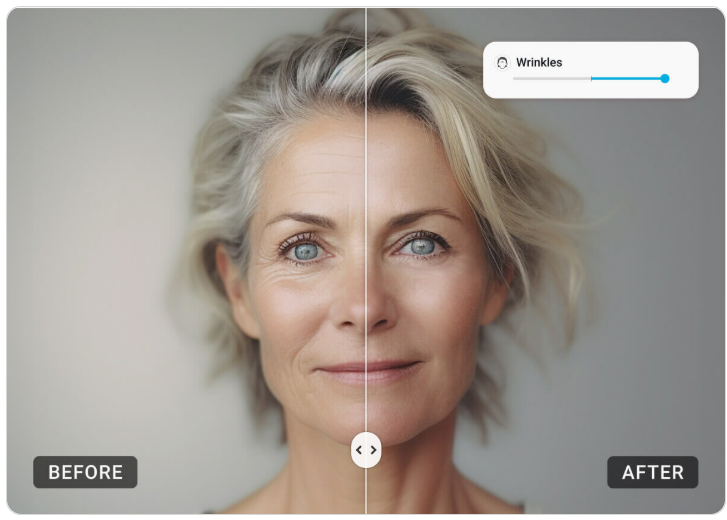
How to Remove Wrinkles from Photos Online
Step 1: Go to the YouCam Online Photo Editor website
Step 2: Click “Upload Photo”
Step 3: Select the Retouch > Wrinkle feature
Step 4: Use the slider to smooth wrinkles instantly
Step 5: Download and save your edited photo for free
Best Free App to Remove Wrinkles from Photos
Achieving smooth, wrinkle-free photos has never been easier with the right tools at your fingertips. Whether you want to remove forehead wrinkles, under-eye lines, or smile lines, YouCam Makeup offers the best AI-powered wrinkle remover to make your pictures look naturally flawless.
Download YouCam Makeup today and enjoy a simple, free way to remove wrinkles from photos and create images you’ll love to share!

More About Wrinkle Remover App
- App Comparison: 5 Best Wrinkle Remover Apps
- How to Remove Lip Wrinkles from Photos With an App
- How to Remove Wrinkles from Clothes in Pictures


