Author:


To remove braces from a photo, use the AI braces remover in a braces remover app like YouCam Makeup. Simply upload your photo, use the brush to highlight the braces, and let the AI instantly erase them for a natural, braces-free smile.
Ever wondered what you'd look like without braces? A no braces filter is the perfect way to preview your smile before your orthodontic treatment is complete. With the right app, you can easily remove braces from your photos and see your smile—braces-free—instantly!

Remove Braces from Photo With No Braces Filter
When it comes to using a no braces filter to remove braces from photos, there are several apps that make the process quick and easy. One of the best options for braces removal is the YouCam Makeup app for several key reasons:
AI-Powered Detection and Braces Removal

What sets YouCam Makeup apart is its advanced facial recognition technology. The app uses AI-powered algorithms to detect the object you want to remove, allowing you to remove braces or other orthodontic devices in a matter of seconds.
Variety of Features to Achieve Perfect Smile
The app is incredibly user-friendly and offers a variety of features to help you achieve the perfect smile. The app offers a range of editing options, including tools to whiten your teeth and smooth out any imperfections.

Get Pearly Whites with Teeth Whitening Tool
In addition to removing braces, YouCam Makeup offers a powerful teeth whitening feature that can instantly brighten your smile.
Using advanced AI technology, the Teeth Whitening tool lets you adjust the whiteness of your teeth with just a few taps, ensuring that your smile looks natural and polished. It’s perfect for those moments when you want to make your photos shine even brighter.
How to Remove Braces From Photos With AI Braces Remover
- Download the No Braces Filter App
- Upload a Photo to Remove Braces From
- Remove Braces or Teeth Retainer from Photo
- Whiten Your Teeth With Teeth Whitener
- Save and Share Your Edited Selfie
The YouCam Makeup app is the best selfie editing app that can help you remove braces from your photos. Follow these steps to remove braces from your photos with YouCam Makeup:
Step 1: Download the No Braces Filter App
Download the YouCam Makeup app from the App Store or Google Play Store.

Step 2: Upload a Photo to Remove Braces From
Tap "Photo Edit" and select the photo you want to edit and remove the braces.
Step 3: Remove Braces or Teeth Retainer from Photo

Click the "Removal" feature to remove the braces or teeth retainer from your photo. Use your finger to brush over the braces or retainer. You can adjust the brush size for more precise control.
Tap "Apply" to remove the selected part!
Step 4: Whiten Your Teeth With Teeth Whitener

After removing the braces, you can also use the app's “Teeth Whitener” to make your teeth appear whiter and brighter in the photo.
Step 5: Save and Share Your Edited Selfie
Once you're satisfied with the edits, save the photo and share it with your friends and family on social media.
How to Remove Braces from a Photo Online
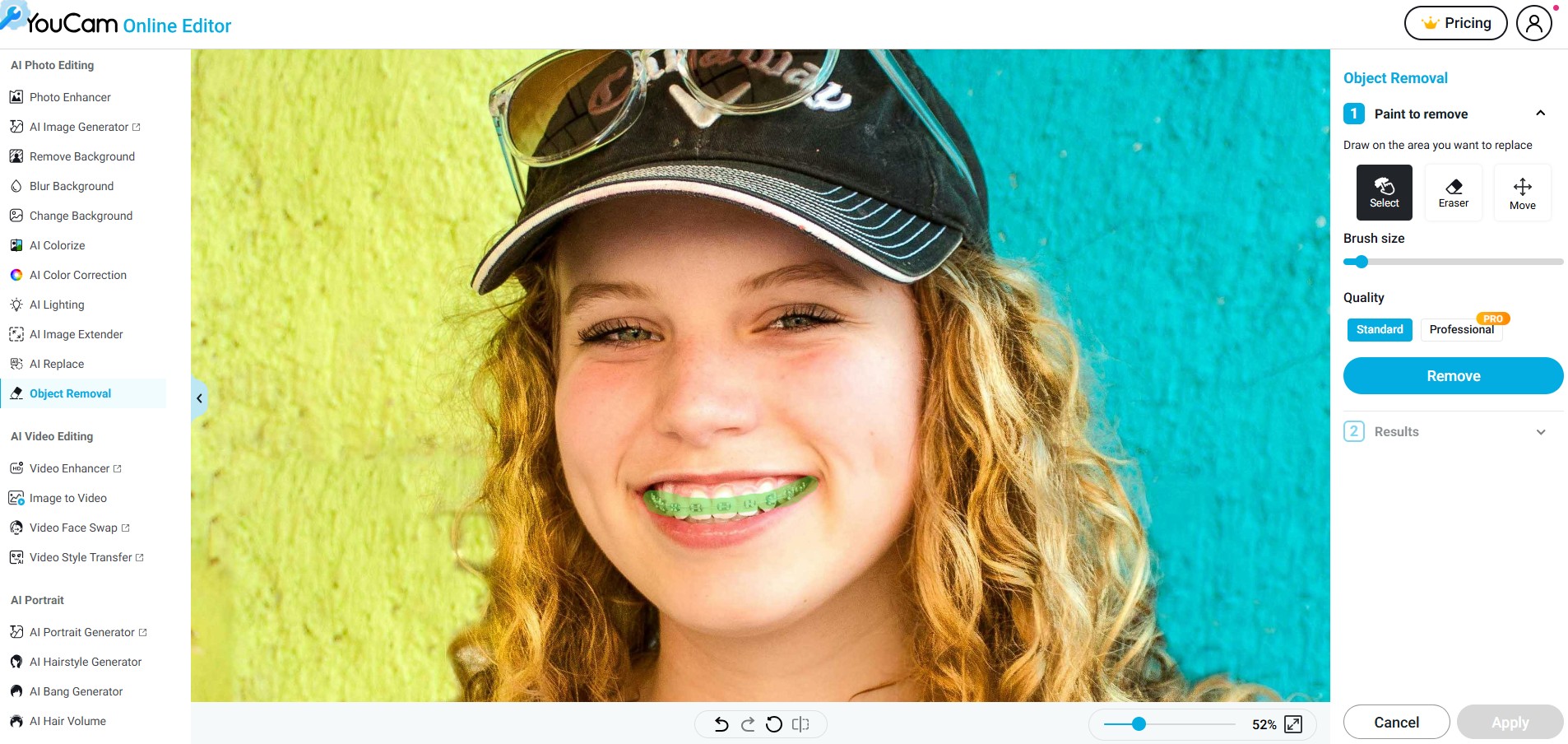
By using YouCam Online Editor, you can easily remove braces from a photo right in your browser. Here's how to do it:
- Go to YouCam Online Editor: Visit the official website on your desktop.
- Upload Your Photo: Choose the image where you want to remove the braces.
- Select “Object Removal”: Click on the Object Removal tool from the editing menu.
- Brush Over the Braces: Use your finger or mouse to highlight the braces.
- Apply and Save: Let the AI work its magic and download your edited photo with a natural-looking smile.
Best No Braces Filter to Remove Braces From Photo
Ready to see your smile without braces? Download the YouCam Makeup app today and try out the 'no braces filter'. Whether you’re just curious or want to edit a photo before sharing it online, this app offers a fast, easy, and effective way to remove braces from any image.

More Selfie Editing Tips
- How to Whiten Teeth in Photos
- How to Edit Smile in Pictures
- How to Edit Messy Hair in Photo
- How to Use Object Eraser on iPhone in 2025
About the Editors

The PERFECT Corp. Editorial Team
We are a team of experts on photo and video editing apps. Our goal is to deliver engaging content on everything from stunning selfie edits to eye-catching video effects. We cover the latest trends and share niche tips to help you master digital creation.