 Author:


How can I enlarge my chest in photos using AI? In 2026, the most effective way to enlarge chest size in photos is by using the YouCam Perfect AI Body Tuner. Its advanced AI Breast Expansion tool uses 3D bone mapping and depth-aware retouching to increase volume while preserving background integrity. Simply upload your photo, select the "Chest" tool, and adjust the slider for a natural, distortion-free result.
We also tested this against a few other body-editing apps and pushed the adjustment past the point where it still looked natural — see the comparison table and our hands-on notes below.
With the AI breast enlarger feature in YouCam Perfect, you can adjust your shape for a natural, realistic result without the use of filters or Photoshop.

▲ Enlarge breasts in photo with AI breast expansion
A quick note from testing this: I ran a few different photos — a front-facing selfie, a three-quarter angle shot, and one in a fitted top — through the Body Tuner's chest slider to see how the results actually hold up. Moderate adjustments blended in convincingly in nearly every case, especially on photos with a simple, uncluttered background; pushing the slider toward the extreme end is where results started to look less proportional, particularly on the angled photo where the AI had less of the shoulder and arm to work with.
How to Get Bigger Boobs in Photos with AI Breast Enlarger [Step-by-Step Guide]
No matter the size of your chest, the AI Breast Enlarger feature in YouCam Perfect gives you the freedom to enhance or shrink it. Follow the steps below for a bigger bust and get perfect body shape photos:
Step 1: Download the Best AI Boob Enhancer App
Best AI Photo Editor
The Best AI Photo Editor & Selfie Camera.
Remove objects, apply filters & more.
Download the YouCam Perfect app, the best free body editor app to start your breast expansion journey today. The app is available for both iOS and Android.
First impressions after installing: the app prompted for photo-library access right away, and the Body Tuner tool was easy to find from the main editing screen without digging through menus.
Step 2: Try the AI Breast Enlarger Tool

▲ The Best Body & Breast Expansion Editor App
Tap the Body Tuner button on the YouCam Perfect app, and select the photo you want to edit.
Testing this step across a few different photos: the Body Tuner opened straight to an accurate outline in most shots, but on a tightly cropped photo where the shoulders were cut off, it took a little longer to detect the chest area precisely — a photo that shows a bit more of the upper body gives the AI more to work with.
Step 3: Enlarge Breast Size with AI Breast Expansion
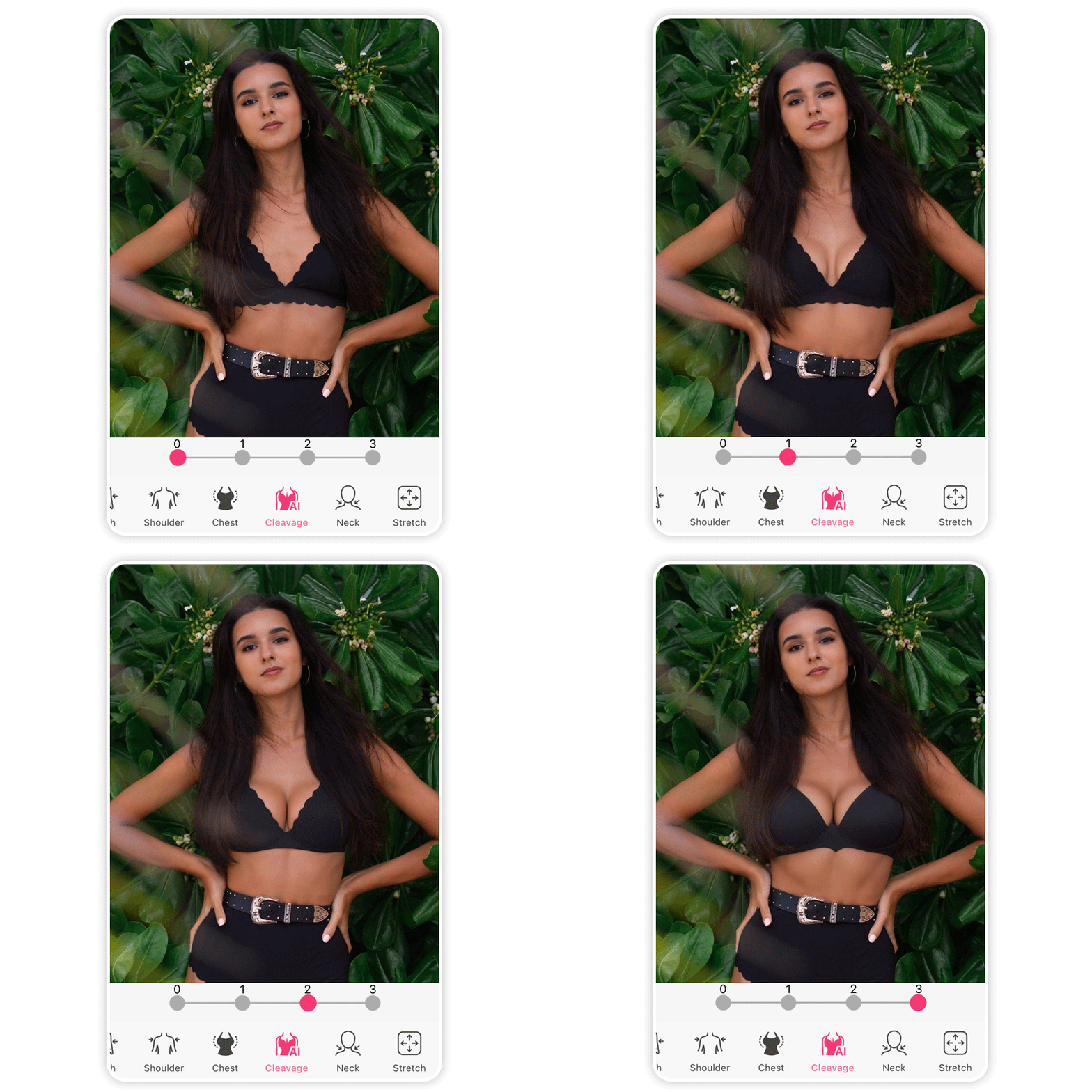
The Body Tuner feature offers a "Chest" option that automatically detects your chest. Use the slider to enlarge your breasts easily and instantly.
Moving the slider to the right will increase the size of your breast. You can increase or decrease the level until you're satisfied with the result.
👉 Read More: Virtual Bikini Try On: Test 6+ Bikini Styles with AI
Testing the slider itself: small, incremental adjustments held up as the most natural across every photo I tried, while pushing it toward the far end of the scale started to look disproportionate to the rest of the body — it's worth nudging it up gradually and checking the full photo at each step rather than jumping straight to a dramatic change.
Step 4: Save Your Perfect Body Photo

▲ Create Breast Expansion Photo Naturally
Once you've achieved your desired body proportions, click on the Apply button. Your photo will be automatically saved to your phone.

Check out other body reshaping tools to slim your waist, edit hips, arms, waist and more to get the body shape you've always dreamed of!
👉 Read More: What Would I Look Like Skinny using Weight Loss Filter
Pro Tips to Make Boobs Bigger in Photos without Surgery
Implants and editing apps can make your breasts look fake, we just would like to give you some tips prior to using YouCam Perfect’s breast expansion AI tool. These tips enhance the natural appearance of your breasts in a way that complements your overall image.
| Factor | Best Practice for AI Enhancements |
|---|---|
| Attire | Wear V-necks or ruffled tops to provide the AI with better depth cues for realistic volume. |
| Posture | Sit or stand straight; AI mapping works most accurately when it can identify the spine and shoulder alignment. |
| Lighting | Soft side-lighting helps the AI generate realistic highlights and shadows for a natural 3D effect. |
| Proportions | Use the "Golden Ratio" tool in YouCam Perfect to ensure chest size is balanced with waist and hip width. |
AI Breast Enlarger Tip 1: Wear the Right Attire

▲ Wear the Right Attire To Enhance Your Photos
Even before you start editing in YouCam Perfect, you can use your clothing choices to change the look of your bust. Plunging necklines emphasize your breasts and often have detailing that makes your breasts look bigger.
Dresses or tunic tops that cinch at the waist make your middle look smaller, which naturally enlarges and shapes your chest. Ruffled tops create the illusion of volume, and horizontal stripes can create a widening effect on your bust.
Comparing a few outfit choices on the same photo before editing: a simple V-neck top made the AI's chest detection noticeably cleaner than a high-necked or baggier top, which tracks with the tool reading depth cues from what's actually visible in the photo.
AI Breast Enlarger Tip 2: Improve Posture

▲ Improve Posture For Perfect Body Shape Photo
Your posture can change how your breast appears in photos, and it can affect how people perceive you. Slouching saps your confidence and hides your chest, so if you want to accentuate it, make sure you sit up straight and tall.
Good posture not only emphasizes your body shape but defines it, too, for a poised aesthetic that sets the tone for your photo.
👉 Read More: How to Edit Your Waist in Photos Naturally
AI Breast Enlarger Tip 3: Angle Your Body

Facing the camera highlights your facial features, but it doesn’t do much for your bust. Try different angles to see which ones offer more flattering emphasis, and take a few photos to see which positions you like best.
Turn your body so you’re facing slightly away from the camera, and push your chest forward. This pose gives you a more prominent definition around your bust while still allowing you to look at the camera and show off your makeup or new haircut.
Testing a few angles on the same photo: a slight three-quarter turn gave the chest detection a cleaner edge to work with than a straight-on shot, and the resulting edit blended in a little more naturally as a result.
AI Breast Enlarger Tip 4: Focus on Proportions

▲ Focus on Proportions For Perfect Body Photo
Even if you want a bigger chest, be careful not to enlarge it too much. You still want your bust to be proportionate to the rest of your body, and editing it to be too big can look awkward or unrealistic. Balancing your edits means enhancing your bust little by little to suit your body.
Testing this on a few photos with different starting chest sizes: the same slider position looked more dramatic on a smaller starting frame than on a larger one, so it's worth judging the adjustment relative to your own proportions rather than aiming for a fixed slider position.
5 Best AI Breast Enlarger Apps in 2026
| App Name | Primary 2026 AI Feature | Best For | Price Point |
|---|---|---|---|
| YouCam Perfect | AI Breast Expansion | Natural texture & distortion-free backgrounds | Free / $5.99 mo |
| YouCam Makeup | AI Body Tuner | Fashion creators & holistic beauty looks | Free / Premium Sub |
| PhotoDirector | 3D Mesh Body Reshaping | Professional-grade manual control | $3.33 mo (annual) |
| BeautyPlus | AI Replacer (Text-to-Edit) | Quick, one-tap social media aesthetics | Free / $8.99 mo |
| BodyApp | Surgical Outcome Simulation | Fitness & aesthetic procedure visualization | $2.99 wk / $29.99 yr |
AI Breast Enlarger App 1. YouCam Perfect
YouCam Perfect is a comprehensive photo and video editing app with a wide range of features, including a "Body Tuner" for reshaping the body. Its AI-powered tools are designed to provide quick, one-tap edits.

Best AI Photo Editor
The Best AI Photo Editor & Selfie Camera.
Remove objects, apply filters & more.
AI Breast Expansion Feature:
The app's body-tuning tools allow you to adjust breast size with a simple slider. It also includes an AI chest enhancement tool within its Body Tuner feature, allowing users to subtly adjust shape and volume with easy sliders for balanced, natural-looking results.
The AI adapts to different body types and poses, while the Protect tool preserves clothing and background details, making it ideal for portraits, fashion shots, and everyday photos.
Pricing:
YouCam Perfect is free to download, but many of its advanced features, including the body editing tools, are part of a premium subscription. Pricing can vary, but a monthly subscription starts around $5.99, with annual plans also available.
AI Breast Enlarger App 2. YouCam Makeup
YouCam Makeup, from the same developer as YouCam Perfect, is primarily focused on virtual makeup and face editing. However, it also includes a powerful AI-powered body editor with a "Breast" feature.
AI Breast Expansion Feature:
This app offers a dedicated "Breast" tool within its AI-powered body editor. You can use a slider to subtly adjust your curves while the AI works to maintain a realistic appearance. It also has a "Protect" feature to prevent unwanted warping.
Pricing:
The app is free to download and use with limited features. Premium access to all tools, including body editing, is available through a subscription.
AI Breast Enlarger App 3. PhotoDirector

PhotoDirector is a powerful photo editing app and software from CyberLink that uses advanced AI technology for a wide range of photo manipulations, including body reshaping.
AI Breast Expansion Feature:
PhotoDirector features a one-click breast size adjustment tool within its "Body Reshape" section. It's designed to give users control over their desired size with a slider, aiming for a natural look that avoids the "obviously fake implant" appearance.
Pricing:
PhotoDirector offers a free version with basic features. For full access to its AI tools and premium features, a subscription to PhotoDirector 365 is available. Plans start as low as $3.33 per month (billed annually), and they also offer a one-time purchase option.
AI Breast Enlarger App 4. BeautyPlus

BeautyPlus is a popular beauty and photo editing app known for its user-friendly interface and quick, one-tap beautification features.
AI Breast Expansion Feature:
BeautyPlus offers a "Reshape" tool for body editing, including features for breast enlargement. The app's AI aims to provide a natural-looking enhancement with a simple slider control.
Pricing:
BeautyPlus is free to download, but a premium subscription, BeautyPlus Premium, is required to unlock all features, including advanced reshaping tools. The subscription provides monthly or annual access.
AI Breast Enlarger App 5. BodyApp

BodyApp is a more specialized app dedicated to body editing and reshaping, offering tools for slimming, muscle enhancement, and, of course, breast and hip enlargement.
AI Breast Expansion Feature:
The app's primary function is body manipulation. It offers a dedicated "Breast" tool with a slider to increase or decrease bust size. It is designed to be a straightforward and efficient tool for body modifications.
Pricing:
BodyApp offers various pricing models, including weekly, monthly, and yearly subscriptions. They also offer a "Permanent VIP" option for a one-time fee. A one-week subscription can be around $2.99, a one-month around $4.99, and a one-year around $29.99.
Try The Best AI Breast Enhancer for Photos
YouCam Perfect is the best free photo editing app that uses AI technology and a variety of features to upgrade your photos. Whether you want to edit objects or reshape your face and body, you always get a seamless look that you can’t wait to share.
Best AI Photo Editor
The Best AI Photo Editor & Selfie Camera.
Remove objects, apply filters & more.
About the Editors

The PERFECT Corp. Editorial Team
We are a team of experts on photo and video editing apps. Our goal is to deliver engaging content on everything from stunning selfie edits to eye-catching video effects. We cover the latest trends and share niche tips to help you master digital creation.