


 Author:


Updated October 2026: added a real before-and-after posture comparison from the app, clearer tool names, and real user reviews.
Want to edit your body in videos without advanced editing skills? Whether you're creating content for social media or simply want a clip that looks the way the moment felt, a video body editor makes it easy to achieve your ideal look.
With YouCam Video, the best body editing video app, you can make subtle proportion adjustments in videos using advanced AI tools. Instantly fine-tune waist, hip and shoulder lines, or reshape specific areas for a natural-looking result. We tested this against YouCam Makeup's photo body editor too, to help you decide which tool fits your project — see the comparison below.
See a real posture edit in YouCam Video
The most natural body edits in video are small posture fixes, not big shape changes. Pick a tool to see the actual app screen before and after the adjustment.
Pick a tool

Level shoulders for a cleaner silhouette
Shifting your weight or carrying a bag drops one shoulder, which makes the whole frame look tilted. A light Shoulder adjustment evens the line without changing your build. Keep the slider low and scrub through the clip so clothing seams and the background stay straight while you move.
In YouCam Video: Body Reshape → Shoulder.

Lift the head line, not the face
Looking down at a phone or leaning toward the camera shortens the neck line. A gentle Neck adjustment gives a more upright look while the face stays the same. If hair or earrings start to stretch, you have gone too far, so pull the slider back.
In YouCam Video: Body Reshape → Neck.
Images are real YouCam Video screens (left: original, right: adjusted). Body edits are a creative choice, not a standard to meet; this is a quick guide, not a body assessment.
Quick tips if the comparison doesn't load: level your shoulders and lift your chin while filming, then use the Shoulder or Neck tool only for small corrections. Subtle edits hold up best when the clip is playing.
How to Edit Body Shape in Video?
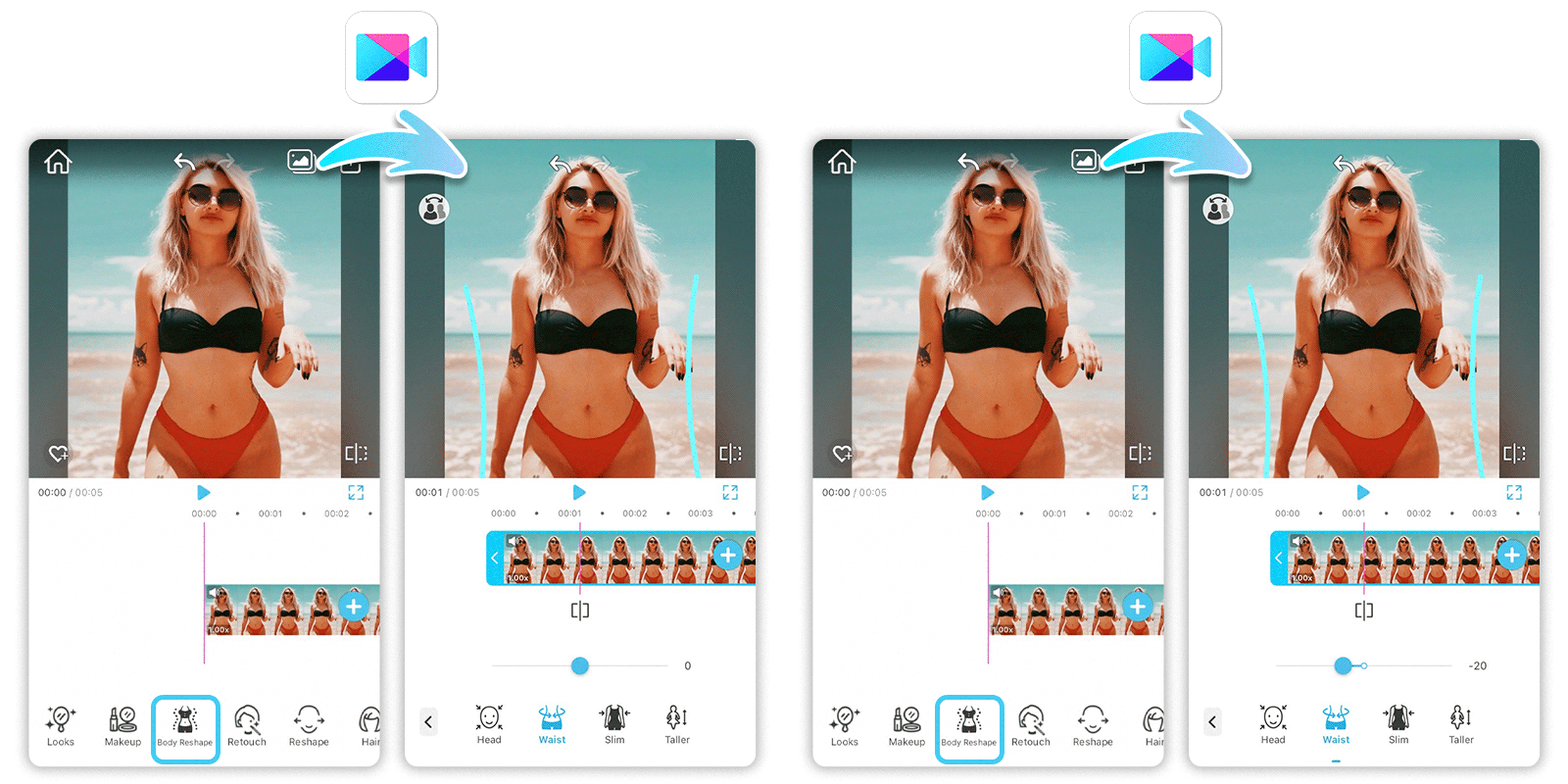
For quick and natural body shape adjustments in videos—like refining waist, hip or shoulder lines—YouCam Video is the best app. Its AI-powered body editing tools make pro-level edits effortless on mobile, perfect for TikToks, Reels, or selfies.
Key Advantages of YouCam Video's Body Editing Tools:
- AI Precision & Natural Results: Smart detection reshapes bodies without distortion or warping—looks realistic, not fake.
- Real-Time Preview: See changes instantly while editing; undo/redo for perfect tweaks.
- Beginner-Friendly Interface: Simple brush + sliders; no skills needed, yet advanced controls for pros.
- Video-Specific Optimization: Handles motion smoothly (up to 4K), unlike photo-only apps.
- All-in-One Suite: Combines with face retouch, filters, effects, and direct TikTok/Instagram sharing.
- Free & Fast: Basic edits free; processes in <1 min on iOS/Android (4.7-star rating).
See step-by-step tutorial here>>>
Best Video Body Editor to Edit Body in Video Free
What makes YouCam Video stand out from the competition? It's the user-friendly interface coupled with advanced AI features that make video body editing a breeze.
Unlike other standalone video editing apps, YouCam Video offers a seamless and intuitive experience for both video editing and body editing.
Try Edit Body Shape in Photo
As the best AI body editing app for photos, YouCam Makeup’s body editor helps you refine your snaps and experiment with shaping your body in any way you want. Here’s how to slim your legs and thighs naturally and easily with YouCam Makeup. Here’s how to get started:
Step 1: Download the Best Body Editing App
Step 2: Upload Your Photo for Body Reshaping
Step 3: Enhance or Slim Body
Step 4: Save the Photo
📒 Read More:
Change Body Shape in Photo With AI
How to Slim and Change Body Shape in Photo with AI

More Body Editing App Ideas
- 5 Best Face Slimming Video Apps
- How to Adjust Head Size in Videos With the Best Video Editing App
- Reshape Your Body in Videos: 4 Best AI Video Body Editor Apps
Reshape Body in Videos with Body Editing App

YouCam Video is packed with comprehensive body reshape tools to help you edit your body in videos. Here’s a breakdown of the key features:
- Adjust Waist: Fine-Tune Proportions
- Adjust Height: Correct Low-Angle Shots
- Adjust Figure: Subtle Overall Reshape
- Adjust Head: Balance Head Size
- Adjust Arm: Refine Arm Lines
- Adjust Chest: Subtle Proportion Changes
- Adjust Hip: Refine Body Lines
- Adjust Shoulder: Improve Your Posture
- Adjust Leg: Refine Leg Lines
- Adjust Neck: Improve Posture Lines
Adjust Waist: Fine-Tune Proportions

Fine-tune waist proportions with the waist adjustment tool. This feature is incredibly useful for fitness videos, fashion showcases, or just to enhance your everyday videos by giving you a sleek and streamlined look.
This was one of the more forgiving edits to test — a moderate waist adjustment tracked well across a full clip of normal movement, though a more dramatic change started to look less natural during quick turns or bends.
Adjust Height: Correct Low-Angle Shots

Shot from a low or awkward angle? The height adjustment feature allows you to increase your height effortlessly. This is perfect for adding a bit of extra height in your video content, making you look more confident and stylish.
Adjust Figure: Subtle Overall Reshape

With the figure adjustment tool, you can reshape your overall body with precision. This feature allows you to tweak different body parts to achieve the perfect look, ensuring flexibility and accuracy in your edits.
Adjust Head: Balance Head Size

The head size adjustment feature lets you modify the size of your head. Whether for a fun effect or to make your videos look more proportionate, this tool offers great flexibility.
Adjust Arm: Refine Arm Lines

Refine the shape of your arms effortlessly with adjustment tools.
If you want to slightly reshape your arms, this feature helps create a more balanced and natural look in your videos.
Adjust Chest: Subtle Proportion Changes

Subtly adjust the chest area to achieve a more proportional look. Whether you want to create a more defined shape or correct distortions from camera angles, this tool ensures a natural appearance.
Testing this one, smaller adjustments held up more convincingly through a full clip than larger ones — a subtle change tracked naturally through movement, while a more dramatic adjustment was more likely to show slight warping at the edges during faster motion.
Adjust Hip: Refine Body Lines

Enhance your hip shape to achieve a more balanced and natural body proportion. If you want to widen or refine the curve of your hips, this tool keeps the silhouette natural and true to your style.
Adjust Shoulder: Improve Your Posture
Create a more confident stance with subtle shoulder adjustments. Whether you need to lift or reshape your shoulders, this tool enhances your overall posture for a more polished and elegant look in videos.
Adjust Leg: Refine Leg Lines

Balance leg lines with a simple tweak, for example when a wide-angle lens stretches them. Whether you want to create a more toned look or even out proportions, adjusting leg width helps refine your full-body appearance.
Legs were one of the trickier areas to adjust in video specifically, since they're moving the most in a typical clip — an edit that looked great on a paused frame sometimes became more noticeable once the clip was playing at full speed, so it's worth previewing the full clip, not just a single frame, before saving.
Adjust Neck: Improve Posture Lines
Refine the length and shape of your neck to improve posture and create a more elegant appearance. Whether you want a slightly elongated look or need to correct posture issues, this tool helps you maintain a graceful and natural presence in videos.
A quick note from testing this: I ran the same clip through several of these adjustment tools to see how the edits actually hold up in motion, not just on a single frame. Adjustments that don't rely on the body moving much — waist, chest, hip — tracked cleanly through most of the clip. Edits on areas that move more during normal motion, like arms and legs mid-walk, needed a smaller adjustment to stay convincing throughout the whole clip; pushing those too far looked fine on a still frame but became noticeable once the video was playing.
How to Edit Body in Videos with Video Body Editor
Here’s a step-by-step guide to using the body reshape feature in YouCam Video:
- Step 1: Download the Best Video Body Editor
- Step 2: Open the App and Select Your Video
- Step 3: Navigate to the Body Reshape Feature
- Step 4: Use the Adjustment Tools
- Step 5: Preview and Save Your Edited Video
Step 1: Download the Best Video Body Editor App
Download the YouCam Video app free on App Store and Google Play.

Step 2: Upload Your Video
Launch the app and select the video you want to edit.
Step 3: Try Body Editing Tools

Find the body reshape feature within the app’s editing tools.
Step 4: Use Body Adjustment Tools
Utilize the adjustment tools to reshape your body as desired, including, head size, height, chest size, shoulder, and more.
Step 5: Preview and Save Your Edited Video
Preview your edits to ensure they look natural, then save your edited video.
Tips for Natural-Looking Body Reshape Edits
- Make gradual adjustments for a natural look.
- Use good lighting and proper angles.
- Combine with other editing tools for a polished finish.
YouCam Video is your ultimate tool for body reshaping in videos. With its user-friendly interface and advanced features, you can easily enhance your videos and boost your confidence.
Start reshaping your body in videos with YouCam Video today!
Video Body Editor vs. Photo Body Editor: Which Should You Use?
| Tool | Best For |
|---|---|
| YouCam Video's Body Reshape | Editing body shape in existing video clips — TikToks, Reels, vlogs |
| YouCam Makeup's Body Editor | Editing body shape in still photos before posting |
If your content is a video, YouCam Video's body reshape tools are built specifically to track and hold an edit through motion. If you're just editing a single photo, YouCam Makeup's body editor is the faster, simpler tool for the job.
What YouCam Video Users Say
Two real Google Play reviews, one happy and one with a fair complaint worth knowing about before you edit long clips:
"It's doing what's needed. My phone, and even the Google photos editor I have, does not touch up appearances in video so this is way more than I could have anticipated. Easy to use."
Ambrosia Lliteras, ★★★★★, Google Play, June 2022
"I pay for this app and I used to really like it but since late, the option reshape and hush editing videos normally is getting stuck, it's freezing and playing up."
Karishma Butani, ★★★☆☆, Google Play, August 2026


