Author:


Dreaming of picture-perfect legs that look longer and slimmer? You’re not alone! Whether you’re perfecting your next Instagram post or snapping a vacation selfie, knowing how to make legs look thinner in pictures (and longer too!) can level up your photo game. Don’t worry, you don’t need to be a pro—just the right tips and tools!
In this article, we’ll share simple hacks and introduce the best AI body editing app that lets you edit your photos effortlessly. Let’s get those legs looking runway-ready in every shot!

| In this Guide: |
|---|
Best Body Editing App for Longer, Slimmer Legs and Thighs in Photos
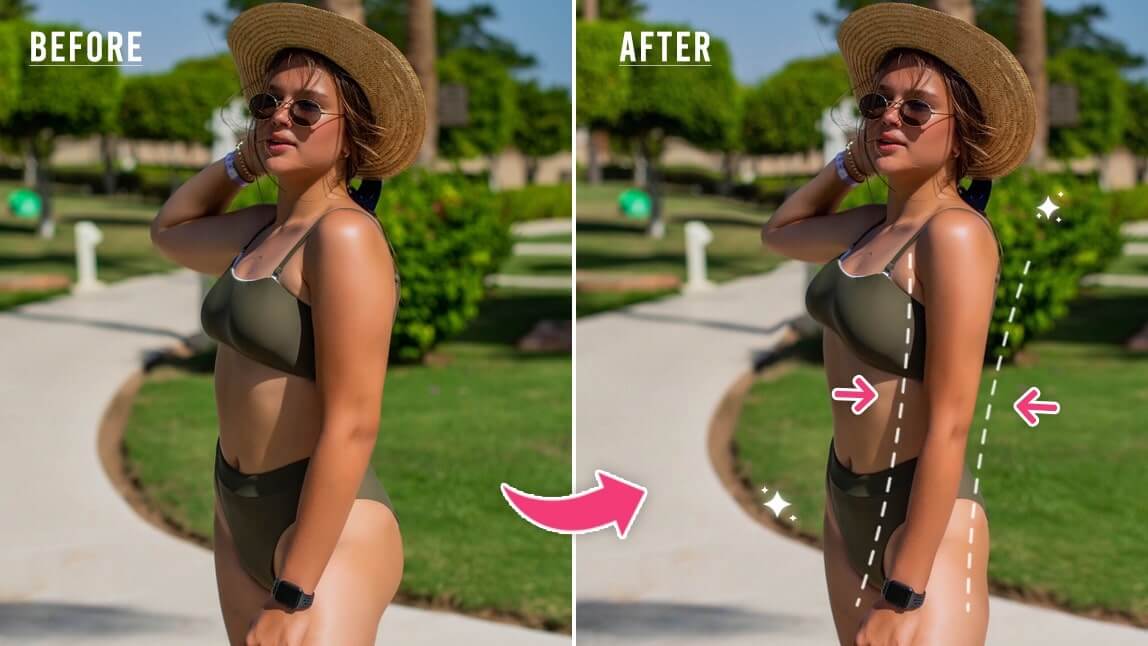
YouCam Makeup is the ultimate body editing app for Android and iPhone, designed to auto-detect your body and specific areas like legs, arms, and hips for effortless photo edits.
With its advanced tools, you can easily learn how to make legs look thinner in pictures or even how to make legs look longer in photos—all with just a few taps.

Read More: Best Body Editing App to Edit Body Curves in Photos in 2024
AI Leg Feature: Slim Legs in Seconds
YouCam Makeup's AI-powered Leg Slimming feature detects both your thighs and calves, letting you target each area for precise edits.
Adjust the slider bar to create the perfect look—whether you want slimmer thighs or leaner calves. With YouCam Makeup, making your legs look naturally thinner in photos is fast, fun, and foolproof!
Slim Feature For Manual Edits
Want more control over your edits? The Slim and Enhancer tools let you manually refine your photos for a custom look.
Use these features to effortlessly make your legs look skinnier or even enhance their shape to achieve the vibe you’re going for—whether it’s strong, toned legs or sleek and slim.

Taller Feature: Make Legs Look Longer in Pictures
YouCam Makeup's Taller feature is your secret weapon for creating the illusion of longer legs. This tool allows you to stretch your legs and enhance your height in photos without distorting the background.
Perfect for mastering how to make legs look longer in pictures and creating Insta-worthy shots that wow!
Read More: Taller Feature: How to Look Like a Model in Photos
How to Slim Legs in Photos on Android & iPhone
YouCam Makeup’s body editor helps you refine your snaps and experiment with shaping your body in any way you want. Here’s how to slim your legs and thighs naturally and easily with YouCam Makeup.
- Step 1: Download the Best Leg Slimming App
- Step 2: Upload Your Photo
- Step 3: Slim Legs on Photos With a Slide Bar
- Step 4: Save the Photo
Step 1: Download the Best Leg Slimming App
To slim legs in your photos, start by downloading the free YouCam Makeup app on either App Store or Google Play.

Step 2: Upload Your Photo
Tap Photo Makeup and choose a photo from your phone’s gallery. Then, select the Body Tuner.
Remember, tap Protect and drag your finger across the areas you want to prevent warping when editing your body.
Step 3: Slim Legs in Photo With a Slider
Then, select the Legs option from the body tuning tools. YouCam Makeup will automatically detect your legs.
Use the slider bar to adjust the size of your thighs and calves. Dragging it to the right will make your legs wider while moving it to the left will slim them.

Step 4: Save the Photo
Tap the pink check in the bottom right corner to save your edits!
Make Legs Thinner and Longer in Pictures with YouCam Makeup
Learning how to make legs look thinner and longer in pictures has never been easier! With YouCam Makeup, you can slim, shape, and stretch your legs effortlessly using tools designed for natural, stunning results.
Whether you want to perfect your vacation snaps, enhance your selfies, or simply experiment with your look, this app has everything you need. Download YouCam Makeup today and discover just how easy it is to create photos you’ll love to share!

More Body Editing Ideas
- How to Slim Arms in Photos: Best Arm Slimming App
- How to Edit Body in Photos Without Background Distortion