Author:


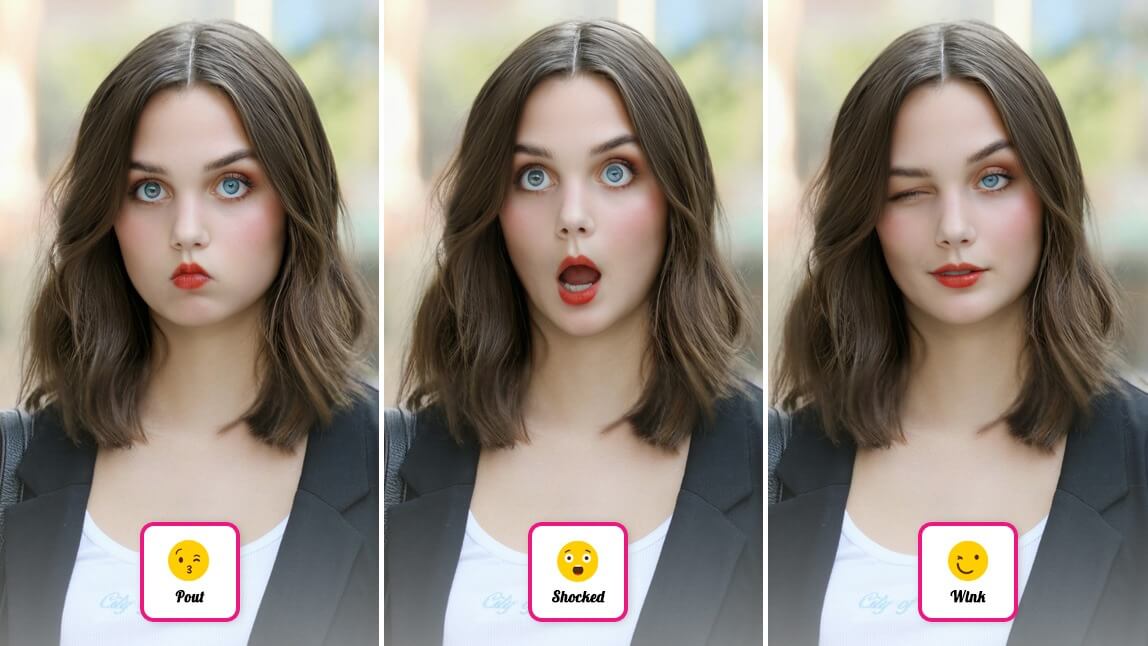
Ever looked at a photo and thought, "This would be perfect if only I smiled a little more!"? Or maybe you’ve captured a great shot, but your expression feels too serious for the moment.
Don’t worry—there’s no need for a retake. Thanks to an AI Facial Expression Changer, you can transform your facial expressions effortlessly, whether it’s adding a smile to your photo, softening a frown, or creating a playful look. Let’s explore how you can use this cool feature to change facial expression in photos!

| In this Guide: |
|---|
Why Change Facial Expressions in Photos?
Facial expressions are the heart and soul of any photo. They convey emotions, set the tone, and bring memories to life. But sometimes, the perfect moment doesn’t align with the perfect expression. Here’s why using AI to tweak your expressions is a game-changer:
- Save the Perfect Shot: No need to delete an otherwise great photo just because your expression doesn’t match the vibe.
- Bring Photos to Life: A smile or a slight change in expression can transform a photo, making it more dynamic, engaging, and full of personality.
- Match the Moment: Sometimes, the expression in a photo doesn’t quite match the mood you want to convey. Whether it’s turning a serious look into a cheerful one or softening a stern expression, editing can help capture the essence of the moment.
- Preserve Special Memories: Have you ever taken a group photo where everyone looks perfect except for one person’s expression? Adjusting that expression can save the moment without needing a retake.

How to Change Facial Expressions with YouCam Makeup
The AI Expressions feature in YouCam Makeup uses cutting-edge technology to tweak your expressions while keeping them realistic. Here’s a simple step-by-step guide:
- Step 1: Download YouCam Makeup
- Step 2: Upload Your Photo
- Step 3: Add a Smile or Goofy Face
- Step 4: Save & Share
Step 1: Download YouCam Makeup
Start by downloading the YouCam Makeup app for free from the App Store or Google Play.

Step 2: Upload Your Photo
Open the app and select a photo where you want to modify the facial expression.

Step 3: Add a Smile or Goofy Face
Navigate to the AI Expressions feature in the app under Beautify. Choose from a variety of facial expressions like “Wink”, “Eye Roll”, “Pout”, and more. The options are endless!

Step 4: Save & Share
Once you’re satisfied, download your photo to your camera roll to share it or create your own custom face sticker for WhatsApp and Instagram.
Extra tip: If you want to try an online facial expression changer, check out the YouCam Online Editor.
Creative Ideas for Using AI Expressions
AI Expressions can help you elevate your photos in countless ways. Here are a few fun ideas:
- Perfect Portraits: Whether it’s a professional headshot or a family photo, tweak your expression to match the mood—confident, cheerful, or relaxed.
- Social Media Glow-Ups: Add a smile to your selfies or group shots to create a friendly, approachable vibe.
- Holiday Cards: Forgot to smile in your family Christmas photo? No problem! Add a festive grin and spread the holiday cheer.
- Themed Edits: Match your expression to the occasion, like a playful smirk for a birthday bash or a serene look for a nature shot.
- Before-and-After Fun: Create striking before-and-after edits to show how a small change in expression can make a big impact.
Add a Smile to Your Photos with YouCam Makeup
With the AI Expressions tool, changing facial expressions in photos is as easy as tapping a button. Whether you’re fixing a serious face, adding a smile, or experimenting with new looks, YouCam Makeup helps you create photos that truly reflect the moment.