Author:


Have you ever come across a beautiful photo that you want to use for your project, but the photo has a watermark on it?
Watermarks can be a nuisance when you want to use or edit someone else's photo. Fortunately, there are ways to remove watermarks from photos, and one of the best free watermark removers is YouCam Perfect.

Keep reading to find out how to remove watermarks or data stamps from photos with a convenient watermark remover app!
How To Remove Watermark From Photos With a Free Watermark Remover App
YouCam Perfect is a free photo clean up and object removal app for Android and iPhone, that can help you take watermarks off pictures for free. To get started to edit a watermark-free photo, follow these simple steps:
- Step 1: Download the YouCam Perfect app
- Step 2: Upload the Photo with Watermark
- Step 3: Choose the AI Removal Feature & Select the Watermark
- Step 4: Save the Photo Without a Watermark
Step 1: Download the Best Free Watermark Remover App

To remove the watermark from photos, start by downloading YouCam Perfect for iOS or Android free from the app store.
Not only does it come with a removal tool, but many more tools, filters, and effects to enhance your photos!
Step 2: Upload the Photo with Watermark

Once you’ve downloaded the app, open it, and choose the photo you want to edit from your phone’s gallery. Upload your image to the app to get started with making the changes you want!
Step 3: Choose the AI Removal Feature & Select the Watermark to Erase

When you select Removal, you can manually brush over or erase any unwanted feature in your photo. Use the slider to adjust the brush size, and choose the area you want.
Simply draw over the part of the photo you want to remove and YouCam Perfect will create a smooth surface with no more distractions!
Step 4: Save the Photo With the Watermark Removed

After you’re finished editing, save your photo to your phone.
*Make sure you only use this feature on your own photos. YouCam Perfect does not encourage the illegal use of artwork, and you should only remove the watermark if you own the photo.
Why YouCam Perfect is the Best Watermark Remover App
▲ Remove the watermark from photos
YouCam Perfect is the best water remover app as its AI object removal feature can help you get rid of watermarks most easily and naturally.
Its AI technology pinpoints the area you want to edit and makes the changes automatically. It only takes a few taps, from adjusting your photo quality to cutting out unwanted objects with the Removal tool to adding stickers and animation to your snaps.
As a result, it is the best app to help you remove date stamps and watermarks on iPhone and Android in a few easy taps.
👉 Read more: How to Remove Unwanted Objects From Photos for Free
What Else Can You Remove From Photos with YouCam Perfect
 ▲ Remove unwanted objects from photos
Photo blemishes and text can get in the way of your polished photos and take attention away from details like your stunning look and the people in your photo.
YouCam Perfect lets you take care of these issues with tools that remove:
- Remove Date Stamps
- Remove Text
- Erase Objects
- Remove People
- Cut Out People
- Erase Photobombers
- Fix Glare
- Fix Glowing Eyes
Remove the Date Stamps from Photos
 ▲ Remove the date stamp from photos
Date stamps can help you remember a special moment, but sometimes, you want to keep the focus on the moment itself. By removing the date stamp, you can put yourself and your viewers in the moment, rather than drawing their eyes to the numbers in the corner.
Remove Text from Photos
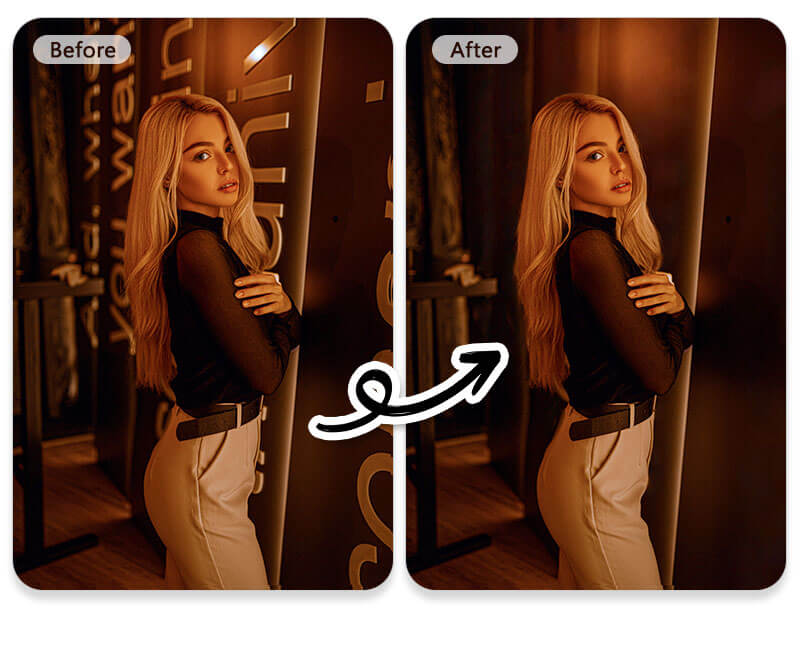
If you took a photo with text in the background, or even if you added the text yourself, YouCam Perfect can help you remove any unwanted text so you draw your viewer’s focus where you want it. YouCam Perfect can help you remove any watermarks when you no longer have the original photo or need it for nonprofit use.
Download YouCam Perfect: Best App to Remove Watermarks from Photos for iPhone & Android
The best AI clean up app YouCam Perfect makes it easy to polish your photos so they look exactly the way you want.
With intelligent tools and many options for making natural edits, you can remove watermarks, text, shadow, date stamps, wrinkles from clothes and more without the hassle of expensive editing software.

More Object Removal Tips
- How to Add a Watermark to Photos
- How to Erase Someone from Your Photo
- How to Crop Someone Out of a Photo in 4 Steps
- How to Edit Sweat Stains out of a Picture
- How to Remove a Snapchat Filter from a Saved Photo
- How to Remove Glasses from Photos Using AI