


 Author:


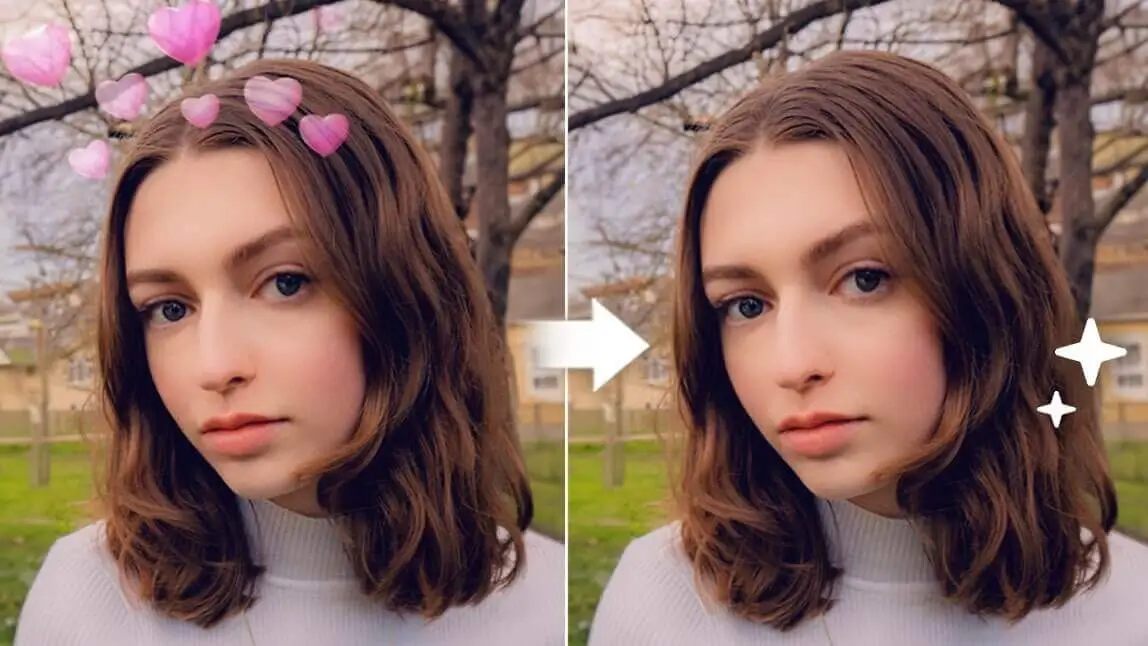
Can you take a filter or an effect off a saved Snapchat picture? The answer is a YES! What you need is a Snapchat filter remover or a photo editing app with a good object removal feature.

☝ Remove Snapchat face filters or effects from selfie or photo
In this blog, we will show you how to edit out a Snapchat filter, text, or a Snapchat watermark from your photo by using YouCam Perfect the best snapchat filter remover app for iPhone and Android in 2026 or online.
How to Remove Snapchat Filter from Photo

To remove Snapchat filter from photo, here's how:
Step 1: Download YouCam Perfect
Find YouCam Perfect from the App Store and Google Store. This is a photo editing app with an AI-powered object removal tool for removing people and objects from photos.
This feature can help you easily edit out a Snapchat filter, Snapchat text, or a watermark.

Best AI Photo Editor
The Best AI Photo Editor & Selfie Camera.
Remove objects, apply filters & more.
Step 2: Upload Your Snapchat Photo
On the YouCam Perfect homepage, tap on "Photo Edit" and upload your photo with a Snapchat filter.
Step 3: Use 'AI Removal' to Remove the Snapchat Filter / Effect

Find "AI Removal" in the toolbar section, and paint over the area you wish to remove.
Say you want to remove a particular sticker that comes with the Snapchat filter, you can just paint over the sticker and click on "Remove".
This will automatically edit out the filter or the Snapchat face filter from your photo.

How to Remove Snapchat Filter Online for FREE
If you need a quick fix and don't require meticulous editing, you can also try YouCam Online.
Here's how:
1. Go to the Object Removal Tool Page

Click on the object removal tool, and upload the photo with a Snapchat filter. If you accidentally uploaded the wrong photo, don't fret! You can always click on the Upload New button on the bottom right to try again.
2. Select Areas with Filter

Next, highlight areas that have effects or filter with the brush. If needed, you can adjust the brush size or erase over highlighted areas.
3. Click Remove and Save
After you have selected all areas in the filter or effect, click on Remove. Next, click on Download in the upper right corner.
How to Remove Snapchat Text from Photos
In case you want to remove Snapchat texts from photo, for example, how to remove Snapchat filter name from photo, you can also use "AI Removal" to edit it out of your photo.

☝ Remove Snapchat texts or filter name from your selfie
Follow these steps:
- Carefully paint over the Snapchat texts, filter name, or Snapchat watermark on your photo
- You can adjust the brush size according to your needs
- Click on the "Remove" button and the app will give you a clean picture
✨ Read More: How to Remove Text & Writing from Image for Free
Why Use YouCam Perfect to Edit Your Pictures
Best AI Photo Editor
The Best AI Photo Editor & Selfie Camera.
Remove objects, apply filters & more.
With powerful AI technology, YouCam Perfect makes it easy to clean up and perfect your photos in just a few taps. From removing unwanted distractions to fixing small details, the app offers a wide range of tools to enhance your images effortlessly.
- Remove unwanted people and objects to keep the focus on your subject
- Erase glare or shadows that affect photo clarity
- Remove watermarks quickly and seamlessly
- Clean up sweat stains or wrinkles on clothes
- Reduce glasses glare and other small visual distractions
- Erase photobombers and background clutter
Besides being one of the best object removal tools, YouCam Perfect has many other features for you to explore.
For example, you can also go into the "Camera" feature in homepage, to add makeup, retouch your face, or adjust skin tones to create a better selfie.


