Author:



Whether you want to post a simple photo, a collage, a music video, or a polished slideshow, YouCam Perfect gives you the easiest tools to edit and enhance your content before sharing it on Instagram.
How to Make an Instagram Story?

In this guide, you’ll learn step-by-step how to create an Instagram Story, plus how to use smart tools like Editing Agent, AI Removal, AI Background, and aesthetic templates to upgrade your Stories instantly.
Follow these steps to post a Story on Instagram:
- Open Instagram
- Swipe right or tap Your Story
- Choose a photo/video, or tap the camera to take one
- Add text, stickers, filters, or music
- Tap Share to Story
That’s it! But if you want your Instagram Stories to look clean, aesthetic, and professional, editing your photos first makes all the difference.
How can I upgrade my Instagram Stories with YouCam Perfect?
YouCam Perfect lets you enhance your Story content before uploading it—so your photo or video already looks polished the moment it goes live. Here’s how:
1. AI Enhance: Instant Story Enhancements

If you want fast edits, the Editing Agent recommends improvements automatically. Features like brightness and color correction, retouching, aesthetic filters, story-ready crops and composition fixes.
Perfect for beginners who want pro-level Instagram Stories without effort.
2. AI Removal: Clean Up Your Background
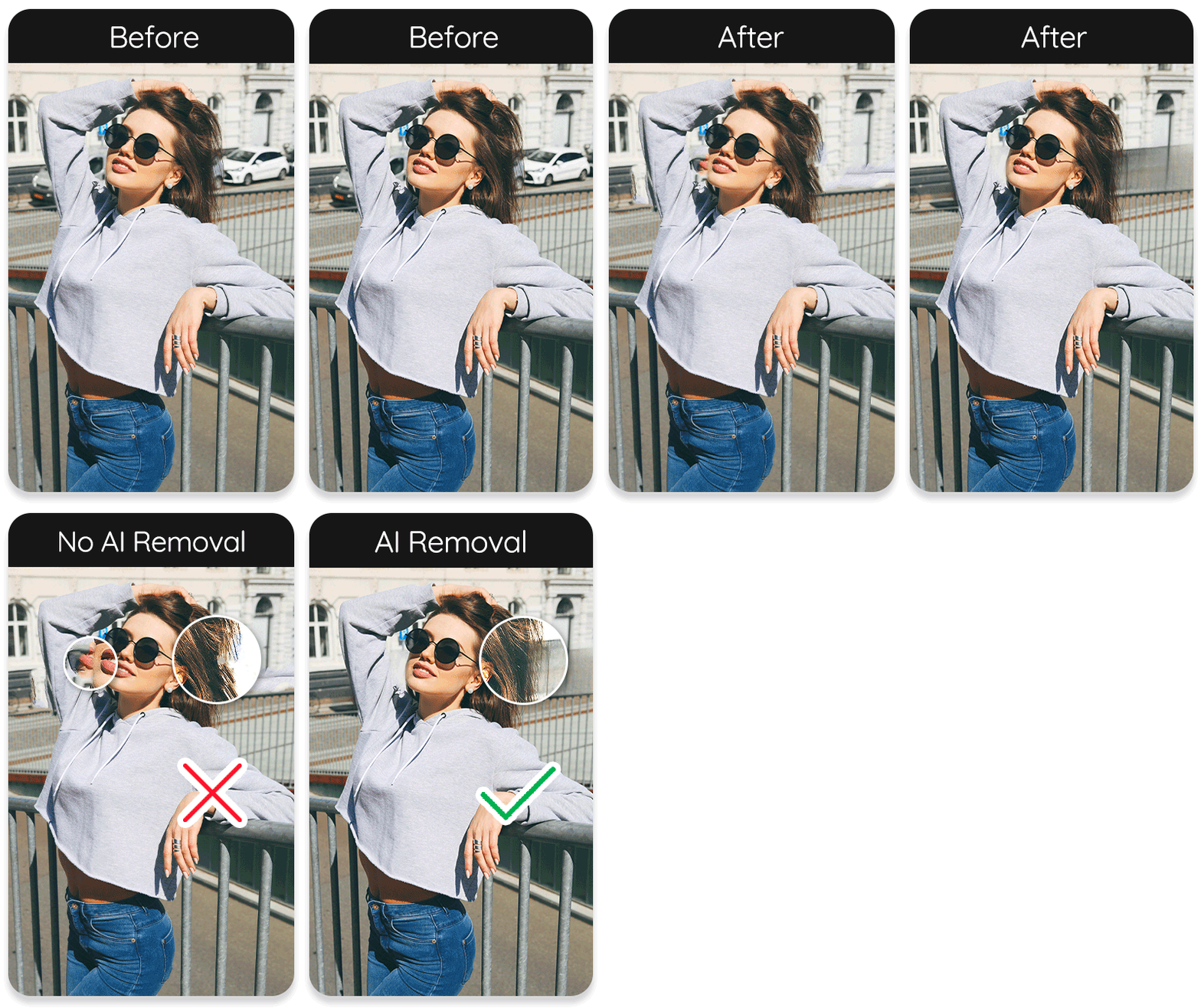
You can use AI Removal to erase:
- Strangers
- Wires
- Trash cans
- Shadows
- Distractions
Your Story would become clean and professional instantly—especially for food, fashion, travel, and lifestyle content.
3. AI Background: Turn Any Photo into a Story Scene

With YouCam Perfect, you can transform your photo instantly using AI:
- Winter background
- Aesthetic room
- City lights
- Nature scenes
- Festive themes
Great for users who want eye-catching Stories without needing the perfect real-life background.
4. Story Templates & Layouts

Make your Story look designed by a pro, you can try features like:
- Collages
- Aesthetic frames
- Scrapbook layouts
- Polaroid styles
- Seasonal holiday themes
With all these templates and layouts, YouCam Perfect is ideal for creating trendy Story styles quickly.
More Instagram Story Editing Tips You Should Know
Beyond learning the basics of how to make an Instagram Story, many users also look for extra tips—like how to add multiple photos to Instagram Story, how to make an Instagram Story collage, how to create a slideshow on Instagram Story, or even how to make an Instagram video with music.
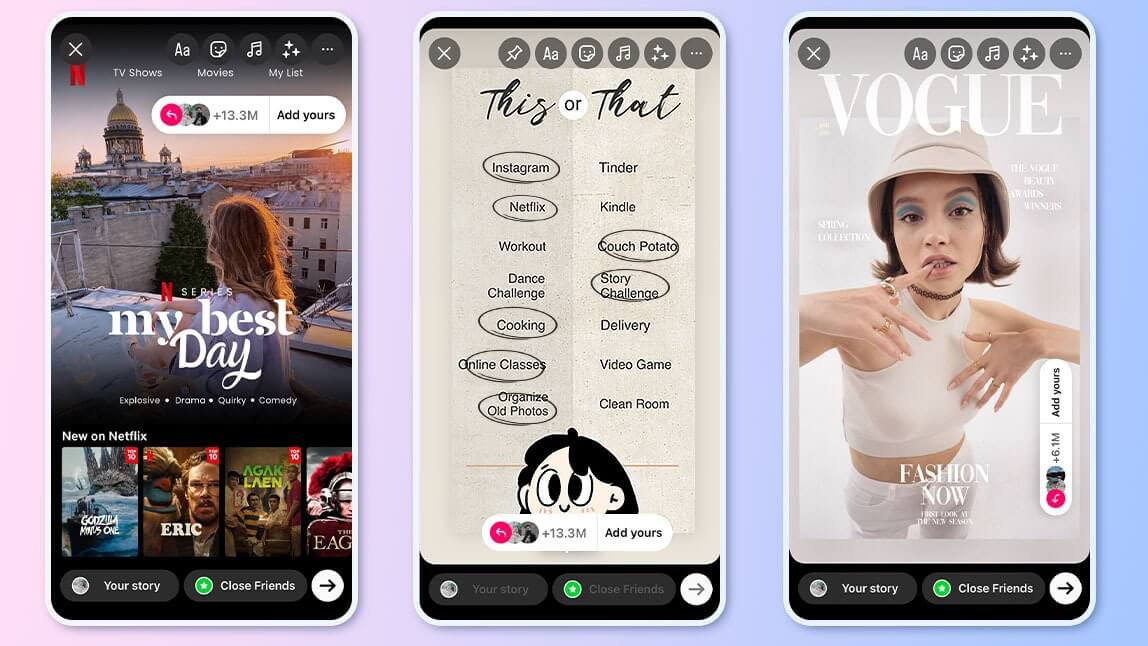
To help you level up your Stories and make them more engaging, the three tutorials below will walk you through these popular features step-by-step.
You’ll also see how YouCam Perfect and its AI tools—such as Editing Agent, AI Removal, and Story templates—can enhance your content instantly, making every Story look cleaner, more creative, and more professional.
#1 How to Add Multiple Photos to Instagram Story
One of the most searched questions is how to add multiple photos to Instagram Story, and YouCam Perfect makes it even easier.
On Instagram:
- Open Story
- Tap the “Select Multiple” icon
- Choose up to 10 photos
- Share them as a sequence

Create a collage first using Story templates with YouCam Perfect:
- Choose Collage
- Add 2–9 photos
- Apply filters + AI removal
- Save & upload as one Story

Read More: How to Add Multiple Photos to Instagram Story
#2 How to Make a Slideshow on Instagram Story
If you want a slideshow-style Story using Instagram:
- Add photos one by one
- Tap quickly to create a slideshow effect
You can also use YouCam Perfect:
- Combine images in a collage
- Add animation or motion effects

- Save as video
- Upload to Story
This is great for creators wanting how to make a slideshow on Instagram story content.
#3 How to Make an Instagram Video with Music
To make a video Story with music:
- Open Instagram Story camera
- Record or upload a video
- Tap the Music sticker
- Choose the song + lyrics style
For more polished videos, edit them in YouCam Perfect first:
- Trim
- Add filters
- Remove background distractions
- Add text or effects
- Then upload to Instagram and add music
Great for users searching how to make instagram videos with music.
Read More: How to Make a Collage on Instagram Story
Final Tips: How to Make an Instagram Story Stand Out?
Use these tricks to get more Story views:
✔ Use AI Removal for clean, distraction-free photos
✔ Try creative AI Backgrounds
✔ Use Story templates for professional layouts
✔ Add stickers, GIFs, and music
✔ Use consistent filters
✔ Add text overlays or aesthetic fonts
✔ Use YouCam Perfect for pre-story editing
Read More: May Dump: How to Create Dump on Instagram Story
Start Creating Your Best Instagram Stories with YouCam Perfect
Now that you know how to make an Instagram Story and how to upgrade it using YouCam Perfect, you can create clean, aesthetic, scroll-stopping Stories in seconds.
✨ Try YouCam Perfect today and transform every Story into something share-worthy.