Author:


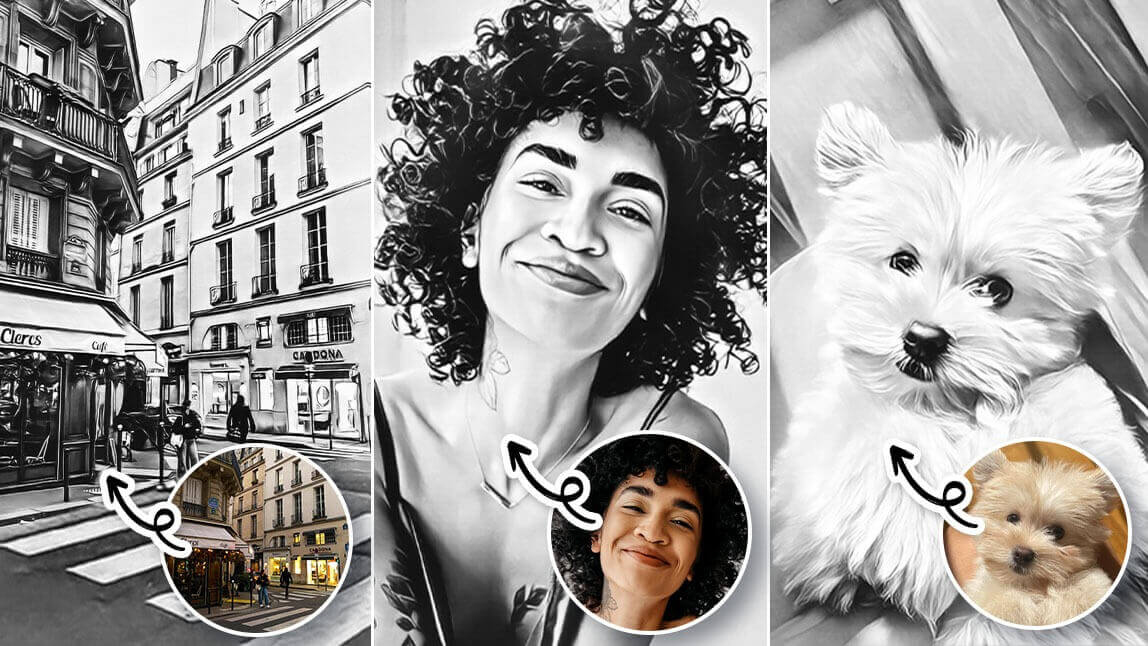
Do you love cartoons? Do you want to be able to cartoonize your pictures on a mobile phone? If so, then YouCam Perfect is the photo to cartoon app for you!
This blog post will show you how to make your picture into a cartoon in just a few simple steps. So what are you waiting for? Start cartoonizing your photos today!
 ▲ Turn Picture into Cartoon
YouCam Perfect: The Best Photo to Cartoon App
YouCam Perfect is a great cartoon picture maker that allows you to turn your photos into cartoon-style images.

The app’s powerful tools enable users to easily cartoonize a photo, remove backgrounds, apply creative effects, adjust colors, use skin-retouching features for flawless selfies, and more!
With YouCam Perfect, you can turn your ordinary photos into cute cartoons!

The cartoon trend has been gaining traction recently, and it’s no surprise that YouCam Perfect is at the forefront of this movement. The app allows you to create detailed, lifelike cartoon versions of yourself or your friends with just a few simple taps.
 With YouCam Perfect, users can easily cartoonize their pictures with just a few clicks. The app has something for everyone, from classic cartoons to full-color sketches or caricatures. Cartoonizing your photos has never been easier with YouCam Perfect! Download the app today and cartoonize your photos now!
Cartoon My Photo: Turn Baby Photo into Cartoon

Cartoon Yourself: Convert Images into Cartoon

Cartoon Picture Maker: Turn Portrait into Cartoon

Cartoonify App: Turn My Pet into a Cartoon

YouCam Perfect can easily transform any picture into a cartoon-style image with its AI cartoon filter feature.
With just a few taps, you can apply various cartoon styles to their photos, such as oil painting or watercolor. This feature allows you to add a unique and artistic touch to their photos with ease.
How To Cartoonize a Picture?
- Step 1. Download YouCam Perfect
- Step 2. Select a Photo to Turn into Cartoon
- Step 3. Choose One of the 5 Cartoon Styles
- Step 4. Save Your Cartoonized Photo!
Step 1: Download YouCam Perfect – The Best Photo to Cartoon App

First, download the YouCam Perfect App from the App Store.
Step 2: Select a Photo to Turn into a Cartoon

▲ Try the Photo to Cartoon App
To cartoonize a picture, you can use a photo from your camera roll or take a new one directly in the app.
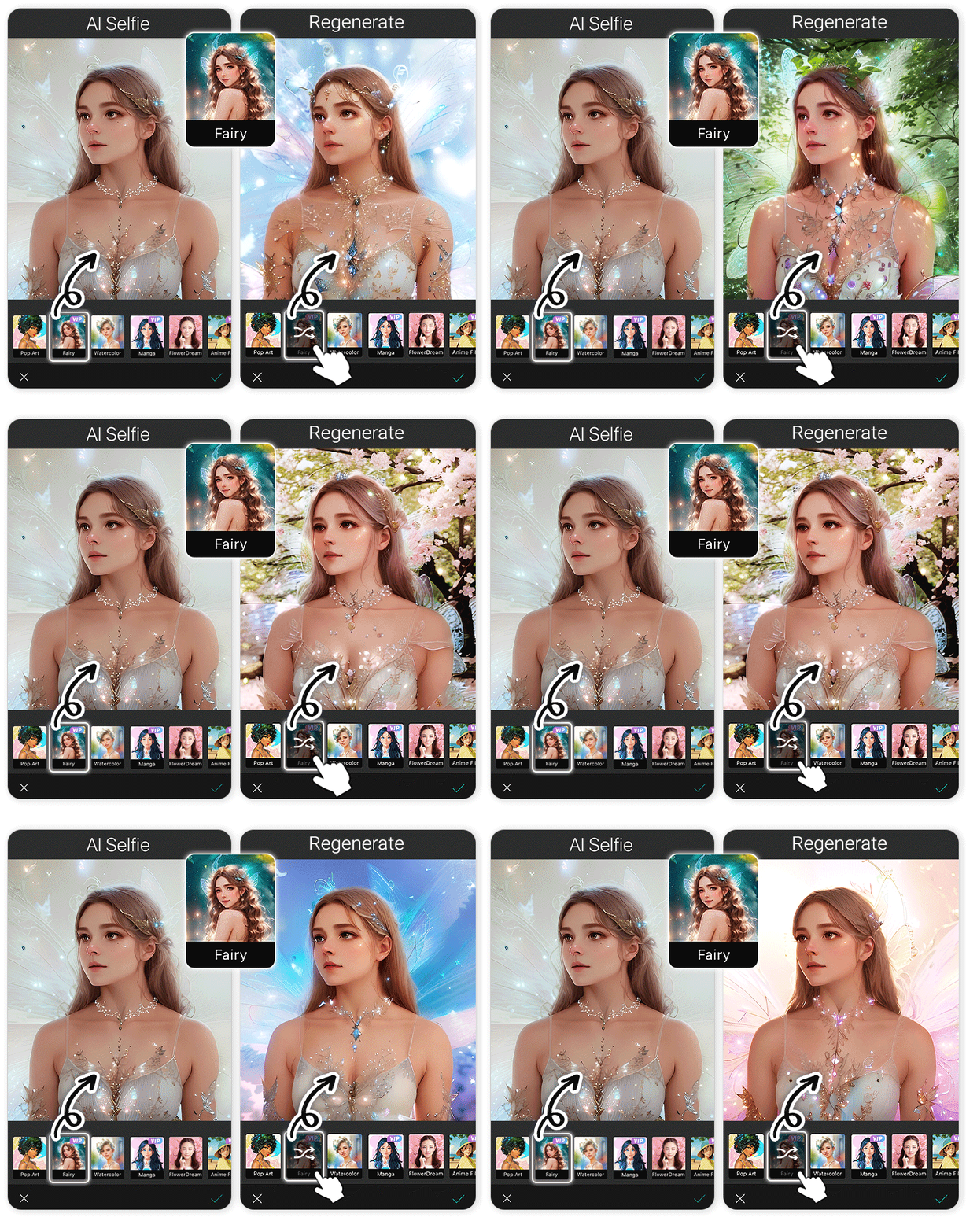
Step 3: Navigate to AI Selfie and Choose One of the 5 Cartoon Styles

▲ Cartoonize Photo Using Photo to Cartoon App
Using the AI Selfie, explore and select your favorite cartoon style. You can choose from various cartoon styles, including Anime, Mysterious, Cute, Retro, and Sketch. You can make your photo more dynamic by adding animated effects and stickers.
The app’s numerous features also allow you to add frames, change backgrounds, and more. The cartoon filters soften the photo and use unique color schemes to bring it to life. The cartoons have a subtle, warm hue.
Step 4: Save Your Cartoonized Photo
Next, save your cartoonized photo and share it with your friends and family. The app allows you to save your images to the camera roll. Remember to share them directly on social media or through messaging apps, and more!
Step 5: Animate Your Cartoon Photo!
With YouCam Perfect, you can also animate your cartoon photo. Just go to the "Image-to-Video" feature and upload the cartoon photo you just saved.

Upload one selfie and then choose a template you want, or you can also enter specific prompt to animate your photo!
💡Bonus Tip: Try Artistic Avatar to Cartoon Yourself
For more "cartoonify" your picture options, try the latest Artistic Avatar features and turn yourself into Sci-fi, Superhero, Fantasy, or Anime characters.

YouCam Perfect currently has 30+ styles for Artistic Avatar. Feel free to upload your selfie and see yourselves in different cartoon or anime characters.

👆🏼 Homepage > Artistic Avatar > Choose 1~5 Styles > Upload a Selfie
Read More: Superhero Avatar Generator: Turn Photo into Superhero
More Than a Photo to Cartoon App
YouCam Perfect has so much more to offer than just cartoon effects. You can also add a variety of animation, text and graphics, backgrounds and stickers, photo templates, or you can even swap out the background altogether.
Whether you’re looking to enhance your selfies or create fun photos with friends, YouCam Perfect has the tools to give your photos a professional touch.

▲Photo to Cartoon App: AI Selfie + Remove BG
With the Removal tool, unwanted objects like braces can be easily erased by brushing over them. Then, use AI Selfie to add a cartoon filter to your photo.
These features help create a fun and personalized cartoon-style image that stands out on social media or as a keepsake.
 With so many options, you’ll never be bored with what you can do with your photos. So go ahead and start editing today! Let creativity guide you to create some stunning images for all to enjoy.
YouCam Perfect: Best Photo to Cartoon App
YouCam Perfect is a fantastic photo editing app for making your photos look like a cartoon or paintings. You can choose from special effects, filters, and frames to make your photos unique. It also has facial retouching, auto-enhancement, blemish fixer, and more.
With YouCam Perfect, you can easily create stunning art pieces — even if you’re not a skilled photographer or artist.
Download YouCam Perfect now, and let the fun begin >

More AI Photo to Cartoon Tips:
- Best Cartoon Maker Apps
- Best Avatar Maker Apps
- Best Anime Selfie Apps
- Best AI Art Generators
- Brings Pictures to Life App