


 Author:


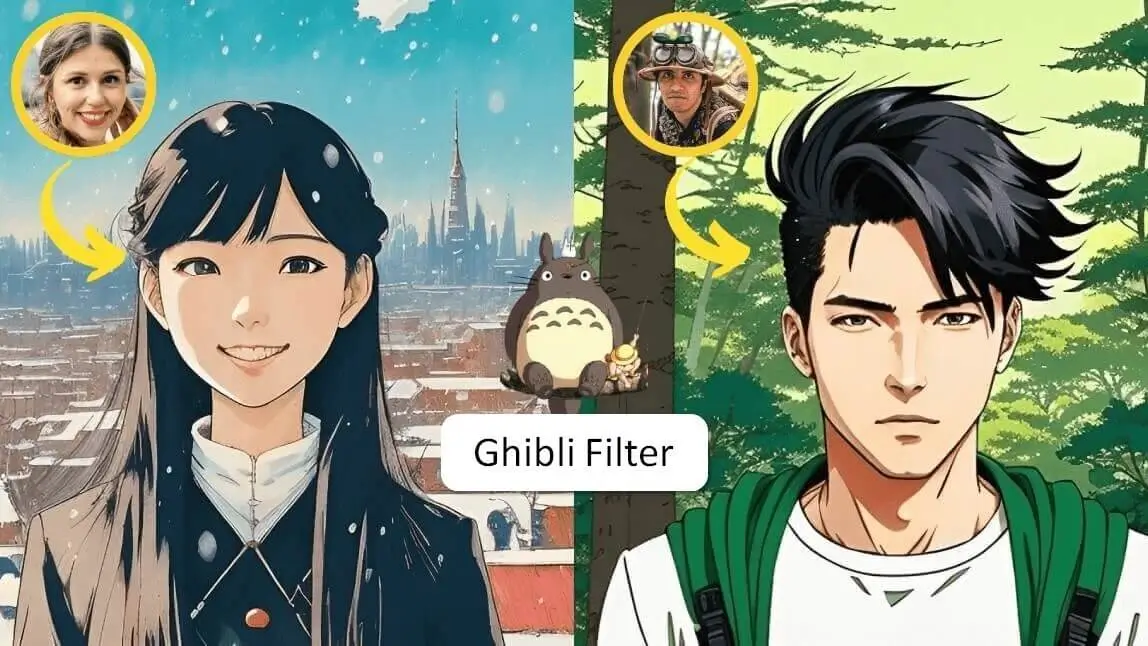
The internet is buzzing with a new trend: creating Studio Ghibli-inspired AI images. This phenomenon has enchanted users with its dreamy, hand-drawn look. For those who haven't heard, the Ghibli trend involves using AI tools to transform personal photos into artwork reminiscent of Studio Ghibli's iconic style.
While tools like ChatGPT and Grok have helped popularize this trend, there are also several free amazing options available for those who want to create Ghibli-style visuals without a subscription.

How to Turn Your Photos into Studio Ghibli Images with ChatGPT

To create images inspired by Studio Ghibli using ChatGPT’s GPT-4o model:
- Enter a Text Prompt: Craft a descriptive prompt emphasizing the Ghibli art style.
- Upload Image (Optional): Provide a base image if you wish to transform an existing picture.
- Generate and Download: Submit the prompt (and image, if applicable), review the generated artwork, and download the final piece.
Comparison of Ghibli Filters from Different AI Image Generators

| AI Image Generator | Best For | Weaknesses |
| Copilot | Light AI edits, not for artistic transformation | Lacks Ghibli-style elements, blurred face |
| ChatGPT | Anime-inspired, retains character details | Semi-realistic anime portraits |
| YouCam AI Pro | Highly detailed, High-quality AI digital portraits | Too refined for the classic Ghibli look |
| Grok 3 | Authentic Ghibli-style art | Simplified details |
If you're aiming to create images that capture the essence of the Ghibli style, Grok 3 is your top pick. On the other hand, for a polished digital illustration, YouCam AI Pro delivers remarkable outcomes. ChatGPT provides a blend of anime and realism, whereas Copilot emphasizes gentle AI enhancements over artistic transformation.
Disclaimer: The AI-generated images and videos are inspired by the visual style of Studio Ghibli, but are not affiliated with, endorsed by, or representative of the original works by Studio Ghibli or its creators. All rights to Studio Ghibli’s characters and original artworks belong to their respective owners.
Best Free Studio Ghibli Photo Filter Apps: How to Turn Yourself into a Ghibli Character
Most anime fans would jump at the chance to become their favorite character and enter the world of anime or Ghibli. Here are some of the free apps and websites you can use to create your Ghibli images for free:
1. Best Free Studio Ghibli Photo Filter App: YouCam AI Pro

YouCam AI Pro generates a highly detailed and painterly Ghibli style with the Image to Image feature. The textures in the clothing, the refined shading in the hair, and the soft lighting make it stand out. While it’s artistically stunning, it leans more towards a highly detailed digital illustration rather than the simplistic, hand-drawn charm of Ghibli-style art.
- Pros: Exceptional detail, enhanced textures, and soft pastel colors.
- Cons: The ultra-refined aesthetic may be too polished compared to traditional Ghibli-style animation.
Bonus Tip: Turn Your Ghibli Image into Video
After generating the Ghibli image, you can easily animate it with our Image-to-Video feature.
- Navigate to the Image-to-Video feature under AI Editing section.
- Upload your Ghibli-style image.
- Select an animation template or write a prompt to describe how you want the photo to move.
- Generate & Save the video.
Shared Materials by Strapi
*Adjust the size of images ONLY. Please go to Strapi to edit the materials info.
2. Best Free Studio Ghibli Photo Filter App: YouCam Perfect
With a photo editing app like YouCam Perfect, you can experiment with different anime styles and transform yourself into one of these characters.
For example, "Fun Sketch" is one of the popular anime styles in YouCam Perfect, and better yet, it's FREE! Experiment the look and see if you like it.

How to apply this filter:
- Go to 'Photo Edit' > Upload a picture of yourself
- Find the "AI Selfie" feature and tap on "Fun Sketch" anime style
- If you don't like the result, you can always regenerate the look until you find one you like

In YouCam Perfect, you can find at least 5+ anime styles to try with your photos. For instance,
- Anime Film
- Manga
- Kawaii Hop
- Sakura
- Shrine Style
Read more: Anime Yourself: What Would I Look Like as an Anime Character
Studio Ghibli Filter: Anime Style

▲ Transform into a character straight out of Ghibli
Open the YouCam Perfect app and select the "AI Tools" option > "Anime AI"
Studio Ghibli Filter: Manga Filter

In the 'Anime' tab, you'll find different anime styles, so feel free to try them all.
Studio Ghibli Filter: Sunflower & Soccer Themes

Studio Ghibli Filter: Transform Landscapes into Studio Ghibli Style
Guess what? You can also change the landscapes into beautiful Ghibli styles. Just like in the movies.

▲ Turn your landscapes into anime wallpapers

3. Best Free Studio Ghibli Photo Filter Online Tool: YouCam Online Editor

Another noteworthy alternative is the YouCam Online Editor, providing accessible tools for Ghibli-style image creation directly through web browsers.
With no downloads required, this tool delivers:
- Easy, intuitive controls for customization.
- Ghibli-style preset filters.
- High-quality image generation scalable across devices.
TikTok Studio Ghibli Filter: How to Do the Studio Ghibli Filter on TikTok
@jshella29 Anime Ghibli filter #ghibli#trend#fyp#capcutpioneer#pioneertemplate#CapCut#globalaidc#capcutgala2025♬ original sound - joe.hisaishi
The Ghibli filter has become the new trend on TikTok! People just can't get enough of this cute filter. There is only 1 decent Ghibli filter on TikTok you can try (Believe me, we've tried the rest), which is made by CapCut. However, you need to unlock CapCut Pro to use it.

If you are looking for some free options, here's one you can try.
Related Posts:
- Photo to Cartoon App: Cartoonize Photos for Free
- Superhero Maker: Turn Yourself into Superhero in 3 Ways
- Disney Pixar Filter App: Me as a Disney Princess


