Author:


Ever wondered how to add a festive touch to your photos without any photo editing skills?
I’ve discovered a very convenient free AI tool that can add a realistic Christmas hat or Santa hat to your pictures effortlessly.

In this guide, I’ll introduce you to this amazing tool and teach you how to easily add a Christmas or Santa hat to your photos, just like a pro!
How to Add Santa & Christmas Hat to Photo Online for Free With AI
Curious about how to add a Santa or Christmas hat to your photos online for free using YouCam Enhance?
Here’s a simple guide to get you started!
Step 1. Open YouCam Enhance’s AI Replace Feature

Start by opening the YouCam Enhance app and selecting the AI Replace feature.
Upload the photo you want to edit by choosing it from your gallery or taking a new one.
The app will prepare your photo for the next steps.
Step 2. Brush the Head Area and Add a Text Prompt to Generate a Christmas/Santa Hat

Use the brush tool to highlight the head area where you want the Christmas or Santa hat to appear.
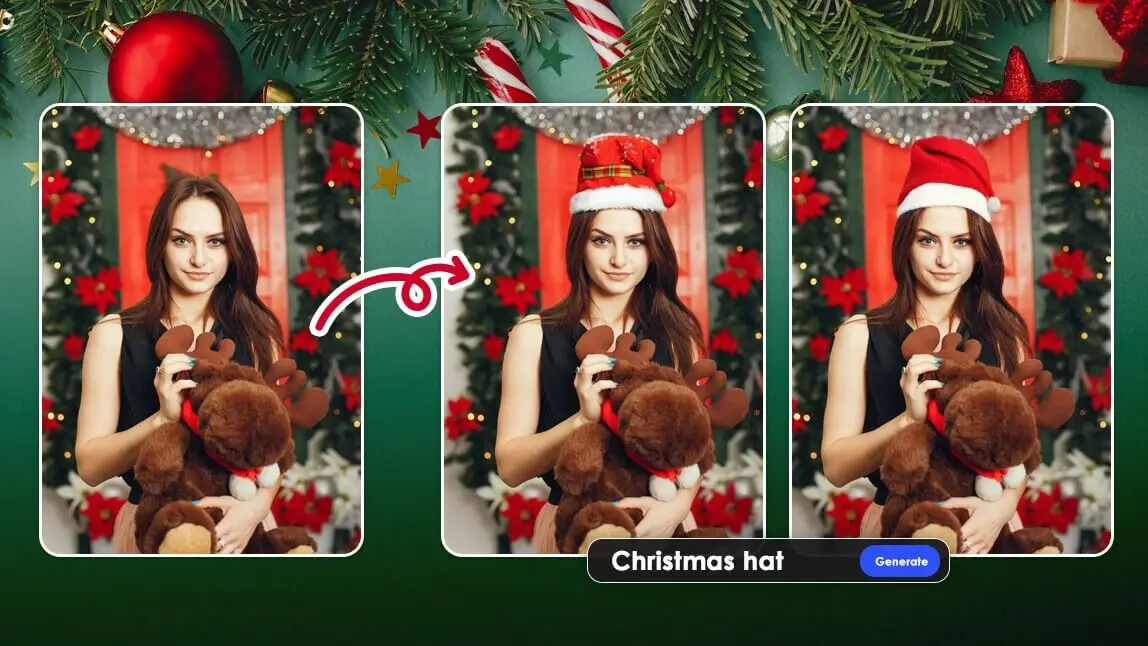
After brushing the area, add a text prompt such as “Christmas hat” or “Santa hat”.
The AI will analyze your photo and generate a hat that fits perfectly on the model.
Step 3. Save Your Photo with the Christmas/Santa Hat
Once the AI has added the hat, review the result to ensure it looks just right.
If you’re satisfied with the outcome, save your photo to your device.
Now you have a festive photo ready to share with friends and family!
What’s New for Christmas 2025
This holiday season, things are stepping up: you’ll find more users updating their profile pictures, group photos and social-media reels with festive touches — and adding a Santa or Christmas hat is just the start.
In 2025, we’re seeing more trends like rose-gold or jewel-tone Santa hats, eco-friendly natural backgrounds, and vertical formats made for TikTok & Instagram Stories.
Want everyone in your group photo wearing a hat? Want a unique colour hat? YouCam does it all for you!
Get ready to share your holiday photos in style — fresh for 2025!
Add Christmas & Santa Hat to Your Photos Online for Free With AI
Here’s the app I tried for adding a Christmas hat to my photos: YouCam Enhance.
I used its “AI Replace” feature to generate different types of Christmas hats and found the results to be very realistic.
I didn’t have to do any post-editing; it looks just like the person was already wearing a Santa hat before the photoshoot.
To easily add a Christmas hat to a photo, simply brush over the head area and add the text prompt “Christmas hat” or “Santa hat”. The AI will analyze your photo and generate a hat that fits the model perfectly.
One-Tap Add Multiple Santa Hat to Your Photos Naturally

You don’t have to add Santa hats to photos one by one.
With YouCam Enhance, you can brush all the people in the photo and use the app to add Santa hats to multiple people at once.
This saves you a lot of time and ensures that everyone in your group photo gets a festive hat effortlessly.
Easily Edit Your Christmas PFP With AI
With this AI tool, you can do much more than just add a Christmas hat to your profile pictures.
Whether you want to include a Santa outfit, a festive candy cane, or any other holiday accessory, AI Replace ensures that all elements are perfectly generated and seamlessly fit your photos.
This makes it incredibly easy to create fun and festive Christmas PFPs that stand out.
Read more: Santa Claus Photo Editing: Turn Yourself Into Santa Claus With AI
Add Vivid Santa Claus to Your Photos

Ever wanted to surprise your kids with a photo of Santa in your house?
Using YouCam Enhance's AI Replace feature to add a vivid Santa Claus to your holiday pictures is a fantastic way to do it!
It's much more effective than simply adding a fake-looking Santa sticker, making the photos look incredibly realistic and magical. Highly recommend trying it out for some festive fun!
Start Adding Santa & Christmas Hat to Photo With the Best Tools in 2025
With the advance of AI technology, there are now many convenient and vivid ways to add Christmas to your photos, making the Christmas photo editing process both fun and effortless.
Whether you prefer detailed customization or quick edits, these tools offer a variety of features to suit your needs.
Start exploring these apps today and bring some festive cheer to your holiday photos!
More Christmas & Santa Photo Editing Tips
- Best Free Online AI Christmas Photo Editor & Maker in 2025
- Free Christmas Photo Frames & Borders | Christmas Frame App
- Best Christmas Photo App to Add Christmas Effects to Photos