


 Author:


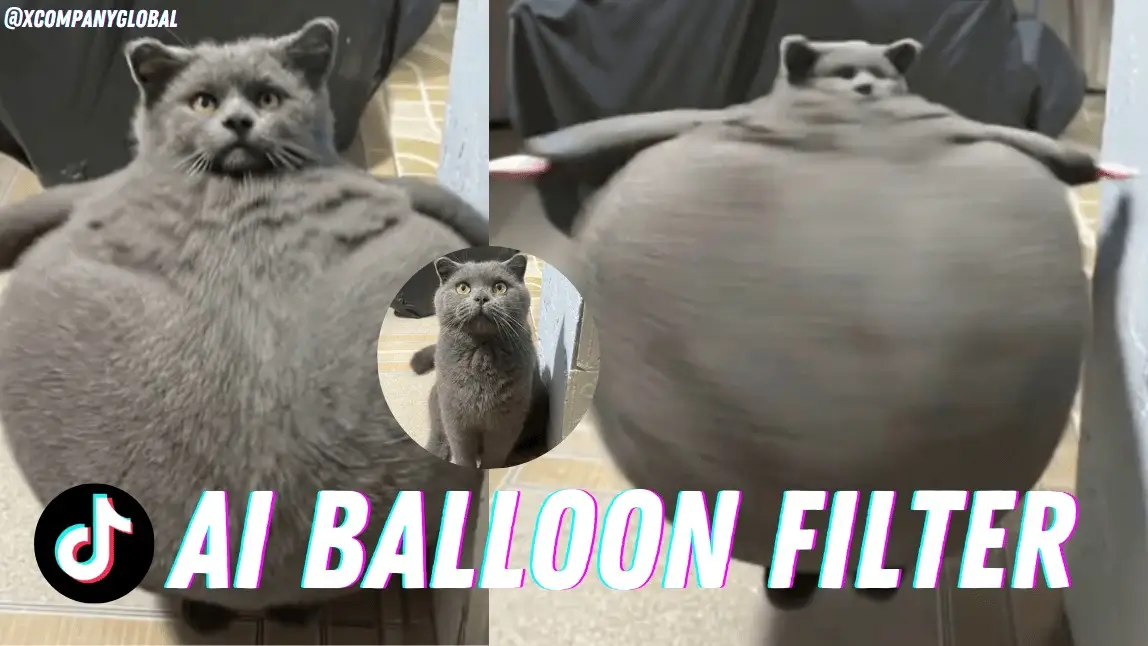
TikTok has a new viral trend, and it’s hilarious—the Balloon Filter!
This effect makes your whole body puff up like a balloon and float away, giving off total “I’m outta here” vibes.
People are using it to act out funny situations, and honestly, it’s one of the most entertaining filters we’ve seen in a while!
What Is the Balloon Filter on TikTok?
Basically, this filter makes it look like your body is inflating like a balloon until you start floating up into the sky.
TikTokers are getting super creative with it—pretending to float away after getting bad news, acting like they’ve been filled with helium, or just randomly taking off mid-conversation.
It’s goofy, it’s fun, and it’s all over everyone’s For You Page!
Why Is the Balloon Filter So Popular?
 Apply Balloon Filter

It’s super simple, totally ridiculous, and guaranteed to get a laugh.
Trends like this go viral because they’re easy to do and fun to watch—plus, there’s endless ways to make it your own.
People are even getting their pets involved!
How to Apply AI Balloon Effect

Create balloon filter videos is super easy with YouCam Video.
(Available for iOS and Android users.)
Just follow these steps:
- Open YouCam Video
- Tap 'Image to Video' in the menu
- Upload a Photo
- Choose the temp;ate 'Inflate'
- Tap 'Generate' and wait for the result
- Save the Video
How to Use the Balloon Filter on TikTok
Want to try it out for yourself?
Here’s how you can join the trend:
Step 1: Download CapCut
Step 2: Find the Balloon Filter Video
On TikTok, search for 'Balloon Filter' and locate a video that uses the effect.
Step 3: Access the Balloon Filter
Tap on 'CapCut ∙ Try this AI template' above the creator's username, then select 'Use template in CapCut.'
Step 4: Create Your Video
Upload your chosen image or video, preview the effect, and export the final result.
You can also check out this video tutorial for a step-by-step guide.
Make Your Balloon Videos Even Cooler
TikTok’s built-in filter is fun, but if you wanna level up your videos, YouCam Video is where it’s at!
This easy-to-use video editing app lets you add even crazier effects, customize your background, and make your content stand out from the crowd.
Why You’ll Love YouCam Video:
- Add extra effects to make your balloon moment even funnier
- Change backgrounds so it actually looks like you’re floating away
- Use fun filters & stickers to make your video pop (literally)
Ready to make your Balloon Filter video go viral? Download YouCam Video and start creating now!

More TikTok Trend Filters You Need to Try

- Microwave Filter: Give your video a spinning, inside-a-microwave effect for a quirky and fun twist.
- AI Kiss: A romantic filter that creates the illusion of an AI-generated kiss.
- AI Hug: A heartwarming filter that makes it look like you're getting a cozy, virtual hug.
- AI Dance: Watch as AI makes your character bust out impressive dance moves, no choreography needed!
- Make Photo Talk: Transform a still photo into a moving, talking animation with AI magic!
- Make Pet Sing and Dance: Hilariously animates your furry friends.
These AI filters are making it easier than ever to add personality, humor, and creativity to your TikTok videos.
Want to make your content stand out even more? Try YouCam Video to customize effects, backgrounds, and add a professional touch to your viral videos!


