


 Author:


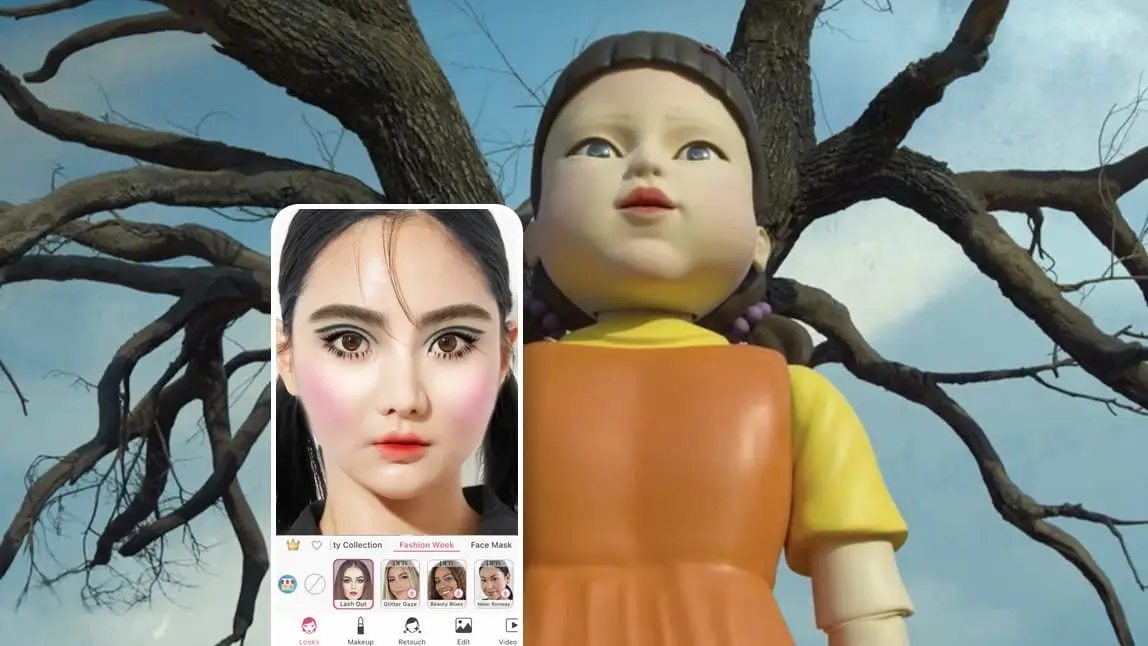
Squid Game is one of Netflix's most successful series, and its third and final season premiered in June 2025. Still missing the games? Why not try a Squid Game-inspired makeup look for Halloween? This guide has been updated for Halloween 2026.
🧪 How I tested this: I re-ran every step of this Young-Hee doll edit in YouCam Makeup for Halloween 2026 on my own front-facing selfies. I tried it on a photo with my hair pulled back in low ponytails and on one with my hair down, and the ponytail photo sold the doll effect far better. The lip reshape and cheek tools did most of the heavy lifting; the makeup filter alone looked more like a cute doll than the eerie Squid Game one. My notes under the steps below cover where I would push the sliders and where I would hold back.
What Will Squid Game Season 2 Be About?
Three years after winning Squid Game, Player 456 abandons his plans to go to the States and returns with a new resolve. Gi-hun dives back into the enigmatic survival game, starting another high-stakes competition with new participants vying for the 45.6 billion won prize.
As the first episode of 'Squid Game: The Challenge' revisits the iconic 'Red Light, Green Light' game, fans can relive the excitement by transforming their photos into the famous 'Squid Game doll' while eagerly anticipating this memorable competition. Keep reading to learn how!
| Table of Contents |
|---|
Update: Season 2 premiered on Netflix on December 26, 2024, and the third and final season premiered on June 27, 2025, bringing Gi-hun's story to a close.
How to Edit ‘Squid Game’ Doll Face on Photos
- Step 1. Download the Best Squid Game Photo Editor
- Step 2. Apply Doll Makeup Filter
- Step 3. Adjust Lip Size
- Step 4. Plump the Cheeks
- Step 5. Add Orange Ombre Lip Color
- Step 6. Change Hair Color to Black
- Step 7. Save the Photo

The Squid Game doll refers to the 4-meter-tall robot that appeared in season 1 episode 1, 'Red Light, Green Light'.
The doll, named Young-Hee, originates from a South Korean textbook and is famous for its orange-yellow outfit, ponytail hairstyle, baby-like plump cheek, and dolly lips - though not as innocent as it appears.

Read on to discover how to edit your faces like this iconic doll robot with free makeup filters and face shaping tools for some Squid Game fun!
Download the Best Squid Game Photo Editor

To begin, start by downloading the YouCam Makeup app. It is a free selfie editing app that offers the best makeup filter collection and powerful face editing tools.
Apply Doll Makeup Filter

Next, tap Photo Makeup and choose a photo to edit.
To replicate this particular look the best, choose a front-facing image of yourself with low ponytails, similar to the show to make the end result even better. (Don't worry if you don't have dark black hair, we will get into that later.)
Then, scroll to Looks, and apply a doll makeup look by selecting the 'Lash Out' makeup filter from the Fashion Week category. In doing so, you’ll see a modern take on Twiggy’s iconic doe-eyed lashes that are equally as eye-catching.
🧪 My test notes: The Lash Out look gave me the wide-eyed lashes right away, but on its own it read as glam rather than creepy. It only started to look like Young-Hee once I finished the lip and cheek steps, so do not judge the result at this stage.
Adjust Lip Size

Next, we will adjust the peak and shape of your lips. To do that, tap Retouch and scroll until you see Lip Reshape. With this feature, you’ll want to use the sliders to increase your lip peak to 100, and your lip width to -100.
🧪 My test notes: Pushing the lip sliders all the way looked striking on a straight-on photo but slightly odd on a tilted one. If your head is angled, I would ease off a little so the mouth still looks like it belongs to your face.
Plump the Cheeks and Add Blush

Next, we’ll adjust the cheeks. Tap Cheek under the Face Reshape tab, and use the app's unique cheek filling feature to get plumped cheeks similar to the Squid Game doll. Then, to add some color, select Makeup, and Blush, then add a bright pink color to the highest possible level.
🧪 My test notes: Full-intensity pink blush looked right for the doll, but in warm indoor light it leaned more orange than pink. A photo taken in daylight kept the blush closer to the bright pink of the character.
Add Orange Ombre Lip Color

To achieve the innocent dolly look, let’s give your photo the quintessential orange lip. Under Lip, select a matte orange/red ombre hue. The ombre lip style is also one of the classic elements of Korean makeup.
Change Hair Color to Black

Lastly, let’s get you that dark hair. Tap Hair Color and choose a dark gray hue. There were 150+ hair color filters to choose from in the YouCam Makeup app, so take your time exploring.
🧪 My test notes: The dark hair color blended most naturally on a photo where my hair was smooth and pulled back. Flyaways and loose strands were where the preview looked least realistic, so I would smooth your hair before taking the photo.
Save the Photo
Then Voila! You have your Squid Game doll robot look!
Best Squid Game Filters to Try With a Free App
Aside from the 'Red Light, Green Light' doll robot, the YouCam Makeup app also has two free face filters that are inspired by the famous TV show.
Player 067 Filter

When it comes to Squid Game, the North Korea escape player 067 is definitely a highlight of the show. Played by HoYeon Jung, the charm of this seemly distancing character has swooned over the audiences.

To get this filter, open the free YouCam Makeup app, and scroll to Looks. Find the Player 067 look under the Daily category, and snap a photo to get the Squid Game vibe in a way tap!
Dalgona Candy Filter

Another Squid Game filter you can try for free is the Dalgona look, inspired by the Game Room background for the Squid Game Dalgona Candy scene.

To try this colorful face paint look, open the free YouCam Makeup app, then scroll to Looks, then Daily, to try on the Dalgona look yourself!
🧪 My test notes: If you are short on time, these one-tap looks are the way to go. I found the Dalgona look more fun for a playful group photo, while the full doll edit made the better standalone profile picture.
Download YouCam Makeup: Best Squid Game Photo Filter App

Have fun starting your Squid Game makeup edits now by downloading the safe and easy-to-use app.
Get the YouCam Makeup app for either iOS or Android app right now!
More Editing Ideas
- 5 Korean Makeup Looks to Look Like a K-Pop Star
- Best AI Anime Filter App: How to Create Anime Photos
- Best Squid Game Filter App: Try 3 Squid Game Looks for Free
Start Your Squid Game Edit Now

Want to know more about the latest beauty trends? Subscribe to the YouCam Makeup YouTube channel and follow us on Instagram for the hottest beauty, makeup, and skincare trends.
Squid Game Looks Compared: Which Option Is Best?
Here is how the different ways to get a Squid Game look compare, based on my testing.
| Option | Best For | My Verdict |
|---|---|---|
| Full Young-Hee doll edit (filter + reshape + hair) | A standout Halloween profile picture | Most recognizable result; worth the few extra minutes |
| Player 067 look | Fans who want a character look in one tap | Quick and easy, and more wearable than the doll edit |
| Dalgona Candy look | Playful, colorful group or story posts | Fun rather than eerie; great for casual posts |
| Real doll makeup (DIY) | Costume parties and in-person events | Use the app edit first as a preview of blush and lip placement |
Verdict: For Halloween photos, the full doll edit gives the most recognizable Squid Game result. If you are doing real makeup for a party, recreate the look in the app first so you know exactly where the blush and lip shape should go.
What Real Users Say
Here is what YouCam Makeup users have shared in recent Google Play reviews.
"the hairstyles look fairly natural for being AI. it's about 50/50 on what you can and can't use for free." — Sierra Keller, ★★★★★ (Google Play review)
"I like the app for hair styles, however you can only choose from 3 short hair styles, You have to subscribe if you choose a long or pretty one." — D Armyjo, ★★★★☆ (Google Play review)
Pro Tips for Better Results
- Use a straight-on selfie: Reshape tools look most natural when your face is centered and level, which also matches the doll's symmetrical look.
- Style your hair first: Low ponytails and smoothed-down hair give the hair color tool a cleaner edge to work with.
- Shoot in daylight: Soft window light keeps the pink blush and orange lip true to the character instead of shifting warm.
- Work in order: Reshape lips and cheeks before adding color, so blush and lipstick follow the new shape.
- Keep a neutral expression: A blank, wide-eyed stare sells the eerie doll effect much better than a big smile.
- Pair with the costume: An orange pinafore-style top or yellow collar in the photo makes the character instantly recognizable.
Looking for more spooky ideas? Try these cute Halloween makeup looks or browse trending Halloween filters and effects.
Squid Game FAQ


