


 Author:


I believe Disney is a part of childhood for a major part of people. Among various cartoons, Disney characters always come to mind when we talk about our favarite characters, since it has a special style and features that stand out from others.
But do you ever think of a question: What would I look like as a Disney character? If you noticed the Disney filter TikTok trend recently, you may want to know how to turn yourself into a Disney character or a cartoon character without Photoshop or any other professional skills!
Using a photo editing app you can easily add a disney filter to your photo.

And with the right video editing app you can even animate that photo!
Keep reading to learn how!
| About Disney Filter |
|---|
What is a Disney Filter?
The Disney Filter is trending again on TikTok these days, many couples and families use this filter to turn themselves into classic Disney characters. The big eyes, smooth facial features, and bright smile make people in photos look as cute as Rapunzel from Tangled or as charismatic as Elsa from Frozen.

Disney Filter on TikTok
My Disney Twin Filter on TikTok
This filter shows your Disney character lookalike! Join this trend on TikTok and find your Disney twin, is it Moana, Rapunzel, or Fiona?

My Disney Twin Filter on TikTok
Try the best Disney Lookalike Generator, YouCam Perfect, and have fun trying different cartoon filters!
What Would I Look Like as a Disney Character?
YouCam Perfect is a Disney filter app that can help you get a cartoonized selfie easily within a few clicks. And not only are there Disney filters, there are also a variety of cartoon styles for you to try on and experience! Now, let’s dive in!

After downloading YouCam Perfect on App Store or Google Play, go to Photo Edit and upload the picture of you that you would like to convert into Disney style.

Then, find AI Selfie in the tool bar and click the Portrait category. The next step is to find the Disney filter -- the Toon Style in the cartoon filters and apply it just by a few taps!
Finally, you can see yourself as a Disney character in seconds!

Image-to-Video Magic: Create Your Own Disney Style Video
Once you got your Disney style photo you can take it a step further by turning that photo into a video!
Simply use the image-to-video feature (currently available for iOS only) in YouCam Video and choose one of the many AI filters to make your photo move.
If you want to know more about this feature, we have listed all the steps for animating your photo. Try it now!
Best Disney Filters: What Would I Look Like as a Cartoon Character
But first, let's check out all the amazing Disney style photo filters in YouCam Perfect.
You can find more than 10 cartoon styles for you to try with your photo. Let’ s see which cartoon filter meets your satisfaction!

Fun Sketch Filter
Fun Sketch Filter is one of the latest filters in YouCam Perfect. This filter gives your photo a comic book feel, making you look like a main character in a fun sketch!

Manga Filter
“Manga” means comics in Japanese, and this filter transforms your photo into a classic Japanese comic style.

Read more: Best Free App That Brings Pictures to Life: Animate Photos
Comic Filter
You can also turn your photos into comic book style and create comic strips with your unique color!

Read more: Comic Book Filter: How to Turn Photo into Comic Book Art
These are some of the recommending cartoon filters to find out what you would look like as a cartoon character. However, there are more filters waiting to be discovered! Try YouCam Perfect now and cartoonize yourself!
Is There Any Disney Lookalike Filter I Can Try?
Yes, there is! If you are looking for a Disney Lookalike Filter, you can go to TikTok and search for keywords like "Disney lookalike filter" or "what Disney character do I look like".
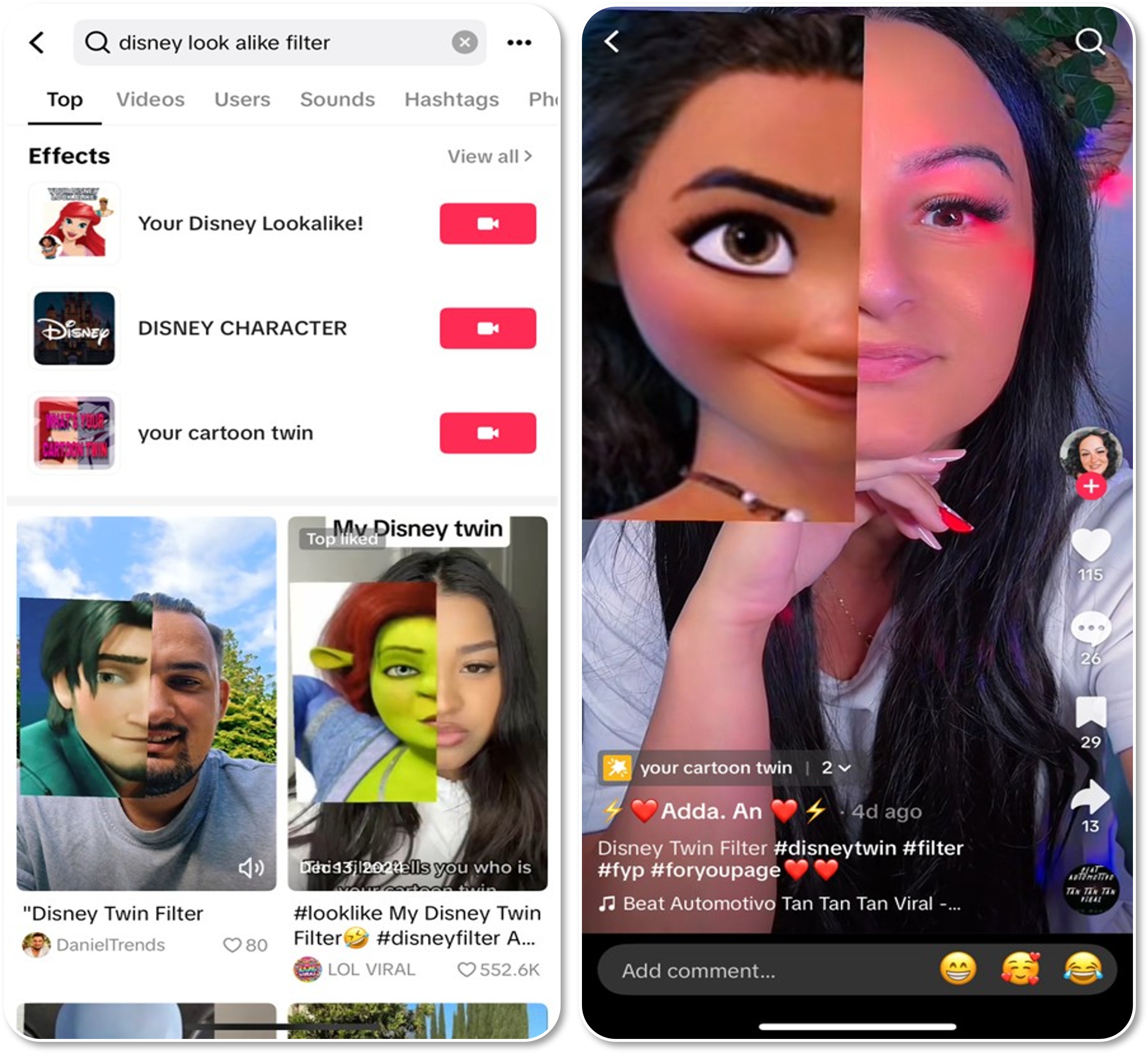
You can find filters like "your cartoon twin" filter and it will automatically pick a character that resembles your look!
Reasons to Try the Best Disney Filter App
YouCam Perfect not only has Disney filters and cartoon filters, it is also an all-in-one photo editor. It provides several features that is beneficial for photo editing, and let me show you what they can do.
1. Generate AI Paintings
The biggest difference between YouCam Perfect and other photo editing apps is that it supports everything with AI. Using the AI Selfie feature, we can turn ourselves into paintings while preserving the essence of different painting styles.

2. Turn Yourself into AI Portrait
Besides turning photos into paintings, YouCam Perfect can also help generate AI Portraits. With the AI Studio feature, you can easily visualize yourself as a cover model in magazines and find out how you would look like as a character in hit TV series after uploading one picture of you!

3. Create AI Avatars
YouCam Perfect also provides a feature, Artistic Avatar, that creates avatars of you. You can see yourself as different characters and outfits simply by uploading a photo of yourself!

Read more: Superhero Maker: How to Turn Yourself into Superhero


