Author:


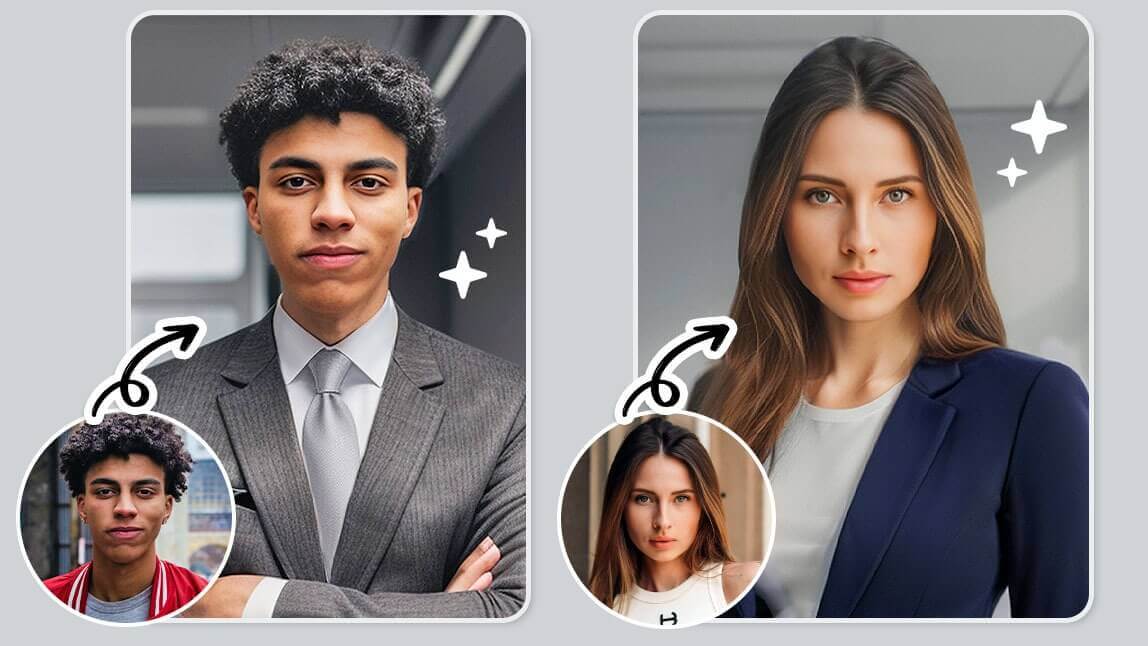
In the digital age, personalizing and enhancing photos has never been easier. Whether you're prepping for a virtual event, updating your LinkedIn profile, or simply having fun with your images, the YouCam Perfect app is here to help you add suit to your picture.

▲ Put a suit on my photo👔✨
One of its standout features is the ability to add a suit or blazer to your photo using AI technology. In this article, we'll walk you through the steps to seamlessly transform your casual snapshots into professional, polished images—all within minutes!
Why Add a Suit or Blazer to Your Photos?
 Before diving into the how-to, let's explore why you might want to add a suit or blazer to your photos:
- Professionalism: A suit instantly elevates your image, making it ideal for professional profiles, resumes, and business presentations.
- Convenience: No need to get dressed up just for a quick photo. You can appear well-dressed with just a few taps on your phone.
- Creativity: Experiment with different styles and colors to find the look that best represents you without purchasing multiple outfits.
- Cost-Effectiveness: Investing in multiple suits can be expensive, not to mention the hassle of having them cleaned and pressed. With YouCam Perfect, you can experiment with different styles, colors, and fits without spending a dime on new clothing.
- Creative Expression: Beyond professionalism, the ability to switch between different styles can be a fun way to express your personal brand. Whether you’re aiming for a sleek modern look or something more classic, YouCam Perfect gives you the freedom to experiment with your appearance.
Step-by-Step Guide: Add Suit to My Photo Using a Suit Filter
Here’s how you can effortlessly add a suit or blazer to your photo using the AI Suit feature in YouCam Perfect:

Step 1. Download and Install YouCam Perfect
First, head to the App Store (for iOS) or Google Play Store (for Android) and download the YouCam Perfect app. Once downloaded, open the app and sign up or log in if you already have an account.
Step 2. Navigate to the AI Suit Feature
For quick access, click “AI Tools” on the main page and navigate to Portrait Avatar.

Step 3. Select Your Desired Suit or Blazer
Browse through the available options. You can find different styles, colors, and fits. For both genders, there are Coffee Connection, Corporate Coffee Hour, and Metropolis styles. Men also have a couple fancier suit options, such as Class Act and Debonair.

Tap on your preferred suit or blazer styles to see how they look on you. The app’s AI technology will automatically generate the final images based on only ONE photo!
Step 4. Enhance AI Suit Photo with Additional Edits
 YouCam Perfect isn’t just about adding suits—you can also enhance your photo further by changing the background, applying filters, or using beauty tools to touch up your appearance.
For example, you might want to change the background to an office setting or add a subtle filter to complement your new outfit.
Step 5. Save and Share Your AI Suit Look
 Once you're happy with the results, save the final portrait avatars to your device. Share your polished, professional look directly to social media, or use it for your business profile, online portfolio, or wherever you need to make a great impression.
💡Bonus Tip: How to Put Me in a Suit using AI?
#1 Face Swap - Insert Your Face in Any Suit Picture
If you want to be in a particular suit you found online, then we have another option for you. That is -- the "Face Swap" tool in YouCam Perfect.
 Through "AI Face Swap", you can find the perfect suit picture online and then replace your face with the person in the base picture.
Here's how to do it:
- Find the "Face Swap" feature in AI Tools
- Choose the suit photo you like with the model
- The app will automatically detect the face in the photo
- Click on the button "Add Face" and choose your own selfie
- Then your face will be inserted to the base photo with a natural result
#2 AI Headshot Filter - More Formal Looks
For people who are looking for more formal attires, AI Headshot Filter is another go-to solution. Here you can find the classic black suit and tie style, black button-down, or white polo.

✨ How to Find it: AI Tools > AI Headshot > Choose 1-5 styles > Upload your selfie > Generate results

It only takes one selfie to achieve your formal look! Make sure to choose a selfie that shows your full face to help the AI generate a higher quality image.
👨🏻💼Add Suit or Blazer to Your Photo Online for Free!
With YouCam Perfect's AI Suit feature, you can easily add a suit or blazer to your photo in just a few clicks. If you're looking for a free online tool to do this, check out the YouCam Online Editor.

Whether you're aiming for a professional look or just having fun experimenting with different styles, this AI Headshot Generator Online gives you the power to transform any casual photo into something special.

You can also take your professional look to the next level with face retouching, instantly changing hairstyles with AI Hairstyle, or even whitening your teeth for a bright, confident smile. So why wait? Download YouCam Perfect today and start creating your perfect look!