Author:


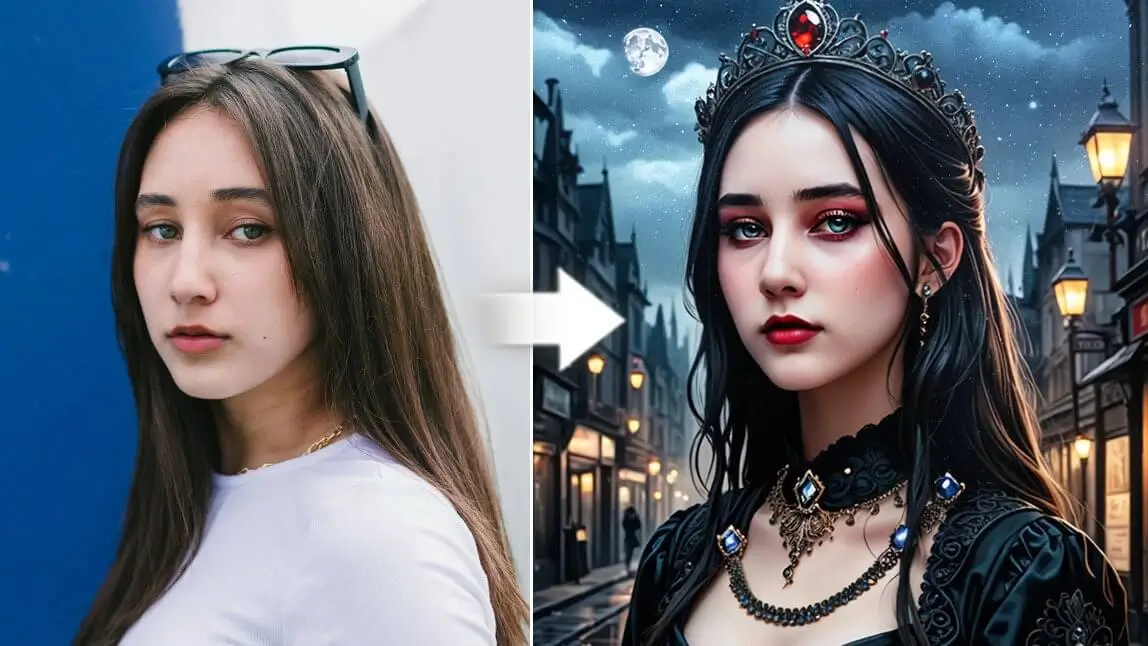
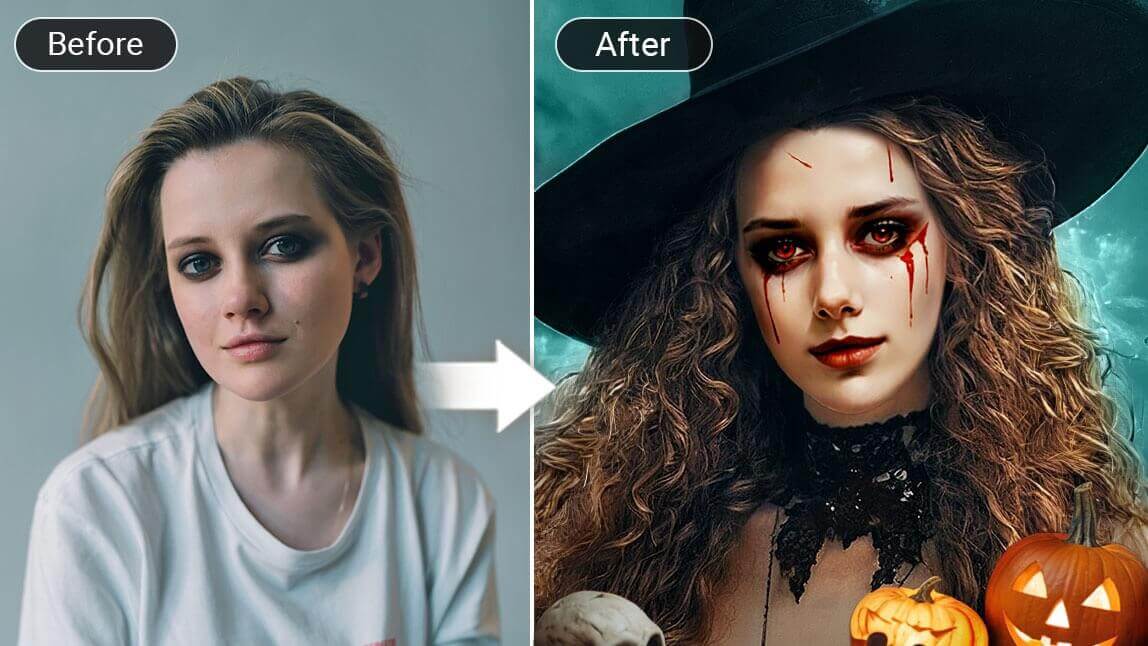
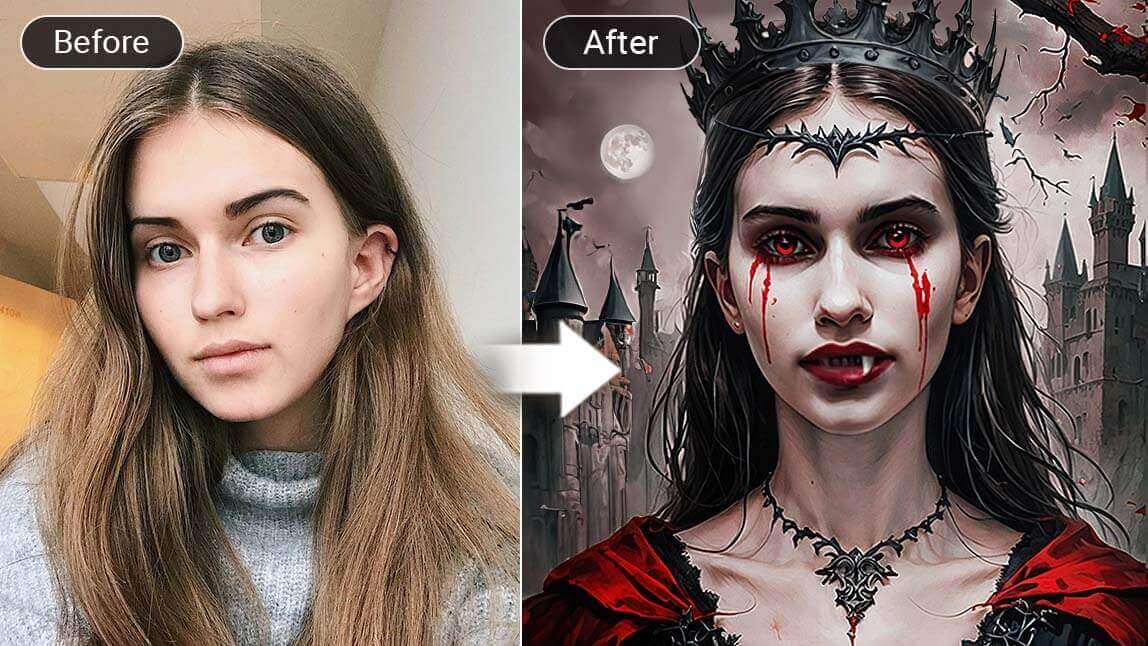
Interested in trying out the Gothic look on you? Besides actually experimenting the gothic makeups, here's another way you can see yourself in Gothic aesthetic.
That is through Goth AI, or a Goth Filter, which can easily turn your daily photo shot into Gothic style.
Wednesday Season II kept the goth look in the spotlight, and for Halloween 2026 the Goth Filter is still one of the easiest ways to try it — I've updated this guide with my own test notes.

Source: TUDUM by Netflix
Read on to see how to do it!
| About Goth Filter |
|---|
🧪 How I tested this: For this Halloween 2026 update, I ran my own everyday photos through YouCam Perfect's goth tools: the Gothic Style avatar, the goth outfits in AI Fashion, Face Swap, the Beautify makeup tools and AI Replace. I used a mix of selfies, a waist-up shot and a full-body photo, taken both in daylight by a window and indoors at night. The clearest difference came from the photo itself — a well-lit, front-facing shot kept me recognizable, while dim or heavily angled photos drifted further from my real face. Each tool also solves a different problem, so below I note which one I'd reach for and when.
What is Gothic Aesthetic?
If you’re wondering what defines a Gothic aesthetic, it’s helpful to look at its roots.
This style first emerged in the United Kingdom during the late 1970s and 1980s. Interestingly, the Gothic aesthetic was developed by fans of Gothic rock, a subgenre of post-punk music that explores themes of melancholy, darkness, and existentialism.
You can typically recognize a Gothic aesthetic by:
- Clothing: Dark or black outfits often featuring elements like lace, leather, and velvet.
- Makeup: Pale skin paired with dark eyeliner and lipstick in black or deep red shades.
- Art and Film: Influences from horror films and Victorian art, with common motifs seen in vampire movies (like Interview with the Vampire).
🧪 My test notes: Before editing, I jotted down which goth sub-style I wanted — romantic lace, Victorian or punk leather. Having that in mind made it much easier to pick between outfits and to write AI Replace prompts later, instead of scrolling aimlessly.
Addams Family Filter on TikTok

The Addams Family Filter on TikTok
The Addams Family has always been an icon for Halloween. There is a 'Addams Family Filter' on TikTok trending these days, which adds gothic looks to your photos.
Get the Gothic filter and see yourself turn into Mortricia Addams!
How to Try Gothic Filter on My Picture?

If you can't wait to discover your gothic looks, we have made a simple guide of how you can do this with one of the gothic photo editor apps -- YouCam Perfect.
Download YouCam Perfect

First, you can find YouCam Perfect in either App Store or Google Play.
It offers a series of Gothic styles you can try, such as Goth AI (that turns your selfie into Gothic style) to AI Fashion (that puts you in iconic Gothic costumes).
Apply Gothic Filter to Picture

To try Goth Filter on your pictures, follow these steps:
- Go to the YouCam Perfect homepage, and tap on "Artistic Avatar"
- Find the "Gothic Style" in the 'Hot' or 'Ghost' category
- Upload just ONE of your selfies to generate the looks
- A few minutes later, you will see all your gothic selfies in the Pack.
🧪 My test notes: The Gothic Style avatar looked most convincing on a straight-on selfie with soft window light. On a photo where my face was partly in shadow, the result looked more like a stylized character than me — still fun, just less recognizable. If your first result feels off, try a different photo before trying a different filter.
Save the Pictures
You can scroll and preview the generated gothic styles and decide which to save to your device.
Read more: Vampire Filter: How to Turn Yourself into a Vampire
Try the Gothic Outfit using Goth AI
Try the iconic Gothic outfits using another feature called "AI Fashion" in YouCam Perfect. It allows you to change your styles into dark and victorian clothings.

To try this feature, simply go to the "AI Fashion" > Feminine > Halloween. You will find two fashion styles, Doomed Diva and Gothic.

As you might have guessed by now, the Doomed Diva look refers to the popular Netflix TV series - Wednesday.
To try on these styles, just upload one of your pictures, and click on the "Create" button.
🧪 My test notes: AI Fashion needs more of your body in frame than the avatar does. My waist-up and full-body shots gave the goth outfits room to show lace and structure, while a tight selfie cropped most of the outfit away. A plain background also kept the new outfit from blending into the clutter behind me.
More Gothic Features You Should Know🖤
Face Swap with an Iconic Gothic Character
You can use "Face Swap" feature to swap faces with an Iconic Gothic character from a famous movie.

For instance, you can search for "Lydia Deetz" in YouCam Perfect's gallery, and upload your picture to replace her face with yours.
*Lydia Deetz is a famous character from Beetlejuice 1 & 2, who always wears a very Gothic outfit, with dark dress and a quirky hairstyle.

💀 Another attractive character from Beetlejuice 2. Beetlejuice's wife "Delores Beetlejuice".
🧪 My test notes: Face Swap was the most "costume party" of the tools — great for a laugh in the group chat. It worked best when my photo and the character image were at a similar angle; mismatched head tilts were where the blend looked least natural.
Try on Gothic Makeup
When we talk about Goth Aesthetics, one super important element is no doubt Gothic Makeup.

If you are not confident about trying the Goth Makeup on your face (or simply don't know how), why not use virtual makeup tools to recreate the looks?

In the "Beautify" section, you can find features like "Makeup" and "Skin Tone".
First, adjust your skin tone level to pale. And then play with black lip color, black eyeliner, and eyelash to recreate the gothic look you like.
Read more: Tan Filter: Get Tanned Skin Effects with a Free Tanning App
Use "AI Replace" to Add Gothic Elements
One of our favorite features called "AI Replace" is also worth trying! It provides a flexibility for you to add any kinds of Gothic elements you want to your photo.

This feature is powered by Generative AI. You can paint over the area you want to change, and then enter a prompt.
The Goth AI will generate the elements based on your prompts, so make sure you enter a clear instruction.
🧪 My test notes: AI Replace rewarded patience. Brushing a small area and asking for one thing — a black lace choker, a candelabra on a shelf — looked far more natural than painting a big region and asking for a whole gothic room at once.
Iconic Gothic Characters from the Movies
Besides Lydia Deetz and Delores Beetlejuice, here are more iconic Gothic characters for your reference:
Edward Scissorshands
Wednesday from the Addams Family

🧪 My test notes: If you're recreating Wednesday specifically, I found it helps to combine tools: a goth outfit from AI Fashion, then dark lips and pale skin tone from Beautify. The braids and blunt bangs are the signature details, so a photo with your hair pulled back gives the edit the cleanest starting point.
Corpse Bride

Goth Photo Tools Compared: Which Option Is Best?
Here is how the YouCam Perfect goth tools I tested stack up against each other and against doing a full goth look for real.
| Option | Best For | My Verdict |
|---|---|---|
| Artistic Avatar (Gothic Style) | A quick, shareable goth portrait of yourself | Fastest way to see yourself in a goth aesthetic; start here |
| AI Fashion (Halloween outfits) | Previewing a goth costume or outfit | Best for costume planning; use a waist-up or full-body photo |
| Face Swap | Becoming an iconic gothic character | The most fun for group chats; less about your own style |
| Beautify (Makeup and Skin Tone) | Subtle goth makeup on a real photo | Most natural-looking; ideal for a profile picture |
| AI Replace | Adding gothic props and details to a scene | Most creative control; works best on small areas |
| Real makeup and costume | Parties and in-person events | Nothing beats the real thing, but it takes time and money; preview with the app first |
Verdict: Use the Gothic Style avatar for an instant goth portrait and AI Fashion to plan your costume, then layer Beautify or AI Replace for finishing touches. If you are dressing up in person, preview your look in the app before you buy anything.
What Real Users Say
Here is how App Store reviewers describe their experience with YouCam Perfect.
"I have tried SO MANY photo editors, and a lot are identical to the next, just basically a database of filters. YouCam actually edits the PHOTO" — Islandgirl75, ★★★★★ (App Store review)
"It's very user-friendly, no it is not going to make you look like a movie star. But it will even your skin tone out, remove acne, you can make your eyes a different color but I think it looks a little flaky." — Stefanie0320, ★★★★☆ (App Store review)
Pro Tips for Better Results
- Face the light: Stand facing a window or a soft lamp so there are no harsh shadows across your face; the goth filter keeps your features more accurately.
- Frame for the tool: Use a close-up selfie for the Gothic Style avatar and makeup, but a waist-up or full-body shot for goth outfits.
- Clear the background: A plain wall makes outfits and AI Replace edits blend more cleanly than a busy room.
- Keep your original: Save each version separately so you can compare looks or restart from the unedited photo.
- Describe one detail at a time: In AI Replace, specific prompts like "black lace veil" or "wrought-iron candelabra" beat vague ones like "make it gothic."
- Crop for where you post: Crop to a vertical frame for Stories and Reels, and check that your face is not cut off in the profile-picture circle.
New for Halloween 2026: Practical Magic–Style Romantic Goth
Practical Magic 2 arrived in September 2026, and its press tour put moody, lace-layered witchy style back in the conversation — Marie Claire highlighted Joey King's sheer, lace-trimmed looks for the promotional campaign. For a softer, romantic take on goth this Halloween, try adding lace, candles or dried flowers to your photo with AI Replace, or pick a flowing dark outfit in AI Fashion. (Source: Marie Claire, August 26, 2026)
Want to go further with the look? Try our goth makeup filter ideas for dark lips and dramatic liner, or turn yourself into a vampire for a spookier twist.
About the Editors

The PERFECT Corp. Editorial Team
We are a team of experts on photo and video editing apps. Our goal is to deliver engaging content on everything from stunning selfie edits to eye-catching video effects. We cover the latest trends and share niche tips to help you master digital creation.