 Author:


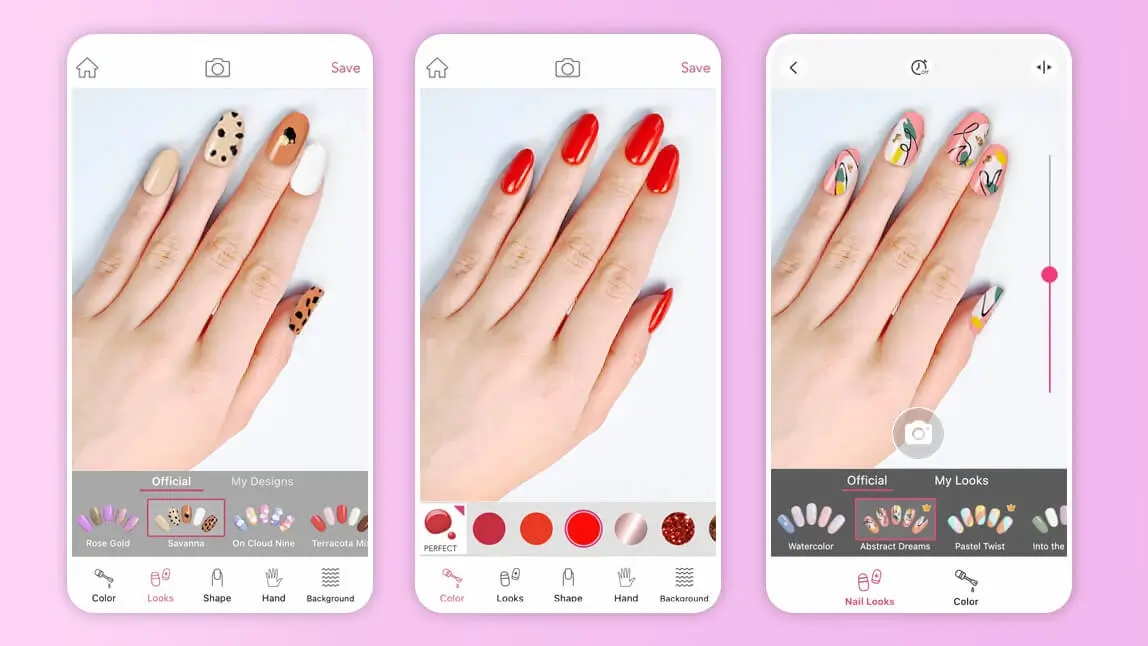
Sometimes it can be tough to nail down the perfect nail color or nail art design. That's why I now use the new AI Nails feature in YouCam Makeup — this guide is fully updated for 2026. With just a few taps, you can try on 100+ AI nail designs, from clean nudes to cat-eye and French sets, on a photo of your own hand. Whether you want a fun French manicure, bright ombre, or bedazzled tips, YouCam Makeup's AI Nails feature lets you get creative and experiment with different looks before you book — no salon visit needed to preview!
🧪 How I tested this: I used to send people to a separate nail app, but after YouCam Makeup added AI Nails, I re-tested the whole flow on my own hand and rewrote this guide around it. I tried it with a close-up taken by a window, a quick snap under indoor lighting, and an older camera-roll photo where my hand wasn't the main subject. I compared minimal nudes, French tips, cat-eye, and darker fall designs to see which looked believable and which read as obviously edited. My notes below are what I'd tell a friend before they book their next manicure.
YouCam Makeup (AI Nail): The Free Virtual Nail Try-On App
Nail apps are apps that allow you to try on nail colors on your hands taken with a camera or to design your nails. In this article, I'll walk you through YouCam Makeup, and its new AI Nails feature, which maps a complete nail design onto a photo of your own hand so you can preview a manicure before you commit.
- Try Nail Designs on a Photo of Your Own Hand
- 100+ AI Nail Designs in 9+ Style Categories
- Save and Share Your Favorite Nail Looks
YouCam Makeup's AI Nails gives you a realistic virtual manicure with a wide range of preset designs to choose from. Instead of painting each nail by hand, you pick a finished design — from minimal nudes and French tips to cat-eye and dark, moody sets — and the AI maps it onto your nails. All you have to do is snap or upload a photo of your hand, choose a design, and let the AI process it.
Keep reading for the key benefits of AI Nails in YouCam Makeup.
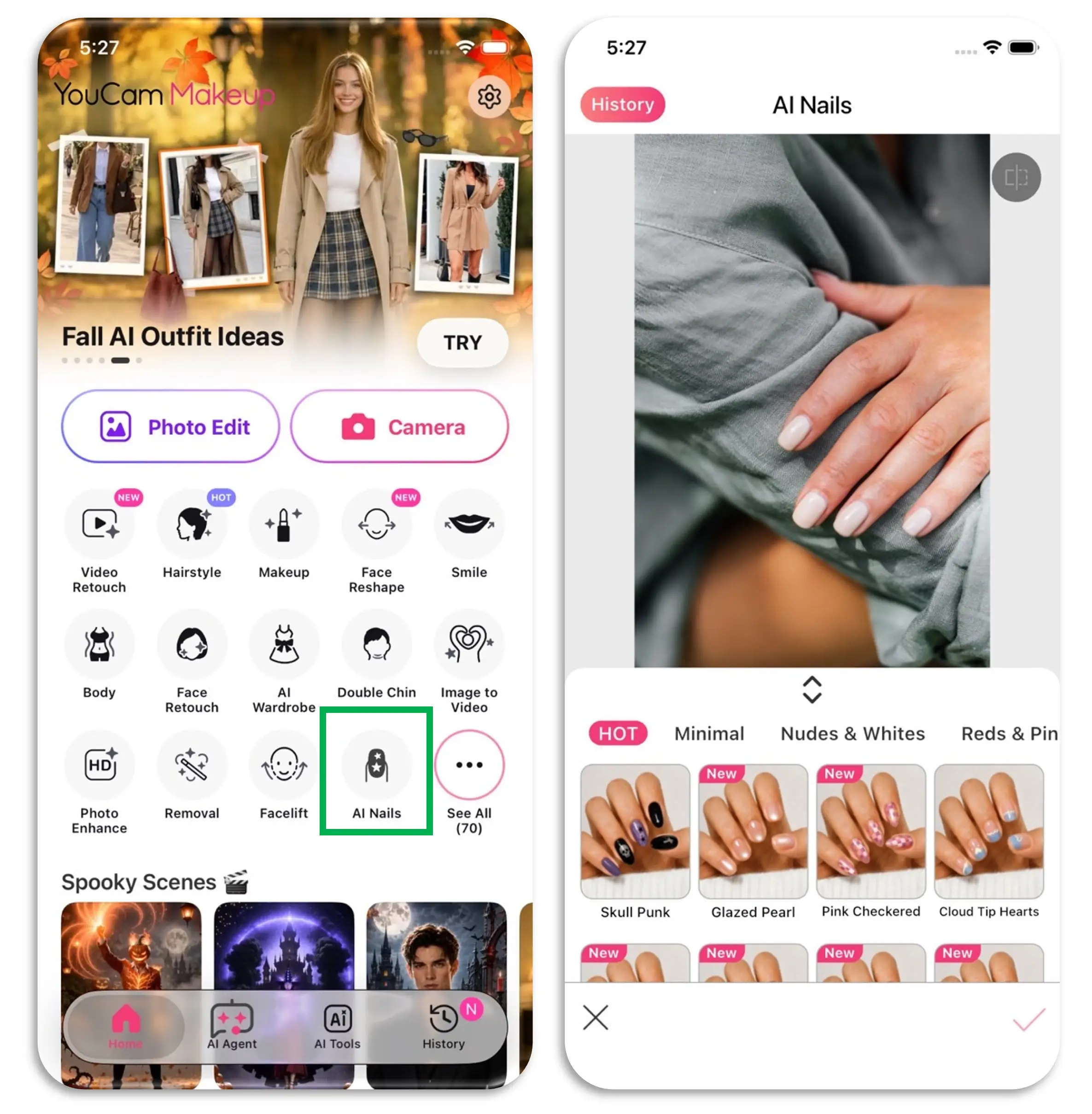
AI Nails is the newest try-on tool inside YouCam Makeup. Open the app, tap AI Nails (you'll also find it in the Fashion category of the tool launcher), then snap or upload a photo of your hand. Pick a design and the AI maps it onto your nails, so you can see a full manicure on your own hand before you book it.
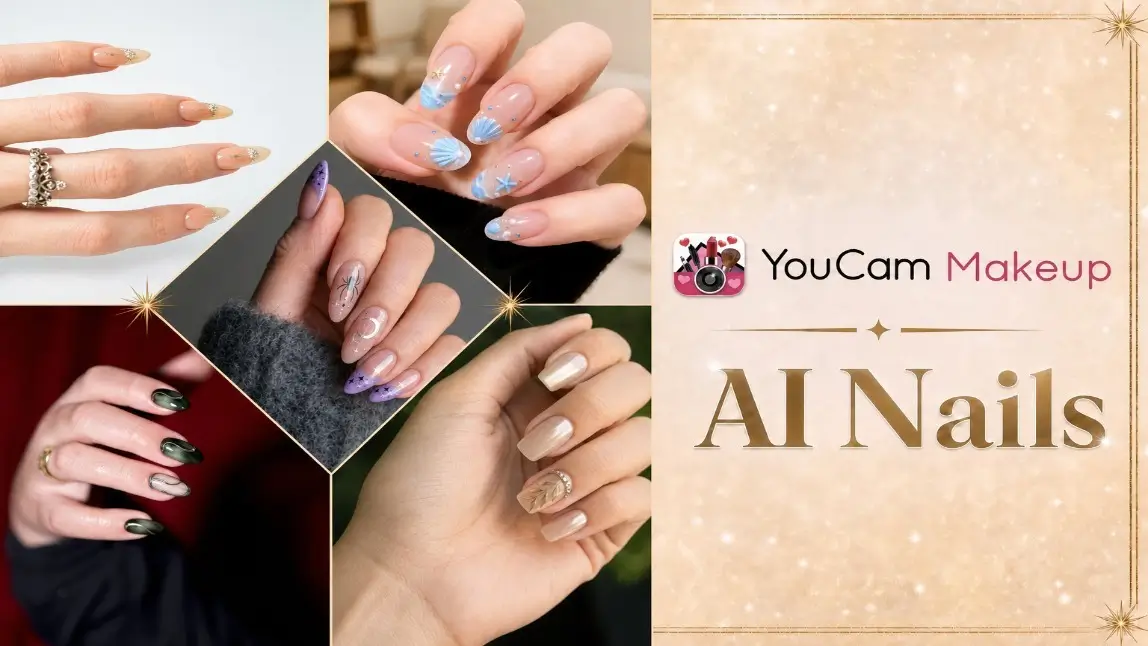
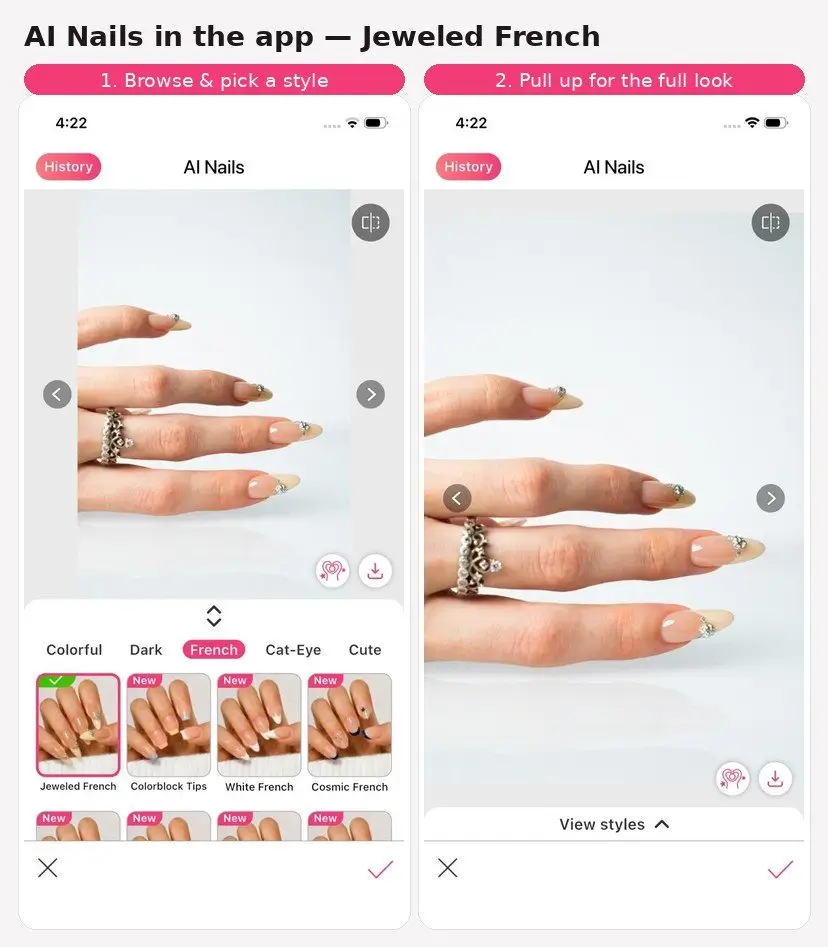
🧪 My test notes: The biggest difference from older nail apps is that I didn't have to paint each nail. I picked a finished design and got a complete look, which made it much faster to compare very different styles. Soft daylight results looked the most like a real salon manicure; a dim indoor photo still worked, but the finish looked flatter.
Try Nail Designs on a Photo of Your Own Hand
The great thing about AI Nails is that you try designs on your own hand, not on a stock model. Simply take a photo of your hand or upload one from your camera roll and try out nail designs on the spot. It is also useful to check nail polish colors & designs that look good with clothes and pants like this.
*AI Nails works from photos (snap or upload) rather than a live camera, and it is built for real-world shots — even photos with more than one person's hands, or where your face isn't in frame.
🧪 My test notes: A relaxed hand with fingers slightly apart gave me cleaner edges than a tight fist or a heavily angled pose. I also liked that a casual photo that wasn't staged as a nail close-up still worked, so I could reuse pictures I already had.
100+ AI Nail Designs Across 9+ Style Categories
AI Nails has 100+ preset nail designs to get creative with, organized into categories like Minimal, Nudes & Whites, Reds & Pinks, Colorful, Dark, French, Cat-Eye, Cute, and Sweet — plus limited-time themes such as Halloween. Many styles are free to try; premium styles for YouCam Makeup Plus and Pro members are clearly marked, and some include a limited number of free tries each day. Each design is a complete nail look, so you get a full nail makeover in one go instead of building it nail by nail.
You'll find everything from clean everyday manicures to cute motifs and bold seasonal sets. It's now the nail try-on tool I reach for first.
From the very popular pink nude color to unique colors, you can choose according to your mood. Try a few designs in the same color family — a French tip and a cat-eye look can feel completely different on the same hand. Comparing them side by side is the fastest way to narrow down your next manicure.
🧪 My test notes: The Nudes & Whites and French categories looked the most convincing on my skin tone — they read like something I could actually walk out of a salon with. Cat-eye and dark designs were the most fun to preview, but I'd use them to decide on a vibe rather than an exact shade, because real polish can look a little different in person.
Save and Share Your Favorite Nail Looks
Once the AI finishes, compare the result with your original photo, then download the look you like to share with friends or show your nail tech. You can also keep your favorite looks for later, so you're not starting from scratch at your next appointment. A saved preview makes it much easier to explain the exact shape and color you want.
How to Try Nail Designs On Your Hands?
AI Nails in YouCam Makeup lets you preview your dream nail designs without the time and mess it takes to paint them yourself. To get started doing easy nail art designs, follow these steps:
- Step 1. Download YouCam Makeup & Open AI Nails
- Step 2. Take or Upload a Hand Photo
- Step 3. Choose Your Nail Design
- Step 4. Review & Save Your Look
Download YouCam Makeup and Open AI Nails
The first thing to do is to grab your phone and download YouCam Makeup. Then tap AI Nails in the feature list, or find it in the Fashion category of the tool launcher. YouCam Makeup is available on iOS and Android.
You can snap a new photo of your hand or upload one you already have.
Take or Upload a Photo of Your Hand
Now that AI Nails is open, take a photo of your hand or upload one from your device. A relaxed, well-lit shot works best.
Keep all your nails visible and in focus.

🧪 My test notes: The window-light close-up was clearly my best photo. Harsh overhead light added shine spots that made some designs look less natural, and a blurry shot softened the nail edges. If I did it again, I'd take two or three quick photos and keep the sharpest one.
Pick a Nail Design
Browse the design categories — Minimal, Nudes & Whites, Reds & Pinks, Colorful, Dark, French, Cat-Eye, Cute, and Sweet — and tap a design.
Premium designs are marked in the style panel, and some offer a limited number of free tries each day.
Check the limited-time theme section for seasonal sets like Halloween.


🧪 My test notes: I got further by picking one category at a time instead of jumping around. Trying two or three French variations back-to-back made the differences much easier to notice than bouncing between wildly different looks.
Review and Save Your AI Nail Look
Now for the fun part. Give the AI a moment to map the design onto your nails, then compare the result with your original photo. If you like it, download it (a subscription may be required to save some results); if not, go back and try another design.


🧪 My test notes: Always compare the result with your original photo before deciding. The preview is great for shape and overall color story, but it can't tell you how a gel will wear over a couple of weeks — that's still a conversation with your nail tech.
Download YouCam Makeup: Free App to Virtual Try On AI Nail Designs
YouCam Makeup's AI Nails has designs for every season, and many of them are free to try in the app. Go bold with cat-eye or dark designs, or keep it simple with a clean nude or French set. Download the app for iOS or Android to plan your year in nail designs!
More Nail Design Ideas:
- Top 6 Nail Games
- How to Do Easy Nail Art Designs
- How to Do Easy Nail Art At Home
- How To Do Marble Nails
- How to Find Best Nail Colors for You
Virtual Nail Try-On Compared: Which Option Is Best?
Here's how AI Nails stacked up against the other ways I usually decide on a manicure.
| Option | Best For | My Verdict |
|---|---|---|
| AI Nails in YouCam Makeup | Seeing a complete nail design on your own hand before booking | My first step now — fast, private, and easy to compare many styles |
| Painting swatches at home | Checking a specific polish you already own | Accurate for one color, but slow and messy for comparing designs |
| Saving inspiration photos | Collecting ideas and trends | Great for ideas, but you can't see them on your own skin tone |
| Salon consultation | Final shape, length, and what's realistic for your nails | Still essential — bring your AI Nails preview to speed it up |
Verdict: Use AI Nails in YouCam Makeup to narrow down the look, then confirm shape and product with your nail tech.
What Real Users Say
Here's what App Store reviewers have said about YouCam Makeup in general (these reviews predate the AI Nails feature).
"They always work unless you have horrible lighting (obviously) and look crazy realistic which is definitely one of the best parts!" — Cute Crazy Chic, ★★★★★ (App Store review)
"Not everyone can afford the subscription for the premium services though. Not to worry, the developers thought ahead and even threw in a free test drive with each of their shiny new premium features, and you're able to see what your photos would look like with them on." — alit8, ★★★★★ (App Store review)
Pro Tips for Better Results
- Use soft daylight: Shoot near a window instead of under overhead bulbs to avoid glare spots on the nails.
- Relax your hand: Keep fingers slightly apart and all nails facing the camera so the design maps cleanly onto each one.
- Keep it sharp: Take a few quick photos and pick the one with the crispest nail edges.
- Compare within one category: Try several French or nude variations back-to-back to spot the subtle differences.
- Check undertones: Preview one warm and one cool version of a shade to see which flatters your skin.
- Bring it to the salon: Save your favorite result so your nail tech can see exactly what you want.
New for Fall 2026: Jewel Tones, Velvet Finishes & Clean French Nails
Fall 2026 nail trend coverage highlights rich jewel tones like ruby, emerald, and sapphire, velvety magnetic finishes, dark metallics, fashion-inspired plaid and tweed prints, and clean classics like French tips (Source: The Zoe Report, August 7, 2026). YouCam Makeup also added AI Nails in September 2026, so you can preview darker fall designs and French sets on your own hand before committing (Source: YouCam Makeup blog, September 24, 2026).
Want a deeper walkthrough? Read how to use AI Nails in YouCam Makeup or see AI Nail virtual try-on in action.
Nail Design App FAQs
What is nail design?
Design you own nails is a way to express your creativity beyond simply painting your nails. With it, you decorate your nails using stickers, patterns, jewels, and more to match your chosen style.
Can you design your own nails?
You can design your own nails, but you need the right tools to do it, and it's not always practical. That's why using a nail try-on tool like AI Nails in YouCam Makeup helps: you can preview the finished look on your own hand before you commit.
How many types of nail art are there?
There are several different kinds of nail art, and the one you choose depends on your preference. You can use stickers, draw with nail polish, or use a stencil to apply a design you love!
How do you make nail art?
- To make your own nail art, first, paint your nails.
- Then, decide on the design you want to create and carefully apply it using tools like nail art tape, a thin-tipped brush, stickers, and more.
You can also use AI Nails in YouCam Makeup to preview finished designs on your own hand first.