Author:


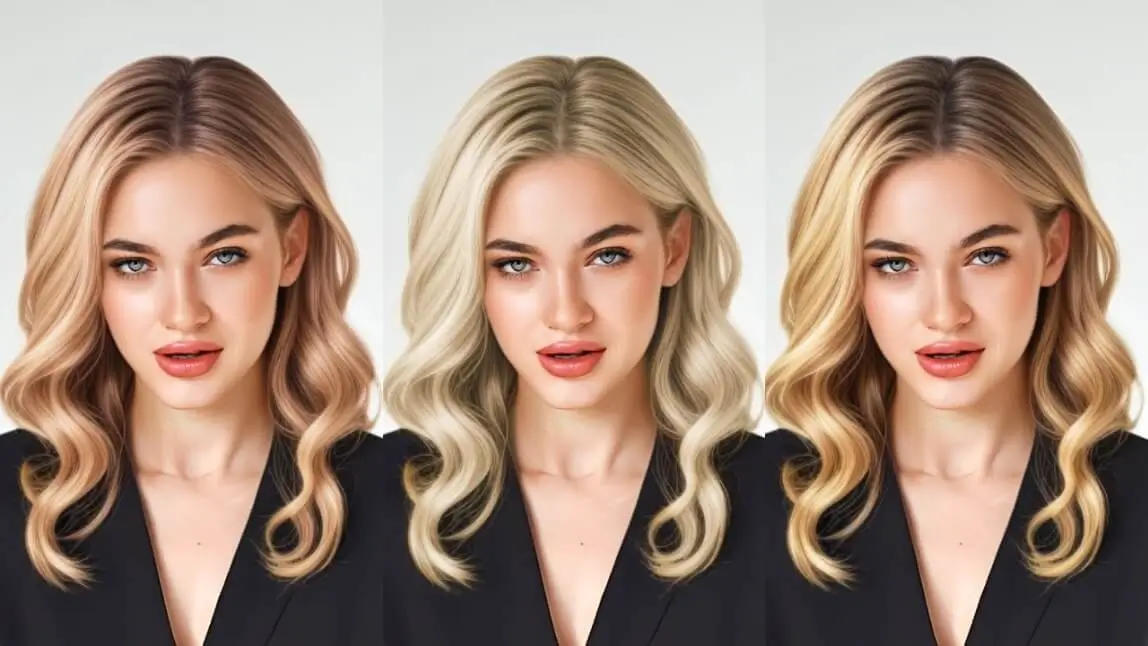
Wondering which blonde would actually suit you before you commit to bleach? A try-on filter lets you preview shades on your own photo, and a quick look at undertone narrows the field first. This guide gives you a two-question shade picker, the exact steps in YouCam Makeup, and the salon notes that make the preview realistic.

Key Takeaways
Undertone matters more than the shade name: cool skin leans ash, warm skin leans honey or strawberry, neutral skin has the widest range.
Lower the filter intensity to see a believable result; a full-strength preview looks flatter than real hair.
Dark hair usually needs lightening in stages, so use the preview to choose a realistic target.
Find Your Blonde: A 2-Question Shade Picker
Not sure of your undertone? Check the veins on your wrist: blue or purple suggests cool, green suggests warm, and a mix suggests neutral. Silver jewelry flattering you points cool, and gold points warm. This is a styling guide, not a diagnosis.
Which undertone describes your skin?
What look do you want?

Your shade
Ash blonde: Cool, smoky and modern
A silvery, low-warmth blonde that cancels brassiness and looks sharp against cool skin.
Try it in the app. In YouCam Makeup, pick one of the blue hair color filters and lower the intensity.
At the salon. Ask a colorist for a violet-based toner and plan on regular toning, since cool blondes drift warm.

Your shade
Sandy blonde: Natural, soft and low-effort
A beachy blonde with a hint of cool brown that grows out gently and looks like real sun-lightened hair.
Try it in the app. In YouCam Makeup, add a cool brown hair color filter and keep the intensity low.
At the salon. Ask for soft, blended lightness rather than stark highlights so the regrowth line stays hard to see.

Your shade
Buttercream blonde: Creamy, bright and balanced
A pale, creamy blonde that sits between warm and cool, which is why it flatters many neutral undertones.
Try it in the app. In YouCam Makeup, tap one of the grey hair filter options.
At the salon. Ask for a creamy beige toner and be ready to lift dark hair in stages; pale shades take the most lightening.

Your shade
Dark blonde: Subtle, grounded and easy to keep
A deeper blonde that reads as a polished upgrade rather than a dramatic change, ideal if you want to ease into blonde.
Try it in the app. In YouCam Makeup, add a black hair filter and reduce its intensity.
At the salon. Ask for a base that matches your natural level, with gentle dimension, so maintenance stays minimal.

Your shade
Strawberry blonde: Warm, rosy and playful
Blonde with a soft copper-pink glow that lights up warm and peachy skin tones.
Try it in the app. In YouCam Makeup, choose a purple or red hair color filter and lower the intensity.
At the salon. Ask for a blonde base with a copper-rose glaze; red-based tones fade fastest, so plan for color-safe care.

Your shade
Honey blonde: Warm, golden and sunny
A golden blonde that adds warmth and glow, and suits warm or golden undertones especially well.
Try it in the app. In YouCam Makeup, tap one of the warm blonde hair filter options.
At the salon. Ask for golden dimension rather than flat color so it looks sunlit, not brassy.
Previews are real YouCam Makeup hair color try-on screens on one model photo.
All six shades at a glance
- Ash blonde: cool, smoky and modern. A silvery, low-warmth blonde that cancels brassiness and looks sharp against cool skin.
- Sandy blonde: natural, soft and low-effort. A beachy blonde with a hint of cool brown that grows out gently and looks like real sun-lightened hair.
- Buttercream blonde: creamy, bright and balanced. A pale, creamy blonde that sits between warm and cool, which is why it flatters many neutral undertones.
- Dark blonde: subtle, grounded and easy to keep. A deeper blonde that reads as a polished upgrade rather than a dramatic change, ideal if you want to ease into blonde.
- Strawberry blonde: warm, rosy and playful. Blonde with a soft copper-pink glow that lights up warm and peachy skin tones.
- Honey blonde: warm, golden and sunny. A golden blonde that adds warmth and glow, and suits warm or golden undertones especially well.
How to Try Blonde Hair Filters in YouCam Makeup

- Tap the AI Hairstyle feature. Open the app and start from the AI Hairstyle room.
- Upload a photo. Pick one from your gallery or take a selfie in daylight.
- Choose a blonde style. In the Colors tab, try “Long Wavy Blonde,” “Two Braid Blonde” or “Blonde Balayage.”
- Tap the checkmark at the top right to save the style and return to the feature room.
- Fine-tune the shade. Open Hair Color and test ash, strawberry, honey or platinum tones.
Tip: use the Color slider on the right to reduce intensity.

More on the tools used here: AI hairstyle try-on, free hair color try-on app and AI hair color changer.
Why Filters Beat Traditional Blonde Previews

| Method | Best for | Limit |
|---|---|---|
| Basic color overlay filter | A quick, rough idea of the shade | Looks flat on dark hair and ignores strands and shine |
| AI hairstyle plus hair color (YouCam Makeup) | Realistic previews on dark or long hair | Still a preview; real results depend on your starting color |
| Consultation with a colorist | The final plan, toner and upkeep | Takes appointment time and costs more |
Verdict: use the AI preview to narrow your shortlist to two shades, then bring both screenshots to a colorist. Together they save the most time and surprises.
Blonde Hair Filter FAQs
How to see what I would look like with blonde hair?
Upload a clear, well-lit photo to a hair color try-on app, choose a blonde shade and lower the intensity until it looks natural next to your skin and brows. Try two or three shades before deciding.
What is the best app for trying AI blonde hair filters?
YouCam Makeup pairs AI hairstyles with a hair color tool, so you can change both the style and the shade on the same photo. Whatever you use, test in daylight so the color is judged fairly.
What blonde shades can I try using AI filters?
Common options include strawberry, ash, buttercream, honey, dark and sandy blonde, plus platinum. The picker above maps six of them to skin undertone and the look you want.
How do I use YouCam Makeup for blonde hair filters?
Open the AI Hairstyle feature, upload a photo, choose a blonde style in the Colors tab, tap the checkmark, then open Hair Color to fine-tune the shade with the intensity slider.
Is the AI blonde hair filter suitable for darker hair?
Yes. A filter previews the shade without bleaching, which is useful because going from dark brown or black to blonde usually needs lightening in stages. Use the preview to pick a realistic target and ask a colorist how many sessions it will take.