Author:



Creating AI CHristmas Photo was the best decision I've made this holiday season! Use AI Christmas photos to show love and share joy with AI Christmas backgrounds, family photos & cards using the best AI Christmas photo generator, YouCam AI Pro! It's the perfect way to express your excitement for the holidays. With top-of-the-line apps like YouCam AI Pro, you can create stunning AI Christmas photos in minutes.

6 Ideas for Generating AI Christmas Photo
 Christmas photos create lasting memories and showcase your festive spirit. YouCam AI Pro is the ultimate Christmas photo generator, offering a variety of enchanting art styles to transform your pictures. Each style brings a unique charm, making your holiday memories even more special.
AI Christmas Photo 1: Gingerbread Style

AI Christmas Photo 2: Winter Whisper Style

AI Christmas Photo 3: 3D Cartoon Style

AI Christmas Photo 4: Pop Art Style

AI Christmas Photo 5: Oil Painting Style

AI Christmas Photo 6: AI Snow Picture

Simply upload a portrait photo, wait for the AI to generate it, and voila—you've got a dreamy snowscape beauty shot. With winter's arrival, these multi-grid AI Christmas photos featuring swirling white snow feel even more on-point and timely.
How To Make AI Christmas Pictures With YouCam AI Pro
However you want to design your Christmas photos & Christmas backgrounds, YouCam AI Pro can help. To create the best Christmas photos with YouCam AI Pro, follow these steps:
Step 1 - Download the Best AI Christmas Photo Generator: YouCam AI Pro
Shared Materials by Strapi
*Adjust the size of images ONLY. Please go to Strapi to edit the materials info.
You first need to get the YouCam AI Pro app. Depending on your device, you can find it on the Google Play Store or App Store. Once downloaded, sign up for a new account or log in to an existing one.
Step 2 -Write a Prompt To Generate AI Christmas Picture

Use YouCam AI Pro’s text-to-image feature by typing in a prompt detailing what kind of picture you’d like generated. The more specific your prompt, the better and more precise your results.
Step 3 - Select a Style for AI Christmas Picture

YouCam AI Pro lets you choose from several styles to give your image the finishing touches. Choose from styles such as Imaginary, Cartoon, Contemporary, and Scenic to see which works best for your image.
Step 4 - Generate Your AI Christmas Picture

After you have entered your prompt and selected a style, click the “Generate” button to see your results. If you want to make changes, adjust your prompt or select a new style. Regenerate your image until you get what you’re looking for.
Step 5 - Save Your AI Christmas Background Free
When you’ve got a Christmas photo you like, save it to your camera roll. You can also post it directly to your social media channels for friends and family to see.
Family Christmas Photo Ideas: How to Make Christmas Family Pictures with AI
Creating family Christmas pictures with YouCam AI Pro is easy and fun! We've got 2 ideas for you to create fun and festive Family Christmas Photos.
Family Christmas Photo Ideas 1. Add Christmas Background to Photo with AI
Step 1. Download the Best AI Christmas Family Photo Generator App: YouCam AI Pro
Install YouCam AI Pro from the Google Play Store or App Store.
Step 2. Use the AI Background Feature for Family Christmas Pictures

Select the AI Background feature under AI Editing section.
Step 3. Upload Your Photo for Family Christmas Photos
Upload the family photo you want to edit.
Step 4. Select AI Background for Christmas Family Pictures

Choose a warm Christmas background or generate a new one using AI.
Step 5. Save and Share Your AI Family Christmas Photo

Once you’re happy with your edited photo, save it to your device and share it with friends and family. Enjoy creating your festive family photos.
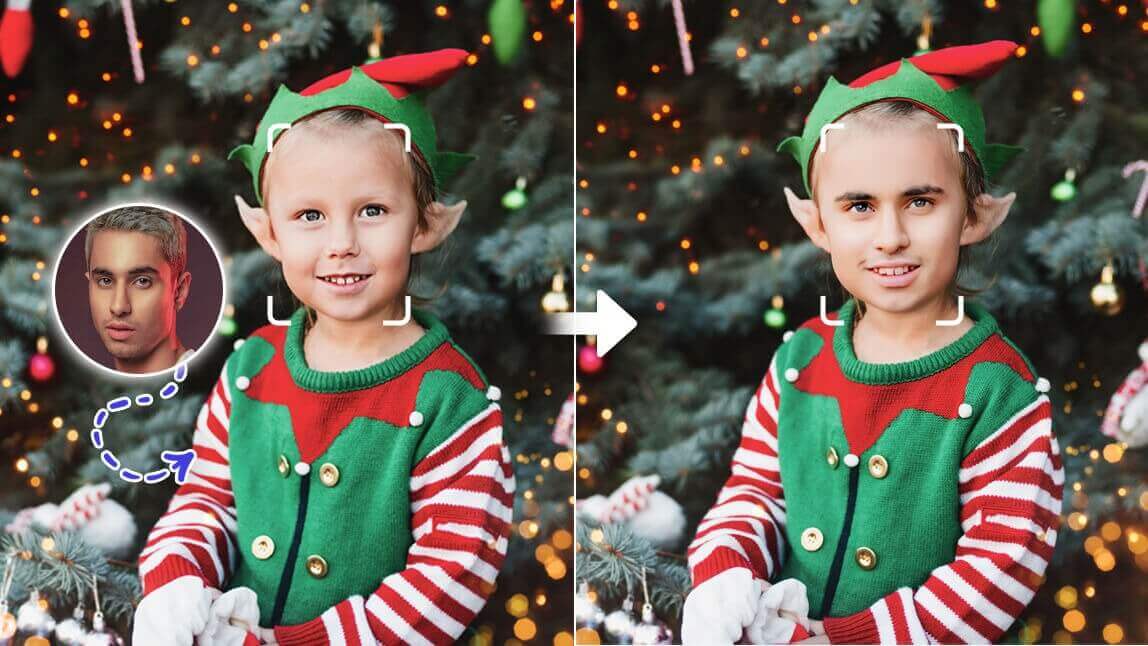
Family Christmas Photo Ideas 2. AI Face Swap

Who wouldn’t want to be Santa during the holidays? With face-swapping technology, you can now put your face on Santa’s body and spread festive cheer! In just a few simple steps, transform your regular selfie into a fun Santa photo—perfect for Family Christmas photos, cards, social media posts, or a good laugh with friends and family.
Head to Face Swap feature under AI Tools section within YouCam AI Pro.
How to Make My Photo Christmassy with AI
Add Santa & Christmas Hat to Photo with AI Replace

There's another fun idea for AI Christmas photo that you can easily create with YouCam AI Pro. Amaze everyone by adding a Christmas hat or outfits to your photos. Using its “AI Replace” feature, you can generate realistic Christmas hats without any post-editing. It looked like the person was already wearing a Santa hat before the photoshoot.
Here's how you do it:
To add a Christmas hat, simply brush over the head area and use the text prompt “Christmas hat” or “Santa hat.” The AI will analyze your photo and generate a perfectly fitting hat.
Transform Your Selfies into Christmas Photos with AI

Enhancing existing photos with YouCam AI Pro is just as easy. Personalize your selfies and photos with a Yuletide touch. YouCam AI Pro lets you change backgrounds, outfits, and more to show off your holiday spirit.
After downloading the YouCam AI Pro app, here’s what you need to do.
Step 1 - Open AI Studio for AI Christmas Photo Free

Once you navigate to the AI Studio feature under AI Tools section, you can look at different Christmas-themed templates and other options. Select your preferred artistic style.
Step 2 - Upload a Photo for AI Christmas Photo

In the app, you can upload an existing photo from your camera roll or take a new one with the app. For best results, choose a photo with high resolution and good lighting.
Step 3 - Select a Holiday Style for AI Christmas Photo Free

Play with different themed filters and effects to personalize your photo. You can also use photo editing tools to adjust the brightness, saturation, and contrast.
Step 4 - Generate & Save Your AI Christmas Photo Free

Another fun feature that YouCam AI Pro offers is AI Avatar. You can generate your own avatar by uploading between 10 and 20 photos of yourself from different angles. The AI then compiles the information from these photos and generates your avatar. Try pairing your avatar with different styles for different results, including the Christmas Avatar style.
Generate AI Christmas Photos with the Best AI Christmas Photo Generator
Making creative AI Christmas photos is a great way to ring in the holiday season. With YouCam AI Pro’s AI features, you can generate high-quality Christmas photos in seconds. Enhance existing photos by adding festive twists or generating holiday scenes from scratch. YouCam AI Pro makes it easy to let your creative side loose and show off the results this Christmas season.
Download YouCam AI Pro today to generate the perfect Christmas photos for the holiday season!
More AI Christmas Photos Ideas
- Elf Face in Hole: How to Put Your Face On an Elf with AI
- AI Christmas Wallpaper Maker: Free Christmas Backgrounds for iPhone & Computer
- Grinch AI Pictures: How to Make Grinch Pictures with AI this Holidays

![50+ Merry Christmas Memes, Images, Cards & Greetings 2025 [FREE Download]](https://plugins-media.makeupar.com/smb/blog/post/2024-11-21/webp_02bb136b-ef72-4760-aa7e-ac7f2637c1c3.jpg)