Author:



Enhancing video quality has never been easier with the best free AI video enhancers available.
These tools can transform your videos to stunning 4K resolution and offer advanced color correction features, making your content look professional and polished.
In this guide, we’ll introduce a top-rated AI video enhancer app and provide step-by-step instructions on how to use it effectively.
Best Free AI Video Enhancer: Enhance Video to 4K With One-Click
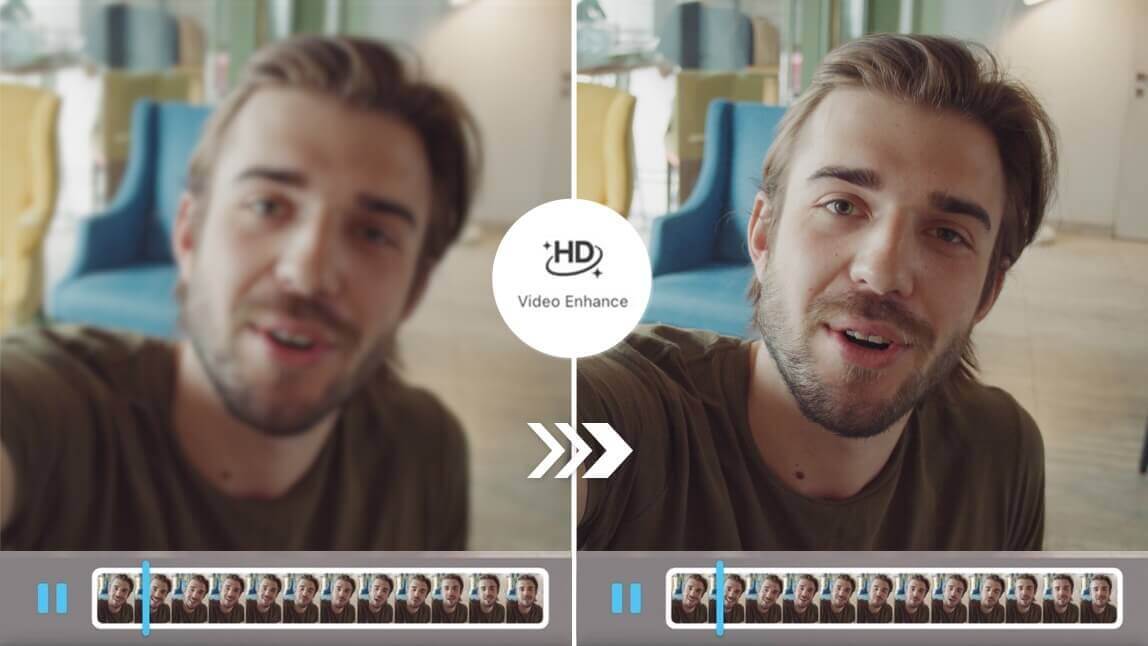
If you’re looking for the best free AI video enhancer, YouCam Video’s “AI Video Enhance” feature is a game-changer.
Available on iOS, android and online, it allows you to effortlessly enhance your videos up to 4K with just one click, restoring face and portrait details beautifully.

Plus, it’s free to use, making it a must-try for anyone wanting to elevate their video quality without breaking the bank!
"I tried the AI Video Enhance feature on some old, low-res clips and was honestly surprised — the upscaled version looked sharp without the weird plastic-y smoothing some apps give you." — Aliethia Blake, App Store review
"Free video enhancers usually cut corners, but this one actually holds up. Colors looked accurate, not oversaturated like a lot of 'AI enhanced' results I've seen." — Divalicious Candi, App Store review
How to Use the Best Free AI Video Enhancer (Step-by-Step Guide)
Here's a step-by-step tutorial on how to use AI Video Enhance to make your videos clearer in just 4 steps:
- Get The Best Video Blur Remover for Free
- Upload Your Blurry Video
- Use "Video Enhance" Feature to Unblur the Video
- Save Your Unblurred Video
Read more: How to Unblur a Video: Tips and Tools to Make Your Video Clearer
How to Use the Onling AI Video Enhancer on Desktop

Just follow these 3 steps:
- Open YouCam Online Editor
- Upload a Low Quality Video
- Download Your Upscaled Video
Why Enhance Videos Using YouCam Video: Top 3 Benefits
Curious about why you should enhance your videos with YouCam Video?
Here are the top 3 benefits you won’t want to miss, thanks to its awesome AI features for improving video quality!
Best AI Video Enhancer for 4K Resolution Video Upscaling

YouCam Video’s “HD Photo Enhance” feature is a lifesaver for anyone looking to upscale their videos to 4K resolution.
With just one click, it uses advanced AI to enhance every detail, making your videos look incredibly sharp and professional.
It’s perfect for preserving precious memories in the highest quality possible.
Read More
- 7 Best AI Video Enhancers We Can't Live Without
- AI Video Quality Enhancer: 4 Ways to Improve Video Quality
Color-Fix Your Videos With AI Color Correction
The “AI Color” feature in YouCam Video is fantastic for correcting and enhancing the colors in your videos.
It automatically adjusts the color balance, making your footage look vibrant and true to life.
This tool is a must-have for anyone who wants their videos to pop with rich, accurate colors.
Read More
- 9 Best Color Grading Apps for Videos [iPhone, Android]
- How to Correct Color a Video With the Best Color Correction App
Stabilize Your Videos With AI Video Stabilizer
Shaky videos are a thing of the past with YouCam Video’s “AI Video Stabilizer” feature.
It smooths out any unwanted movements, giving your videos a polished and steady look.
Whether you’re filming on the go or capturing action shots, this feature ensures your videos are always stable and professional-looking.
Read More: AI Video Stabilizer: How to Stabilize Shaky Videos on iPhone
YouCam Video vs. Topaz Video AI: Which Should You Use?
| Tool | Best For |
|---|---|
| YouCam Video | Free, one-click mobile enhancement on the go |
| Topaz Video AI | Professional-grade desktop upscaling of badly degraded footage |
If you just want to quickly fix up a clip on your phone for free, YouCam Video's AI Video Enhance is hard to beat — it's fast, free, and the results are genuinely usable straight out of the app. But if you're working with severely degraded or very old footage and need the absolute best possible upscale, Topaz Video AI's desktop-grade AI models (G2 rating: 4.7/5) can recover more detail, at the cost of being a paid, desktop-only tool.
More Video Quality Enhancing Ideas
- Best Video Enhancer to Enhance Video Quality
- Video Lighting Tips to Make Your TikToks and Reels Pop
- How to Brighten Video for Free