Author:


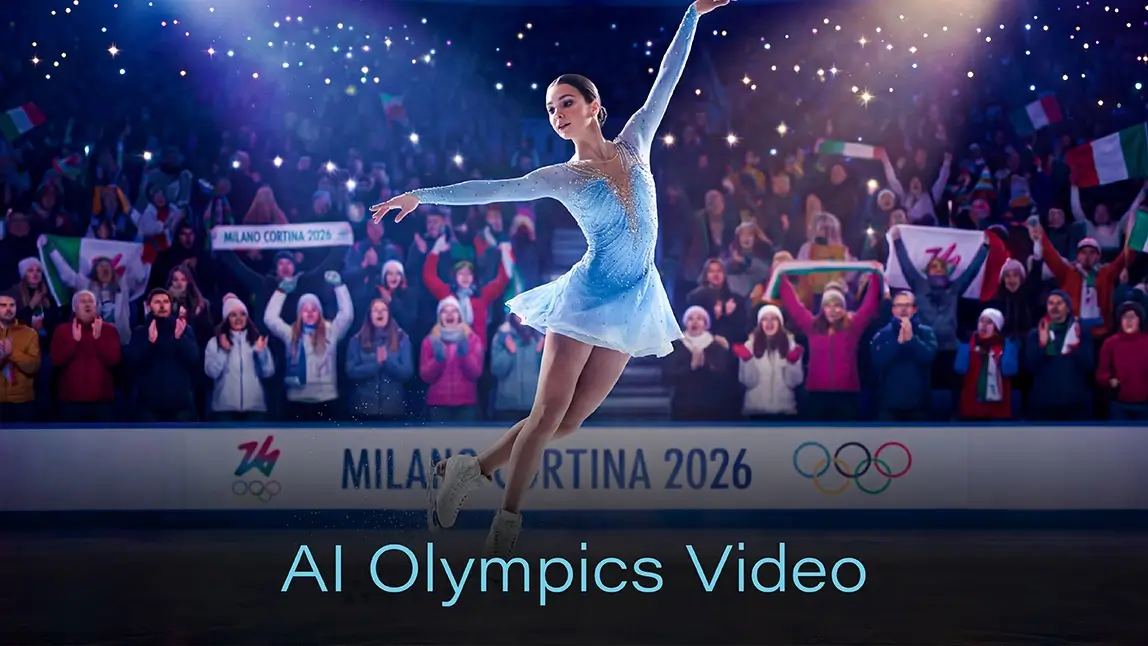
The 2026 Winter Olympics in Italy are capturing hearts around the world. From thrilling ski runs to nail-biting ice hockey matches, every moment is packed with excitement.
But what if you could do more than watch? What if you could bring the Olympics to life with your own creative vision? You totally can with an AI Olympics video!
Using YouCam Video’s Text-to-Video AI, fans can transform their ideas into cinematic Olympic highlights in just a few steps.
How to Create Your AI Olympics Video
1. Download the App
Get YouCam Video from iOS or Android. The app is free to download and gives you access to the Text-to-Video AI feature.

Best AI Video Editor
The Best AI Video Editor & Generator App.
Create videos with AI easily.
2. Open the Text-to-Video Tool

3. Type in a Prompt
Write a detailed prompt describing the scene you want to generate. The more cinematic and specific, the better.

- “A figure skater performing a triple axel under sparkling stadium lights, ice reflecting colorful spotlights, slow-motion close-ups of graceful spins, cheering crowd in the background.”
- “Snowboarder flying off a massive cliff in the Alps, snow spraying dramatically, cinematic wide-angle view with sunset lighting, camera following each flip in slow motion.”
- “Bobsled racing down a twisting icy track at night, neon trails highlighting the path, dynamic camera angles capturing the speed, audience blurred with motion effects.”
- “Freestyle skier performing a series of flips over a snow-covered ramp at sunset, camera following every rotation, snow sparkling mid-air, cinematic lighting effects.”
- “Animated gold medal ceremony in an open snowy stadium, gold, silver, and bronze medals gleaming under spotlights, confetti flying, fans waving flags, cinematic aerial view.”
4. Tweak Preferences

5. Choose AI Model

6. Save Your Video
Once you’re happy with your AI Olympics video, save it to your device. Share it directly to TikTok, Instagram, or YouTube Shorts, or send it to friends to show off your creative highlights.
20 Ready-to-Copy Detailed AI Olympics Video Prompts
Here’s a full set of 20 cinematic prompts you can copy directly into YouCam Video to generate stunning Olympic videos:

1. “A figure skater performing a triple axel under sparkling stadium lights, ice reflecting colorful spotlights, slow-motion close-ups of graceful spins, cheering crowd in the background.”
2. “Snowboarder flying off a massive cliff in the Alps, snow spraying dramatically, cinematic wide-angle view with sunset lighting, camera following each flip in slow motion.”
3. “Bobsled racing down a twisting icy track at night, neon trails highlighting the path, dynamic camera angles capturing the speed, and the audience blurred with motion effects.”

4. “Cross-country skier gliding through a snow-covered pine forest at sunrise, soft mist curling around, cinematic depth of field, golden light glinting on skis and snow.”
5. “Ski jumper soaring high above the Alps, wind whistling past, slow-motion skis cutting through snow, clouds swirling below, epic cinematic panorama.”
6. “Speed skater racing on an indoor ice rink with polished reflective surface, overhead lights creating dramatic reflections, camera moving alongside for action-packed POV shots.”

7. “Snowboarder performing a sequence of flips and spins in a winter wonderland half-pipe, camera circling in 360 degrees, snow sparkling under bright sunlight, cinematic style.”
8. “Ice hockey goalie making an incredible save in a tense match, puck flying in slow motion, close-ups on determination, crowd reacting in suspense, arena lights highlighting the scene.”
9. “Animated gold medal ceremony in an open snowy stadium, gold, silver, and bronze medals gleaming under spotlights, confetti flying, fans waving flags, cinematic aerial view.”
10. “Montage of multiple Winter Olympic events in one short video: skiers racing down slopes, figure skaters spinning, snowboarders jumping, all transitions synced to upbeat music.”
11. “AI-generated ski slope chase with two athletes competing, camera weaving through snowy trees, snow kicking up dramatically, slow-motion of flips, sunrise casting golden hues.”

12. “Olympic torch lighting ceremony in a quaint snowy Italian village, torch passing between athletes, soft glow illuminating snow-covered streets, cinematic wide shots.”
13. “Freestyle skier performing a series of flips over a snow-covered ramp at sunset, camera following every rotation, snow sparkling mid-air, cinematic lighting effects.”
14. “Curling match with close-up shots of stones sliding, ice reflections, strategic team huddles, dynamic overhead and side angles capturing tension and precision.”
15. “Luge speeding down an icy track, POV camera capturing twists and turns, neon trails highlighting motion, snow spraying dramatically as sleds slide past.”
16. “Drone flyover of snow-covered mountains with Olympic flags waving, clouds rolling, cinematic sunrise lighting, slow zoom into skiers and snowboarders below.”
17. “AI recreation of a historic Winter Olympics moment, cinematic slow-motion, crowd roaring, snow falling softly, dramatic focus on athletes’ expressions and movements.”

18. “Fan reaction montage cheering for their favorite athletes, dynamic angles, warm lighting, confetti and snow effects added for extra excitement, cinematic storytelling.”
19. “Snowboarder performing half-pipe tricks in slow motion, golden hour lighting, snow spraying with every move, dynamic camera angles circling athlete mid-air, cinematic feel.”
20. “Opening ceremony light show in a snow stadium, dancers in colorful outfits, fireworks, crowd waving flags, AI cinematic effects making the scene magical and immersive.”
Tips for Making Your AI Olympics Video Shine
Creating an AI Olympics video is fun, but a few tips can make your clips even more engaging:
Think Cinematically: Imagine camera angles, lighting, and slow-motion effects.
- Experiment with AI Models: Seedance for artistic flair, KLING for action-packed visuals, or PixVerse for futuristic styles.
- Use Social Media Formats: Vertical 9:16 for TikTok or Instagram Reels, horizontal 16:9 for YouTube Shorts.
- Combine Clips: Make short highlight reels to post daily during the Olympics.
- Engage Your Audience: Add hashtags like #AIOlympicsVideo, #WinterOlympics2026, #YouCamVideo. Tag friends and encourage them to create their own versions.
- Add Music: Background music can make your videos feel cinematic and ready for social feeds. YouCam Video has a handy AI Music Generator feature just for this.
Why AI Olympics Video Is Perfect for the 2026 Winter Olympics
The Winter Olympics are all about extraordinary moments - flashes of speed, skill, and drama. A traditional video captures these moments, but with an AI Olympics video, you become the director.
You can recreate events with a personal twist, visualize “what if” scenarios, or highlight your favorite athletes in ways that weren’t possible before.
Trends on platforms like TikTok and Instagram show that short, cinematic AI-generated clips are more engaging than ever. Fans are creating viral content that celebrates sports in imaginative ways. With YouCam Video, you can join this movement instantly.
Share Your Winter Olympics Experience
Once your AI Olympics video is ready, the fun doesn’t stop. Share your creation across social platforms:
- TikTok: Use trending sounds and effects to match your AI clip.
- Instagram Reels: Vertical format, 15–30 seconds, with energetic captions.
- YouTube Shorts: Highlight reels or fun “alternate reality” Olympic moments.
Encourage friends to make their own AI videos, creating a mini community of Olympic fans. You’ll see your ideas come alive while joining a global celebration of winter sports.
Conclusion
The 2026 Winter Olympics in Italy are an extraordinary event, and now you don’t have to just watch, but you can also create.
With YouCam Video’s Text-to-Video AI, making your own AI Olympics video is simple, fun, and shareable. From realistic sports highlights to imaginative reimaginings, the app gives fans the power to capture the magic of the Games.
Create your AI Olympics video now, experiment with prompts, tweak your styles, and share your personalized Olympic highlights with the world.
The Games are happening now, so bring them to life your way!
Best AI Video Editor
The Best AI Video Editor & Generator App.
Create videos with AI easily.