


 Author:


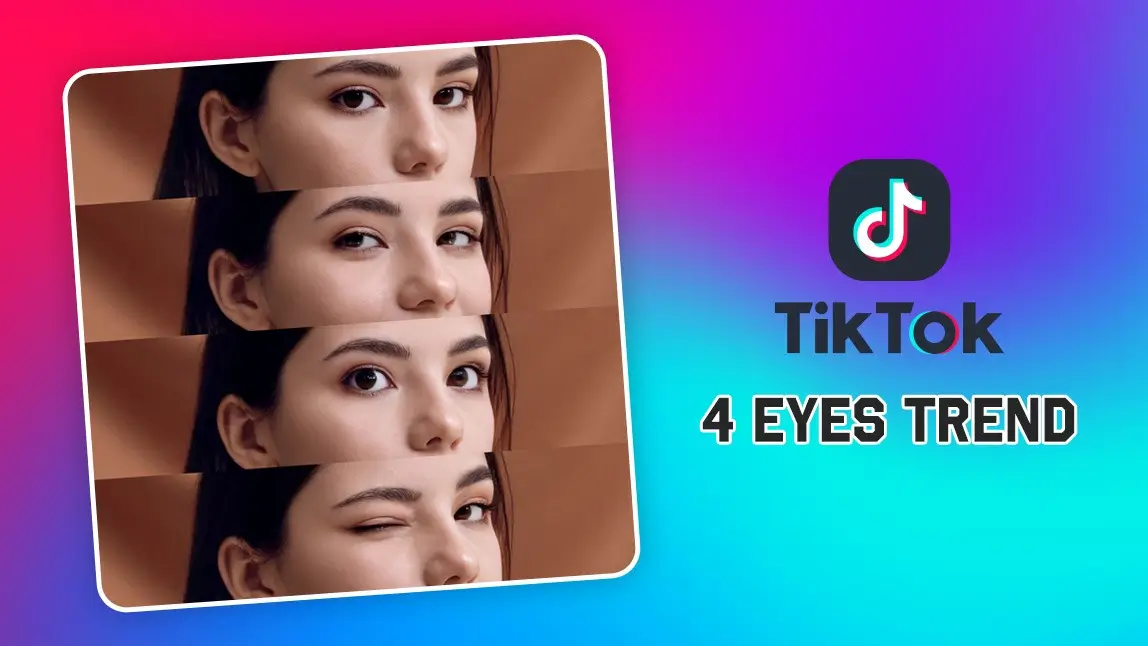
TikTok is still buzzing in 2026 with a viral trend, and this time, it's all about your eyes! The '4 Eyes' trend is taking over, showcasing four different eye expressions in a stylish collage.
If you want to know how to hop on this eye trend filter and make your own, you’re in the right place! We’ll show you how to nail each expression by using YouCam Makeup and YouCam Perfect to bring your TikTok masterpiece to life.
🧪 How I tested this: For this 2026 update, I recreated the 4 Eyes collage myself: I shot my own four expressions, tried touching up the trickier ones with YouCam Makeup's AI Expressions, and assembled the grid in YouCam Perfect. Smiling eyes and the wink came naturally on camera, while siren eyes took the most attempts to look intentional instead of sleepy. The biggest difference-maker was consistent lighting across all four shots, so the collage reads as one set. My notes are added throughout, along with a comparison table and the tips I wish I'd known first.
What Is the TikTok Eye Trend Filter?

The '4 Eyes' filter is a creative collage that highlights four distinct eye expressions, allowing users to show off different moods and aesthetics. The typical expressions featured include:
- Smiling Eyes: A warm and friendly gaze with a slight squint.
- Doe Eyes: Wide, innocent-looking eyes that create a soft, dreamy effect.
- Winking Eye: A playful and flirty wink with one eye closed.
- Siren Eyes: A sultry, intense gaze with slightly narrowed eyes.
The challenge? Capturing all four expressions perfectly and compiling them into a sleek four-grid collage. Let’s break down how to achieve the trend seamlessly.
🧪 My test notes: Before shooting, I watched how people framed the trend: the collages that looked best cropped tightly around the eyes and brows, so each expression reads clearly even as a small tile. I also found that deciding the order of the four looks in advance kept my shots consistent and made the final grid feel like a story.
Capture the Perfect ‘4 Eye’ Expressions
To get started, take four close-up photos of your eyes, focusing on achieving the different expressions:
- Smiling Eyes – Relax your face and let your eyes naturally crinkle as you smile softly.
- Doe Eyes – Widen your eyes and look slightly upward to create an innocent, Bambi-like effect.
- Winking Eye – Playfully wink one eye while keeping the other open.
- Siren Eyes – Slightly lower your eyelids and focus your gaze intensely for a seductive effect.
If your expressions aren’t turning out the way you want, there’s an easy fix!
Adjust Your Eye Expression with YouCam Makeup

If you’re struggling to perfect your expressions,YouCam Makeup’s AI Expressions feature can help.
Simply upload a selfie and use the AI tool to tweak your eyes into a smiling, winking, or siren-like expression with just a tap. No need to take multiple shots, let AI do the work!
🧪 My test notes: AI Expressions was most convincing when I started from a sharp, front-facing selfie with my eyes fully visible. Small adjustments looked natural; pushing an expression too far made the eye area look less like me, so I'd use it to refine a shot rather than invent one from scratch. For the wink, a real photo still looked better to me than an edited one.
Create the Eye Trend Collage with YouCam Perfect
Once you have your four eye shots ready, it’s time to bring them together in a sleek, stylish collage. Follow these steps:
Step 1: Download YouCam Perfect and open the app.
Step 2: Tap on Collage and select upload your ‘4 eyes’ photos.

Step 4: Crop your photos as needed and adjust the image position to ensure each eye expression is centered.
Now that you’ve created your stunning collage, it’s time to share it with the world!
Upload it to TikTok, pair it with a trending sound, and add relevant hashtags like #4EyesTrend, #EyeCollage, and #TikTokTrend to boost visibility. Hit Post, and watch the likes roll in!
🧪 My test notes: The horizontal four-grid template worked, but I had to crop each photo so the eyes sat at the same height in every tile — otherwise the collage looked uneven. Zooming each photo to a similar size mattered more than I expected. Next time I'd shoot all four expressions in one session instead of mixing in older selfies, because the color differences were noticeable side by side.
4 Eyes Trend Methods Compared: Which Option Is Best?
There's more than one way to get four great eye shots. Here's how the approaches compared when I tried them.
| Option | Best For | My Verdict |
|---|---|---|
| Shoot all four expressions live | The most authentic look | Most natural result, but siren and doe eyes can take several attempts to nail. |
| Record a video and grab frames | Catching fleeting expressions like a wink | Handy for spontaneous moments; pick frames that are in focus. |
| Adjust with YouCam Makeup AI Expressions | Fixing one expression that won't cooperate | Great for subtle refinements from a clear selfie; keep changes light for realism. |
| Assemble in YouCam Perfect Collage | Building the final four-tile grid | The simplest way to line up all four shots before posting. |
Verdict: Shoot as many expressions as you can for real, use AI Expressions to polish the one that gives you trouble, and finish the grid in YouCam Perfect.
What Real Users Say
Here's what two App Store reviewers shared about YouCam Makeup.
"The wait times are not bad at all, seconds basically, compared to many other similar apps that crash and stall or make dozens of ads between every click!" — tehstev88, ★★★★★ (App Store review)
"The only makeup filters that are really noticeable are the hair colors (sorry! They are just really bright?) and certain lipstick combinations. The rest of it turns out very realistic." — alit8, ★★★★★ (App Store review)
Pro Tips for Better Results
- Use soft, front-facing light: Face a window or ring light so your eyes catch light and there are no harsh shadows under the brows.
- Keep the same setup for all four: Same spot, same light, same distance from the camera, so the collage looks like one set.
- Frame eyes and brows only: Crop from just above the brows to just below the lower lashes; the expression lives in that strip.
- Hold the camera at eye level: Shooting from below or above changes the eye shape and makes doe and siren looks harder to read.
- Align the eye line: When cropping in the collage, keep the pupils at the same height in every tile.
- Post with the trend tags: Add hashtags like #4EyesTrend so viewers who follow the trend can find your version.
New in 2026: Phone Cameras Are Getting Better at Catching Fleeting Expressions
Capturing a perfect wink or a split-second smile is getting easier. At its August 2026 Pixel 11 launch, Google introduced Magic Capture, which picks the best frames from the many captured while you shoot and auto-crops and unblurs them for sharing. Features like this make it simpler to grab expressive shots for trends like 4 Eyes, which you can then polish and arrange with YouCam apps. (Source: TechCrunch, August 12, 2026)
Ready to build your grid? Try the photo collage maker, or explore more eye and face tools in YouCam Makeup.
Try the Eye Trend Filter with YouCam Apps
The TikTok '4 Eyes' trend is a fun way to showcase your eye expressions and get creative with your content.
With YouCam Makeup’s AI Expressions feature, you can perfect every eye expression effortlessly, and YouCam Perfect makes it easy to create the ideal collage. Download both apps now and join the trend!


