Author:


Did an OOTD Receipt just pop up on your FYP, and now you’re scrambling to figure out how they made it? Don’t worry—we’re not gatekeeping!
Here’s the ultimate OOTD Receipt tutorial so you can show off your fashion sense like a true trendsetter.
What is the OOTD Receipt?
The latest TikTok trend has influencers turning their OOTDs into stylish receipt-like displays, and everyone’s buzzing about it.
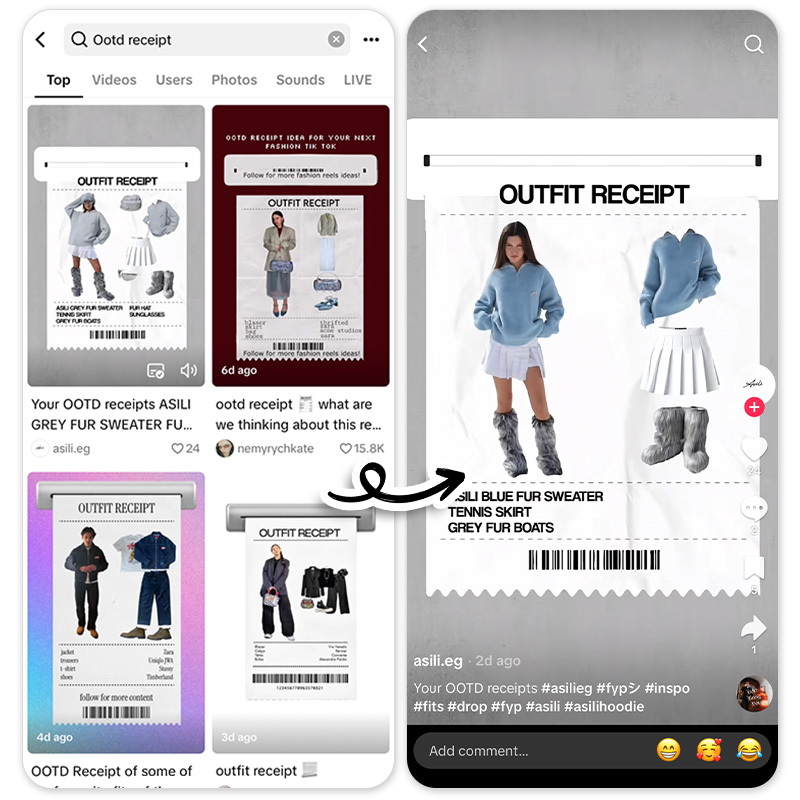
These OOTD receipts combine two parts: a visual breakdown of the outfit—featuring the top, bottom, shoes, and accessories—and a detailed “purchase list” of items and their brands. It’s like shopping straight from the influencer’s cart!
While the trend is skyrocketing in popularity, the real buzz is about how to make one. With countless users asking for tutorials in the comments, we’ve got you covered. Keep reading for a quick and easy guide to creating your own OOTD receipt!
OOTD Receipt Tutorial
1. Download the OOTD Receipt App
Download the best OOTD Receipt app to make your own receipt!

2. Upload Photo
After reaching the homepage, click on Photo Edit and upload a receipt photo. If you don't have one, we've prepared one below. Scroll down to download it!
3. Add Photo

Add your OOTD photo and fashion pieces images.
4. Cutout to Remove Background

Cutout the background by using the Cutout tool. YouCam Perfect's AI ability can automatically detect the subject and erase everything else. If you do want to make adjustments, you can use the eraser and painting tools on the left as well.
5. Add Text

Add your clothing pieces and clothing brands on the bottom of your receipt with the Text tool.
6. Save and Share!
Save and share your receipt, and even this tutorial because we don't gatekeep!
OOTD Receipt Template
Want to hop on the trend and create your own OOTD receipt without the hassle? Save time with our premade template made with the YouCam Perfect app! Download the below OOTD receipt template and upload it in YouCam Perfect to make your own version!