


 Author:


Every year, people worldwide celebrate Mother's Day to show their appreciation for their moms and other influential women in their lives.
They take the time to relax and receive gifts such as flowers, chocolates, and greeting cards. But what if you want to give her something more unique?

The best way to do that is to make something with a personal touch, and you can do just that by making personalized happy Mother’s Day cards.
With the YouCam Perfect app, it’s easier than ever to create a cute digital Mother's Day ecard using an ecard maker app straight from the heart. Keep reading to learn how.
YouCam Perfect: Best Free Mother’s Day eCard Maker
 Make this year’s Mother’s Day extra special by sending your mom a custom-made digital Mother’s Day card. Creating one is fast, fun, and easy. All you need is the best Mother's Day greeting card maker, the YouCam Perfect app.
It has countless tools and features that make it easy to design a special card that you won’t find anywhere else. The best part is that customizing the perfect Mother’s Day greeting cards only takes a few minutes. Read on to learn how simple it is and get inspiration.
How to Make Mother’s Day Virtual Card?
Now is the time to start customizing your e-cards for Mother’s Day, which only takes a few quick steps!
- Step 1. Download the Best Mother's Day eCard Maker App
- Step 2. Create Mother's Day Virtual Card in Minutes
- Step 3. Send Your Greeting Card!
Step 1. Download The Free Mother's Day eCard Maker App
You don’t need to be a professional designer or pricey software to create a custom Mother’s Day card. All you need is the YouCam Perfect app, which is completely free to download and compatible with iOS and Android.
Step 2. Customize Mother's Day ECard in Minutes

- Pick the Collage button on the YouCam home page to start uploading your pictures or downloaded designs.
- Build your e-card collage by selecting up to six images.
- Browse through YouCam Perfect’s Mother’s Day templates to start custom-designing your collage.
- Take your personalization even further by adding unique features like text, animation, and stickers.
Step 3. Send a Mother's Day Greeting Card to Your Mom
 Save your Mother’s Day e-cards directly to your phone, or share them through a different app. You can send it through Instagram, Facebook, and email. After you send it, don’t forget to share it with the YouCam community to inspire others with your Mother’s Day card ideas.
More Mother’s Day Virtual Card Ideas
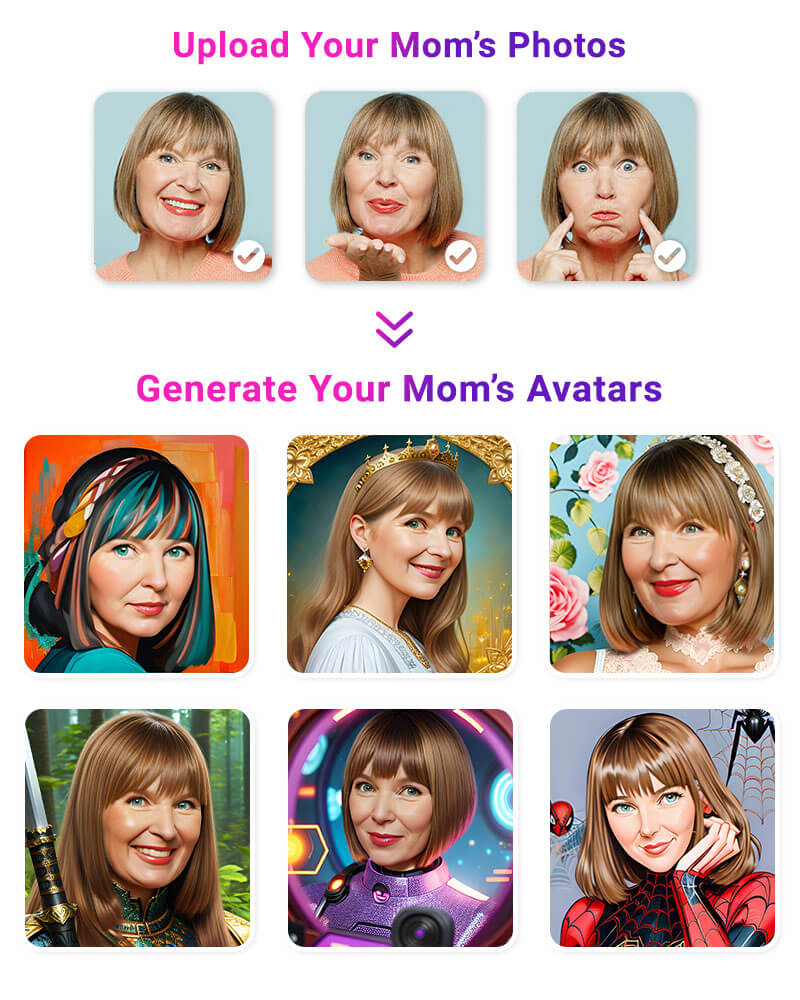
The Magic Avatar feature offered by YouCam Perfect empowers you to create captivating avatar photos of your mom effortlessly. With a few taps, you can explore different styles and transform your mom's image into various avatars.

Next step, insert the avatar into a virtual Mother's Day card. YouCam Perfect provides a wide range of customizable templates, each designed to add a touch of elegance and warmth to your card.
Browse through the available options and choose a template that resonates with your mother's preferences and style.


