Author:


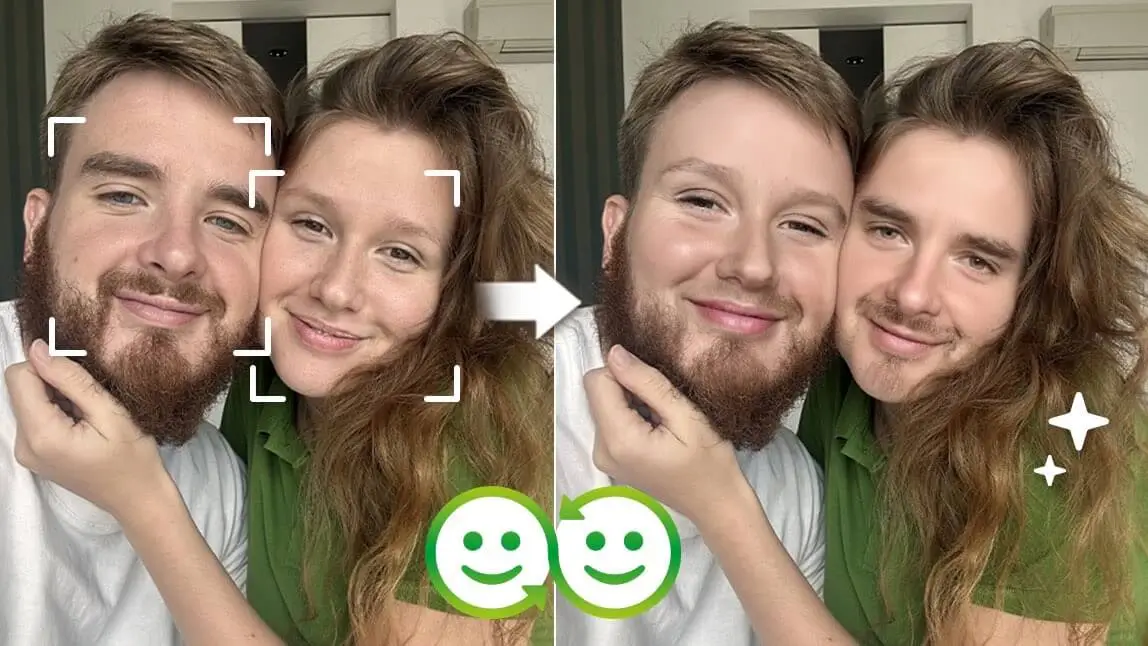
Snapchat has always been known for its innovative lenses and filters, and one of its most popular and entertaining features remains Face Swap.
Whether you’re swapping faces with a friend, a celebrity, or even a picture from your gallery, Snapchat makes it easy and fun.
In this article, we’ll show you:
- What Snapchat Face Swap is
- How to use Snapchat Face Swap step by step
- How to face swap with photos from your camera roll
- A more realistic Snapchat face swap alternative
- Creative face swap photo ideas to try
What is Snapchat Face Swap?
Snapchat Face Swap is a feature that allows users to swap faces with another person in real time or with an image from their gallery. Using facial recognition technology, Snapchat detects faces and exchanges their positions, creating funny, surprising, or sometimes slightly uncanny results.
Face Swap Lens became an instant hit because of its ability to create funny, surreal, and sometimes weird images that are perfect for sharing with friends. It allows users to get creative and experiment with different faces, making it one of Snapchat’s most engaging features.
How To Use Snapchat Face Swap?

2. Switch to the front-facing camera by tapping the camera icon on the top right corner.
3. Find the Face Swap Lens: once your camera is on, tap and hold on your face on the screen until a row of lens options appears at the bottom. Swipe through the lenses until you find the Face Swap option, which typically shows two smiley faces.
4. Position yourself and your friend (or pet) within the camera frame. Make sure both of your faces are clearly visible. When both faces are detected, the camera will automatically swap them. You can also use a photo from your phone’s gallery.
5. Save your face swap to Memories.
Snapchat Face Swap with Photo Alternative: YouCam Perfect
Snapchat Face Swap lens can be a blast, but it often misses the mark when it comes to natural-looking results. While it's fun to see your face swapped with a friend's or a celebrity's, the outcomes can sometimes be quite awkward.

So, if you’re looking for an easy-to-use alternative, YouCam Perfect app allows you to choose from any of your photos and swap faces easily. Its AI-powered technology ensures that the swap is smooth, blending the features seamlessly so the result looks natural.
Here's what you need to do:
1. Download YouCam Perfect
The first step is to download the YouCam Perfect app. You can find it on both the App Store and Google Play. It’s a free app, with additional premium features if you want to take your editing to the next level.

Best AI Photo Editor
The Best AI Photo Editor & Selfie Camera.
Remove objects, apply filters & more.
2. Access the Face Swap Tool

Once the app is installed, open it and navigate to the "Face Swap" tool. The interface is user-friendly, making it simple to find what you need.
3. Select Your Photos and Try Face Swap

For the best face swap results, choose photos where both faces are well-lit and clear.
After selecting the photos, the app’s AI technology will automatically detect the faces. With one tap, the swap happens in seconds, delivering a polished and realistic result. YouCam Perfect's advanced AI ensures that the face swap blends naturally with the rest of the photo.
Bonus Tip: Take a Picture and Then Swap Faces in Seconds
Guess what? You can take a photo with your friends using YouCam Perfect's camera feature and then do a face swap—just like in Snapchat!

Find the Camera tool on the homepage and take a photo. Then, tap the "Edit" icon and scroll right until you find the Face Swap feature. The rest of the process is the same!
Face Swap Photo Ideas
Want to take your face-swapping game to the next level? Here are some creative ideas:
Face Swap with Celebrities
Ever wondered what you’d look like as a movie star? Download a celebrity photo and swap faces for a hilarious or surprisingly realistic result.

Historical Figures Face Swap Challenge
Swap faces with iconic figures like Cleopatra, Albert Einstein, or the Mona Lisa and see yourself in history.

Best AI Photo Editor
The Best AI Photo Editor & Selfie Camera.
Remove objects, apply filters & more.
Face Swap with Movie Characters
Turn yourself into a superhero or iconic movie character by swapping faces with famous film stills.

Swapping Faces with Friends and Family
Face swapping with people you know often leads to the funniest results—perfect for group chats and social posts.

Face Swap Fun with YouCam Perfect!
Snapchat Face Swap is a classic feature that lets users have fun with photos and videos in seconds. From silly selfies to creative edits, it’s a great way to explore face swap effects.
But if you want:
- More natural face swaps
- Better photo blending
- More control over results
👉 YouCam Perfect’s Face Swap tool is a powerful and easy-to-use alternative.
With just a few taps, you can create smooth, realistic, and share-worthy face swap photos—and let your creativity run wild.
✨ Give it a try and see how fun face swapping can really be!
Best AI Photo Editor
The Best AI Photo Editor & Selfie Camera.
Remove objects, apply filters & more.