


 Author:


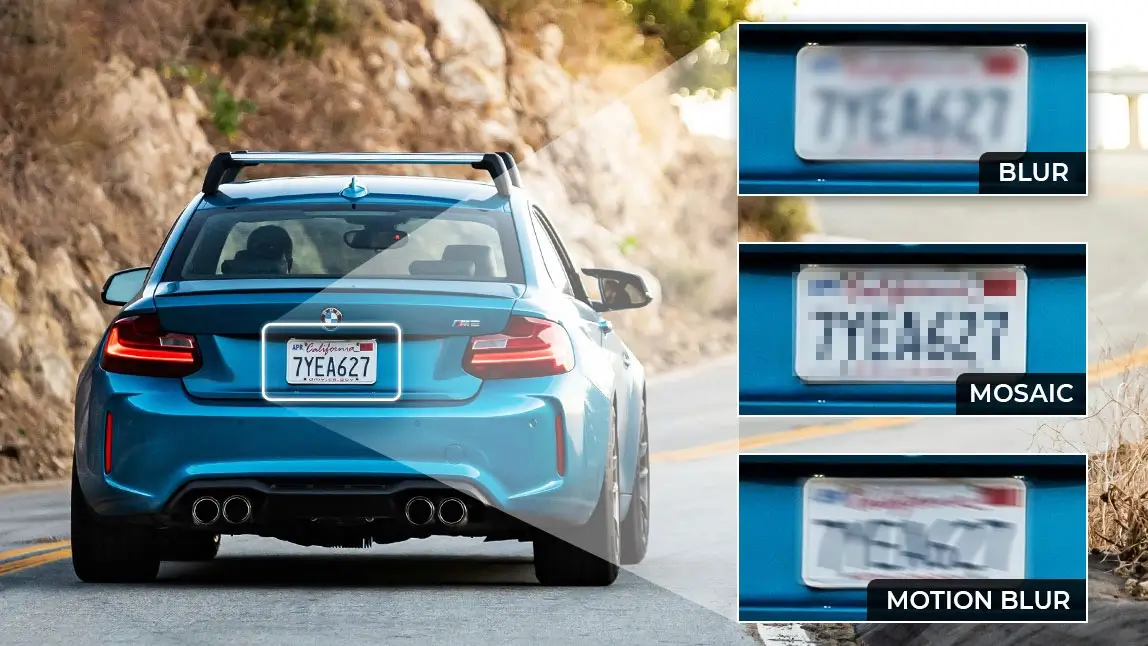
Ever noticed how sensitive details, like license plates, can easily show up in your photos? Whether you're sharing a picture of your car online or just a scenic shot with vehicles in the background, it's essential to protect your privacy.
Blurring your license plate ensures your personal information stays safe from prying eyes—and YouCam Perfect app makes it easier than ever to do just that!

Why Blur a License Plate or Number Plate in Photo?
Protecting Personal Privacy
Your license plate can reveal a lot about you, from your location to your vehicle's history. Blurring it in photos prevents strangers from accessing this information. Blurring it in photos prevents strangers from accessing this information and helps minimize your digital footprint.
Preventing Identity Theft
Hackers can use publicly visible license plates for malicious purposes, such as cloning your plate. It’s a simple precaution that goes a long way.

Avoiding Unauthorized Tracking
Some individuals may misuse publicly shared license plates for stalking or tracking. Blurring ensures your safety and peace of mind.
In some places, it’s illegal to share identifiable license plates online without permission. Beyond legalities, there’s also a social responsibility to ensure you’re not unintentionally exposing others’ private information.
How to Blur a License Plate in Photo with YouCam Perfect
1. Download and Install YouCam Perfect
Start by downloading the YouCam Perfect app from your device’s app store. It’s available for both iOS and Android.
2. Access the Mosaic Blur Tool
You can find the Mosaic Blur tool directly on the main page. Tap on it and choose a photo for editing.

3. Select and Blur the License Plate
For optimal results when blurring a license plate in a photo, use the Brush tool for greater precision. Additionally, you can adjust the Hardness setting to control the intensity of the blur to suit your needs.

4. Fine-Tune the License Plate Blur
Zoom in to check if the license plate is entirely obscured. Adjust the blur settings as needed for maximum effectiveness.

5. Save and Share Your Photo
Once you’re satisfied, save the edited photo to your gallery. You can also share it directly from the app to your social media platforms.
Common Mistakes to Avoid When Blurring Number Plates
- Partial Blurring: Ensure the entire license plate is covered to prevent partial visibility.
- Overlooking Other Details: Don’t forget to blur other sensitive information, like street names or house numbers.

Get YouCam Perfect Now to Blur Number Plate in Photo!
Blurring license plates is a small but essential step in protecting your privacy. With YouCam Perfect’s Mosaic Blur, you can easily edit your photos and share them confidently.
So, why wait? Download YouCam Perfect today and take control of your photo privacy.


