 Author:



A December dump isn’t about perfection. It’s about capturing the feeling of the month: festive chaos, quiet winter mornings, and everything in between. In this guide, you’ll discover:
- What a December dump is and why it trends every year
- Creative December photo dump ideas
- How to design a festive December collage
- The best December captions (short, cozy, funny, aesthetic, holiday-ready)
What Is a December Dump?

A December dump is a photo dump post—usually a carousel or collage—that collects highlights from throughout December. It can include photos, videos, screenshots, or even blurry moments that feel real.
Unlike a single curated post, a December dump tells a story. It reflects the warmth, reflection, and celebration that define the end of the year.
Why December Photo Dumps Perform So Well
December dumps naturally attract engagement because they combine emotion with seasonal visuals:
-
Holiday atmosphere: lights, decorations, candles, winter outfits
-
Year-end nostalgia: people love reflecting on the month—and the year
-
Relatable content: cozy nights, gatherings, food, quiet moments
-
Low-effort, high-impact: authenticity beats over-editing
December content feels personal, and audiences respond to that authenticity.
Best December Photo Dump Ideas
Mix and match these ideas to create a dynamic, scroll-worthy December dump.
1. Festive December Moments
Perfect for early to mid-December posts:
-
Christmas trees and ornaments
-
City lights and decorated streets
-
Wrapped gifts and bows
2. Holiday Gatherings & Celebrations
December is about connection:
-
Family dinners
-
Friends’ holiday parties
-
Group selfies
3. Year-End Reflections
Add emotional depth:
-
Quiet solo moments
-
Screenshots of memories
-
“Last time this year” details
How to Create a December Dump
Turning your camera roll into a festive December dump is easier than you think.
Step 1: Choose the Right Layout
The easiest way to begin your December dump is by using collage templates in YouCam Perfect.
Try layouts with soft borders or rounded corners to match the cozy vibe.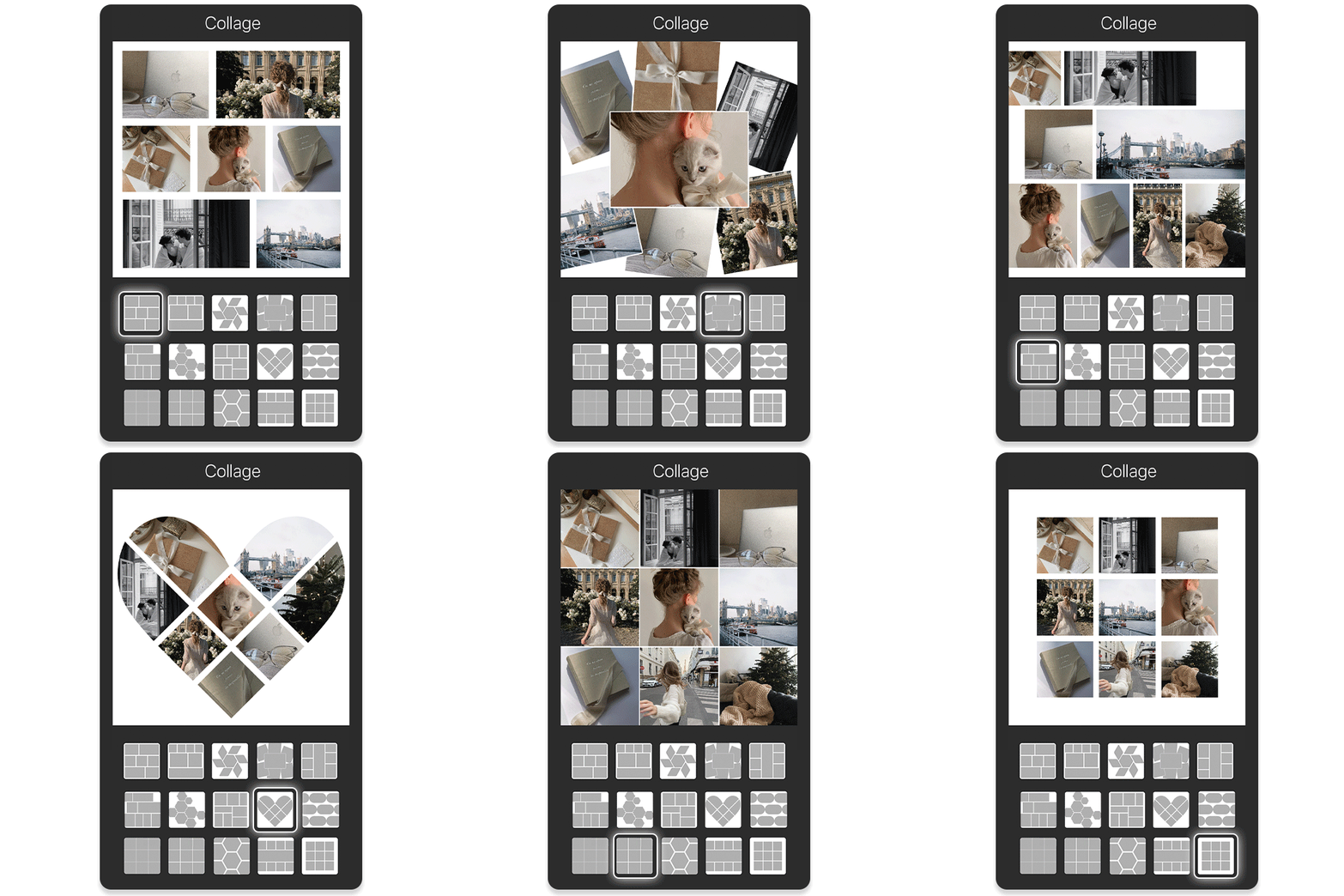
✨ Pro Tip: Customize the border thickness, shape, and radius for a polished, personal touch.
Step 2: Pick Your December Highlights
To make your December dump more visually aesthetic, try the Poster option in the Collage feature—it has pre-designed templates to give your photos a creative flow.

- nature
- cozy indoor scenes
- food
- candid selfies
- lifestyle
Make sure your images have varied angles—close-up, wide shot, overhead—for visual interest.
Step 3: Add December Dump Sticker
Once your collage is ready, upload it to Instagram Stories and tap Stickers → Add Yours → “December Dump.”
How to get the December Dump sticker on Instagram:
- Open Instagram Stories and upload your collage.
- Tap Layout to add multiple photos if needed.
- Tap Stickers → Add Yours.
- Type “December Dump” and place it on your collage.
💡 Pro Tip: Hashtags like #DecemberDump, #PhotoDump, help boost reach.
Adding the sticker not only makes your Story trendy but also encourages friends to join in and create their own December photo dumps.
Choosing the right cover photo and sequencing your images can also increase engagement—helping you get more likes and Story interactions.
40+ Best December Captions for Your Photo Dump
A good December caption can turn your dump into a cozy story. Here are a few styles to match your mood:
Short & Aesthetic December Captions
-
December days ✨
-
Winter feels
-
End-of-year energy
-
Cold air, warm moments
-
December glow
-
Cozy looks good on me
Cozy December Captions
-
Soft lights and slow nights
-
December feels like a deep breath
-
Staying in, staying warm
-
Comfort season activated
-
Wrapped in winter
Holiday-Themed December Captions
-
Festive chaos, loved every second
-
December, you were magic
-
Lights on, worries off
-
Holiday mode: ON
-
The season of togetherness
Funny December Captions
-
December said: no sleep, just events
-
Powered by cookies and coffee
-
I came, I decorated, I napped
-
December is busy pretending to be calm
-
Too festive to function
Reflective / Year-End December Captions
-
Closing the year gently
-
December taught me a lot
-
Letting go, looking ahead
-
Ending the year with gratitude
-
One last chapter before a new year

How To Make 2025 Photo Recap?

A 2025 photo recap or 2025 photo dump highlights your favorite moments—from travel and friendships to milestones and everyday memories—in a single, shareable visual format.
With AI Agent in YouCam Perfect, you can generate a unique 2025 photo recap or photo dump-style image in just a few taps—no manual layout, no design experience required. Just follow these 4 simple steps:
Step 1: Open AI Agent in YouCam Perfect
Launch YouCam Perfect and tap AI Agent from the home screen.
Step 2: Upload Your Photos
Upload multiple photos you want to include in your 2025 photo recap or photo dump.

Step 3: Enter Your Prompt
Describe the look and mood you want. For example:
“Create a 2025 photo dump with a minimalist aesthetic and soft lighting”
“Turn these photos into a 2025 year recap collage with scrapbook style”
“Create a trendy social-media-style 2025 photo dump with film grain and natural poses”
AI Agent will understand your intent and generate a cohesive visual automatically.
Step 4: Generate & Save
Tap Generate, review the result, and save your 2025 photo recap to share on Instagram, TikTok, or keep as a personal memory.

Your Perfect December Dump Starts Here
A memorable December dump isn’t about flawless photos—it’s about emotion, atmosphere, and storytelling. With the right mix of moments, thoughtful layouts, and the perfect December caption, your post can truly stand out.
Using YouCam Perfect, you can effortlessly design festive collages, fine-tune colors, and bring your December memories together in one cohesive look.