Author:


Cherry blossom photography is one of the most enchanting types of photography, capturing the delicate beauty of pink and white blooms in full glory.
However, straight-out-of-camera shots don’t always do justice to the mesmerizing scene. That’s where editing comes in!
With the right tools, you can enhance colors, adjust lighting, remove photobombers, and create a dreamy aesthetic that makes your cherry blossom edits stand out.

If you’re looking for an easy-to-use yet powerful editing app, YouCam Perfect is the perfect choice. This app offers a variety of AI-powered tools, filters, and effects to elevate your cherry blossom photography effortlessly.
Let’s dive into the best ways to adjust your cherry blossom edits like a pro using YouCam Perfect!
1. Bringing Out Vibrant Pink Hues

Cherry blossoms are known for their delicate pink shades, but sometimes, the colors don’t appear as vivid in raw photos. Editing helps enhance the pink tones, making them pop beautifully.
2. Enhancing Background and Details
A well-edited photo ensures that both the cherry blossoms and the background look stunning without overpowering each other.
3. Creating a Dreamy Aesthetic
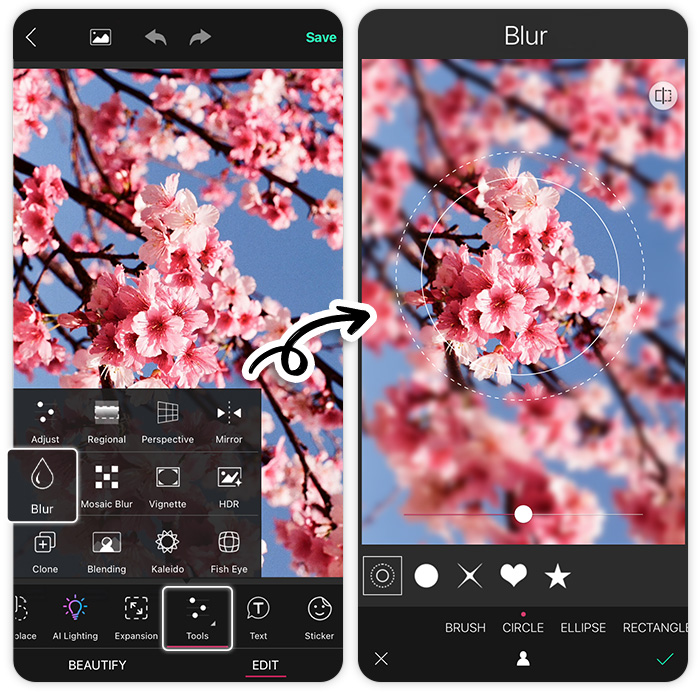
Soft glows, pastel filters, and blur effects can turn an ordinary cherry blossom edit into a dreamy masterpiece.
How to Edit Cherry Blossom Photography with YouCam Perfect
Capturing cherry blossoms in full bloom is a magical experience, but with a little editing, your photos can go from beautiful to breathtaking!
YouCam Perfect makes enhancing your cherry blossom photography effortless. Here’s how to make your cherry blossom edits truly shine:
1. Download YouCam Perfect
First things first, grab the app from the App Store or Google Play. It's free, easy to use, and packed with powerful editing tools.

2. Let AI Enhance Work Its Magic
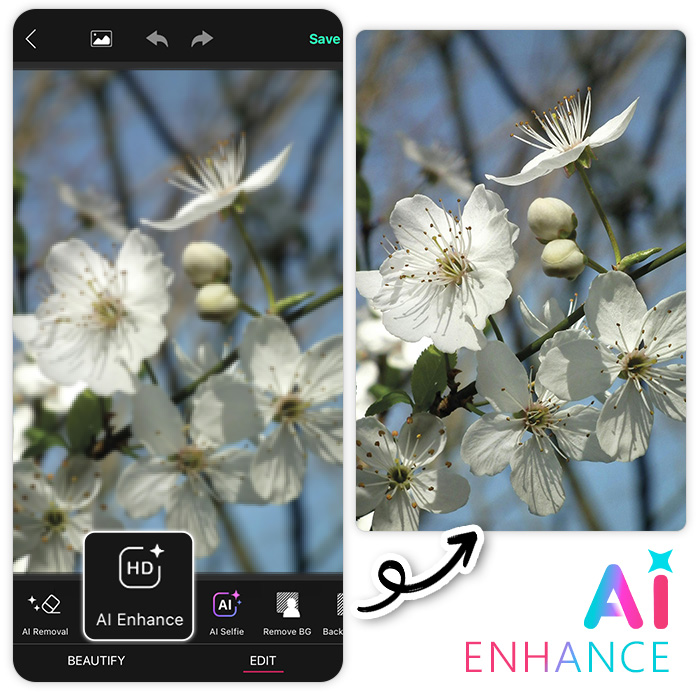
Want instant perfection? The AI Enhance tool brightens, sharpens, and enhances colors automatically, making your cherry blossom photography look crisp and radiant in seconds.
3. Transform Cherry Blossom Photos with Filters & Effects
Take your photos to the next level with YouCam Perfect’s aesthetic filters and cherry blossom overlays. Explore the Spring section for dreamy, pastel-toned hues, add a golden glow with Light effects, or create a soft, cinematic vibe with Nature-inspired filters.
Play around—there’s no wrong way to make your cherry blossoms pop!
4. Erase Unwanted Distractions

Nothing ruins a perfect cherry blossom edit like unexpected photobombers. With the AI Object Removal tool, you can seamlessly remove people, clutter, or anything else that takes the focus away from the blooms.
5. Swap Out a Dull Sky

A cloudy day shouldn’t dull your cherry blossom photography! With just a tap, replace a gray or overcast sky with a vibrant, bright blue one—no Photoshop skills required.
6. Save, Share, and Spread the Beauty!
Once your masterpiece is ready, don’t keep it to yourself! Save your enhanced cherry blossom photography and share it on social media to brighten up everyone’s feed.
With these easy edits, your cherry blossom photography will be more vibrant, captivating, and scroll-stopping than ever! 🌸
Common Mistakes to Avoid in Cherry Blossom Photo Editing
- Over-saturating the pink hues, making the image look unnatural.
- Over-sharpening, which can reduce the soft and dreamy effect.
- Ignoring the background, leading to an unbalanced composition.
Enhance Cherry Blossom Photography with YouCam Perfect Now!
Editing cherry blossom photography with YouCam Perfect allows you to transform ordinary shots into stunning, professional-quality images.
By adjusting colors, applying filters, and using AI-powered tools, you can enhance the delicate beauty of cherry blossoms effortlessly.
So, download YouCam Perfect, experiment with the editing tools, and watch your cherry blossom photos bloom like never before!