


 Author:


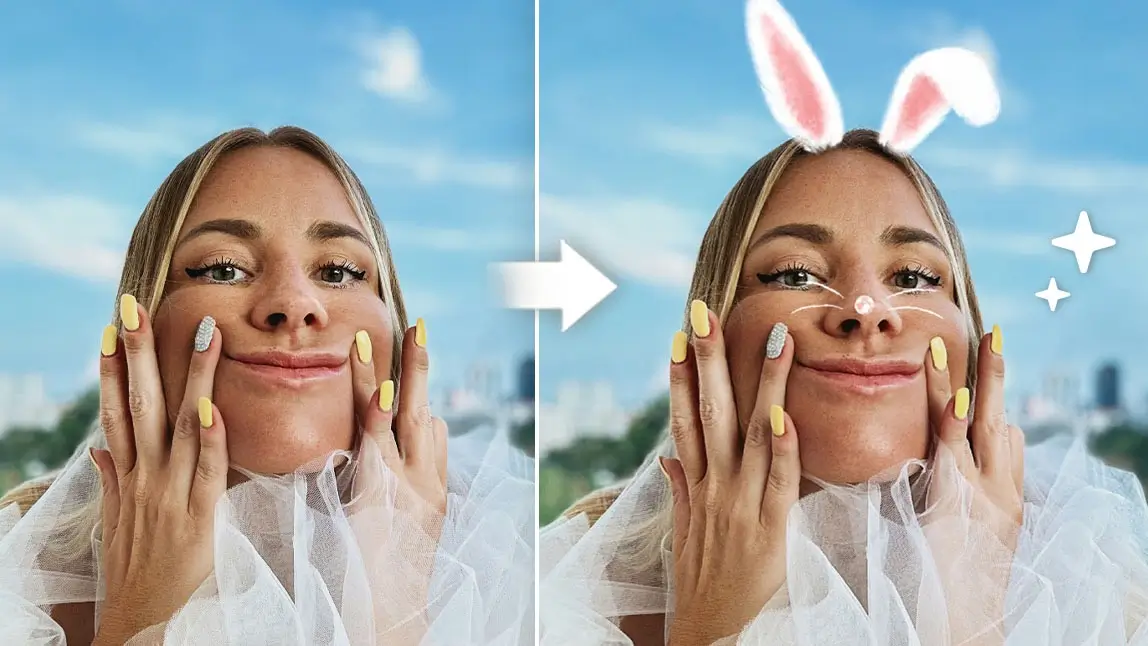
There’s just something about a pair of bunny ears that screams “Easter” in photos!
Whether I’m capturing moments from an Easter egg hunt or creating fun spring content for social media, bunny ear filters always add that perfect whimsical touch.
 If you’re on the hunt for an app to add those adorable bunny ears to your photos, YouCam Perfect has you covered. With its bunny ear filters and easy-to-use editing tools, I can transform my pictures in just a few taps.
Let me show you how to use the app to create the perfect Easter-themed content, complete with bunny ears.
Best Bunny Ear Filter App: YouCam Perfect

Best AI Photo Editor
The Best AI Photo Editor & Selfie Camera.
Remove objects, apply filters & more.
While other apps like Snapchat and Instagram might give you bunny ear filters, I’ve got to say, YouCam Perfect takes things to a whole new level.
It’s got a powerful set of photo-editing tools that let me do everything from adding fun stickers to chopping out things I don’t want in the shot.
 Plus, it’s perfect for getting my creative on—bunny ears? Check. Custom backgrounds and dazzling hair colors? Yup. Easter-themed frames? You bet.
The best part? The built-in AI tools make it all super fast, so I can whip up studio-quality images in no time. It’s like having a personal photographer right in my pocket!
3 Ways To Add Easter Bunny Ears to Photos
Best AI Photo Editor
The Best AI Photo Editor & Selfie Camera.
Remove objects, apply filters & more.
Ready to get started with YouCam Perfect? Download the app from the App Store or Google Play. Then, use the features below to add bunny ears and other edits to your photo.
#1 AI Agent
With AI Agent in YouCam Perfect, you can instantly generate realistic or cute bunny ears using simple text prompts—no manual adjustments needed.
1. Open AI Agent
2. Upload Your Photo

4. Generate and Save

#2 Sticker
- Tap Photo Edit or Camera.
- Tap on Stickers and then Animals.
- Swipe left until you find a sticker you like.
- Tap on the sticker to add it to your photo.
- Add finishing touches, such as cropping or moving the sticker.
- Tap on the green checkmark to save your photo to your image library.

#3 AI Selfie
- Tap Photo Edit or Camera.
- Select the AI Selfie tab.
- Scroll left and choose the Holiday tab.
- Tap on Cute Bunny, Easter, or your selfie style of choice.
- Tap on the green checkmark to save your selfie.

Get Easter-Ready with YouCam Perfect
With Easter just around the corner, I’m excited to make the most of the holiday – and I think you should too! With YouCam Perfect, I’ve been creating fun, unique content that my followers and friends can’t help but remember.
Whether I’m adding bunny ears to my photos or decking them out with cute Easter stickers and other creative touches, the possibilities are endless.
Don’t wait for Easter to get creative with your photos. Download YouCam Perfect and add bunny ears and other fun filters to your content today.


