Author:


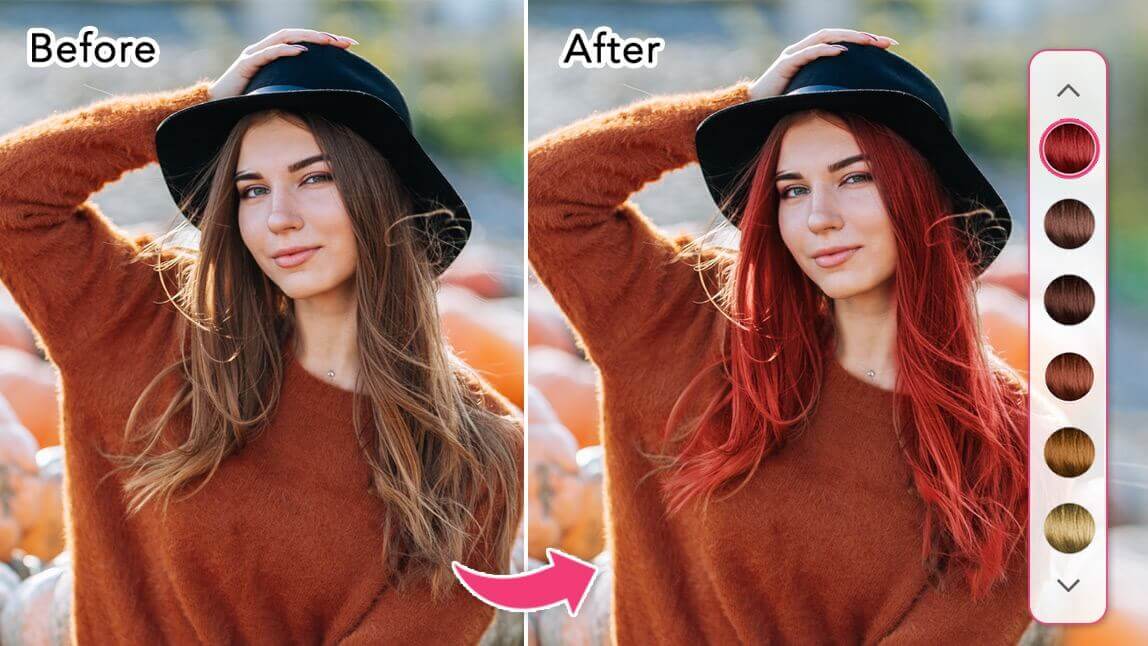
See what you would look like with gray hair using YouCam Makeup's gray hair filter. Upload your photo and use the hair color changer to try realistic silver, white, and platinum shades.
Gray hair is trending and now you can see what you would look like with gray hair with a gray hair filter. Whether you want soft silver tones or bold white hair, a gray hair filter lets you try the look instantly without any commitment.
With YouCam Makeup's virtual hair color try-on, you can experiment with different gray and platinum shades on your photo. It is a fun and easy way to test out a new look before heading to the salon or embracing your natural grays.

Compare Four Gray and White Shades
Tap a shade to compare the same portrait in each color. This is a styling guide to help you choose a direction before you try it on your own photo.

Natural gray mixed with your own color
Salt-and-pepper
The softest way into gray: strands of gray blend with your base color, so the change reads as subtle and grown-in.
Best for people who want a gentle, low-contrast look or are growing out color.
Upkeep. Low upkeep. The blend grows out gracefully, so touch-ups are rare.
In the app: choose a gray shade and keep the intensity low so your base color shows through.

Shiny metallic gray
Silver
A polished, reflective gray with plenty of shine. It reads intentional and modern, especially with cool or neutral skin.
Best for cool and neutral undertones and anyone wanting a sleek, finished look.
Upkeep. Medium upkeep. Silver needs purple shampoo and regular gloss to stay clean.
In the app: pick a silver gray and raise the shine for the metallic effect.

Bright, high-impact white
White
The boldest option: bright white or platinum-gray that frames the face with strong contrast.
Best for fair or cool skin and anyone ready to make a statement.
Upkeep. High upkeep. Getting there usually means bleaching, and white yellows quickly without toner.
In the app: choose the white shade, then lower the intensity if it looks too stark on your skin.

Cool steel gray with a blue tint
Blue-gray
A cool, slightly blue-toned gray that feels fashion-forward and works well for creative looks.
Best for cool undertones and people who like a moody, editorial shade.
Upkeep. High upkeep. Cool tints fade first, so plan on color-safe care and refreshes.
In the app: choose a blue-gray and test it in daylight lighting to judge the tint.
The portraits are AI-generated illustrations made with YouCam AI to show each shade.
What Would I Look Like with Gray Hair?
Gray hair has officially gone from a sign of aging to a style statement. Whether you want to embrace your natural grays or try out the silver hair trend just for fun, using a hair color app is the easiest way to see what you would look like with gray hair.
YouCam Makeup is one of the best hair color apps for trying gray hair filters. Simply open the app, tap on the Hair Color tab, and explore a range of realistic gray and white hair colors to try on your photo.

Best Gray and White Hair Filters to Try
Gray and white hair are having a major moment in beauty and fashion. From Kim Kardashian to Lady Gaga, celebrities are showing that silver strands are anything but boring. If you want to see yourself with this bold look, YouCam Makeup makes it easy.
Here are some of the most popular gray and white hair filters you can try in the app:
Full Gray Hair Filter

Want to go all in on the gray hair trend? This filter gives you a complete transformation with bold silver or white strands. It’s a striking look that shows exactly what you’d look like with a full head of gray hair.
Ombré Gray Hair Filter

If you’re not ready to go totally gray, going ombré is a great middle ground. This look fades your natural shade into soft silver tones, giving you a stylish blend of color that feels trendy without being too dramatic.
Two-Toned Gray Hair Filter

Looking to add a little edge to your style? The two-toned filter lets you pair silver or white with another hair color—like black, blue, or lavender—for a cool, contrast-heavy look. It’s a fun way to play with bold hair color ideas and see what suits you best.
How to Try On Gray Hair Filter with Hair Color App
With the YouCam Makeup app, you can try on gray, platinum, or white hair instantly using AI-powered technology. Here's how:
- Step 1: Download YouCam makeup
- Step 2: Try the Hair Color Changer
- Step 3: Apply Gray or White Hair Filters
- Step 4: Save and Share
Step 1: Download Gray Hair Filter App
The first step is to download the YouCam Makeup app. This app is available for both iPhone and Android.
Step 2: Try the Hair Color Changer
Once you have opened the app, tap on “Photo Edit". This will allow you to take a new photo or upload a photo from your camera roll.
Choose a photo that you want to use and then tap on "Hair Color" to try white and grey hair filters.
Step 3: See What You Look Like with Gray Hair
There are several different white hair filters to choose from. You can try them all out and see which one you like best.
Step 4: Save and Share
Once you have found a white hair filter that you like, tap on the “Save” icon. This will save the photo to your camera roll.
See Yourself with Gray Hair with Hair Color Try On
No need to book a salon appointment just to see how you'd look with gray or white hair. With a hair color app, you can try on gray hair filters and white hair filters instantly, all from your phone.
Whether you’re ready to rock your natural grays or want to experiment with a bold silver makeover, YouCam Makeup makes it easy to find your perfect look
More Hair Color Ideas
About the Editors

The PERFECT Corp. Editorial Team
We are a team of experts on photo and video editing apps. Our goal is to deliver engaging content on everything from stunning selfie edits to eye-catching video effects. We cover the latest trends and share niche tips to help you master digital creation.
Discover more about us: