Author:


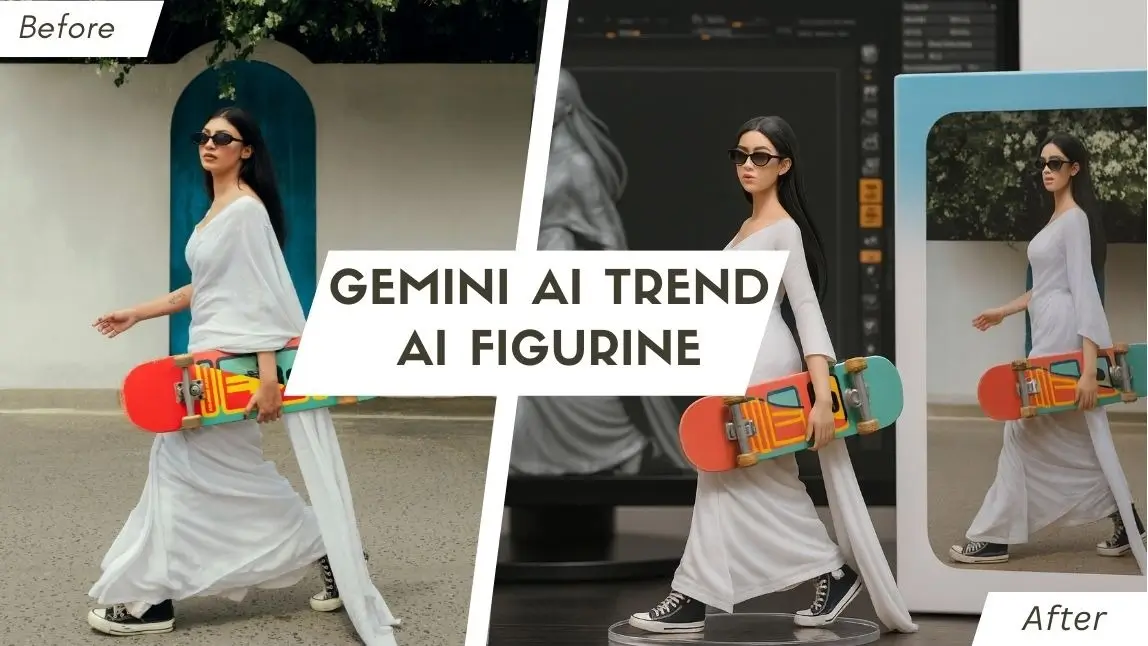
Ever dreamed of seeing your favorite photo subject – yourself, a pet, an anime character – transformed into a cool, tangible figurine? In this article, you'll discover how cutting-edge AI figure technology allows you to create Custom 3D Figurine from Photo using AI. We'll show you how to leverage free tools like Nano Banana with Gemini and explore the powerful features of YouCam Perfect and YouCam AI Pro to bring your visions to life. Join the Gemini AI Trend now!
| Table of Contents |
|---|
What is the Gemini AI Trend: AI Figurine?
@cocoli767 google gemini ai figure filter tutorial 😘😘💕 #gemini#capcutforus#capcut#capcutpioneer#aifigure3d♬ original sound - tôi muốn ăn mcflurry🦋🦋 - 射手座
The AI figurine trend, especially popular on platforms like TikTok, is all about transforming 2D images into stunning 3D-style figures using artificial intelligence. Imagine taking a regular photo and, with a few taps or prompts, having an AI 3D figure of it. This trend is fueled by advanced AI models, including Gemini, making it accessible and incredibly creative for everyone from anime fans to content marketers.
Picture this:
- Your very own 1/6 scale commercialized figurine.
- Sitting proudly on a desk with a clear acrylic base.
- Your likeness showcased on a professional-style toy box.
- Even a simulated ZBrush modeling process on a monitor behind it.
It's about making your digital self tangible and incredibly cool.
Gemini AI Trend: How to Generate the AI Figurine with Nano Banana For Free

Step 1: Open Gemini 2.5 Flash Image (Nano Banana)

Start by navigating to the Nano Banana interface. This is your gateway to creating amazing 3D-style images from simple prompts, all for free.
Step 2: Upload Your Photo and Enter Prompt

Prompt Suggestion:
Create a 1/6 scale commercialized figurine of the characters in the picture, in a realistic style, in a real environment. The figurine is placed on a computer desk. The figurine has a round transparent acrylic base, with no text on the base. The content on the computer screen is the ZBrush modeling process of this figurine. Next to the computer screen is a BANDAI-style toy packaging box printed with the original artwork. The packaging features two-dimensional flat illustrations.
Step 3: Generate & Save the 3D Figure Image

With your photo and prompt in place, simply tap "Generate." The AI will instantly create your custom figure. Once it's ready, just save the image to your device and it's yours to keep!
Make Anime Action Figure with AI>>>
Gemini AI Trend: How to Make Custom 3D Figurine from Photo with Photo to Figurine Apps

For even more advanced features and creative control, dedicated photo to figurine apps like YouCam Perfect and YouCam AI Pro are your go-to tools for creating the ultimate PVC Action Figure.
Best Photo to Figurine Apps 1: YouCam Perfect's Editing Agent Feature

YouCam Perfect makes it incredibly simple to turn your photos into unique AI action figure designs. Its Editing Agent feature is like having your own personal AI artist at your fingertips.
Step 1: Download the YouCam Perfect App
Get started by downloading YouCam Perfect from your device's app store. It's a quick and easy install that unlocks a world of photo editing possibilities.
Step 2: Head to the Editing Agent Feature

Launch the app and look for the "Editing Agent" feature. Upload the photo you want to use as the basis for your figurine.
Step 3: Enter Your Prompt

Describe your desired AI figure to the app by typing in a prompt. Be as creative as you like with details about style, setting, and appearance.
Step 4: Generate & Save
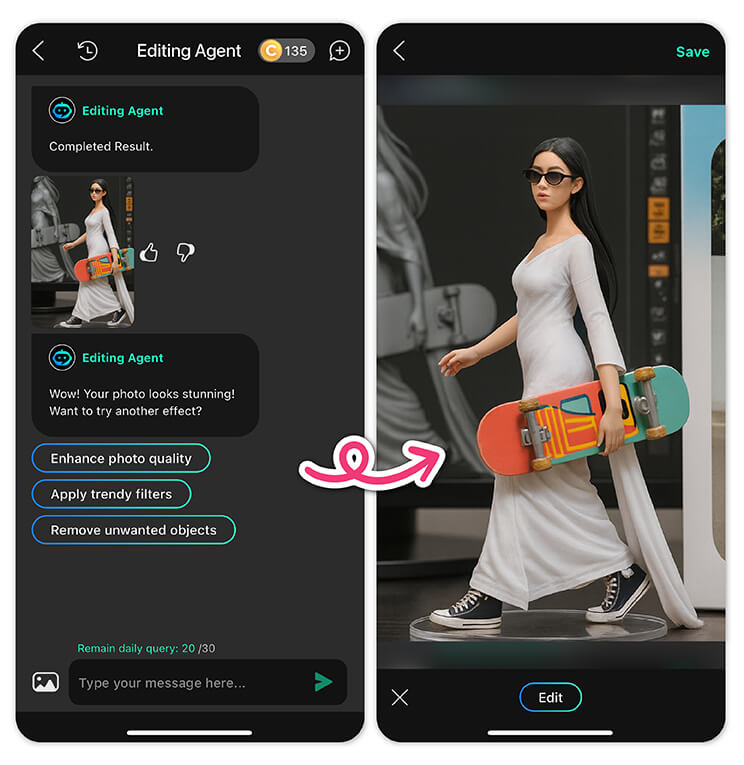

Hit "Generate" and watch as your photo is transformed. Once the AI finishes creating your custom figure, you can save it directly to your phone's gallery.
Best Photo to Figurine Apps 2. YouCam AI Pro’s Image-to-Image Feature
For the best AI action figure experience, YouCam AI Pro offers powerful image-to-image capabilities.
Step 1: Download the Best Photo to Figurine App: YouCam AI Pro
Shared Materials by Strapi
*Adjust the size of images ONLY. Please go to Strapi to edit the materials info.
Find YouCam AI Pro in your app store and download it. This app is designed to make the creative process as smooth as possible.
Step 2: Tap "Add a Photo" for AI Figure

Open the app and tap "Add a Photo" to begin creating your AI figure. Select the image you want to use as your base.
Step 3: Write a Prompt for the AI Figure

Just like with Nano Banana, a good prompt is key. Use a similar detailed prompt to guide the AI:
Prompt Suggestion:
Create a 1/6 scale commercialized figurine of the characters in the picture, in a realistic style, in a real environment. The figurine is placed on a computer desk. The figurine has a round transparent acrylic base, with no text on the base. The content on the computer screen is the ZBrush modeling process of this figurine. Next to the computer screen is a BANDAI-style toy packaging box printed with the original artwork. The packaging features two-dimensional flat illustrations.
Step 4: Add PVC Figurine Style for the AI Figure

YouCam AI Pro has a unique feature where you can select specific styles. Look for the "PVC Figurine" styler to give your image that perfect, polished look.
Step 5: Generate & Save the AI Figurine

Hit "Generate" and watch your AI action figure come to life. Save your creation to share with the world!
Pro Tips: Generate AI Figurine Videos with YouCam Video
Want to add movement and life to your creations? With YouCam Video, you can easily animate your new AI figurine and turn it into a captivating short video. It’s the perfect way to share your masterpiece with the world!
Step 1: Get YouCam Video & Head to Image to Video

Download YouCam Video, then open the app and find the "Image to Video" feature.
Step 2: Upload Your Photo
Select and upload the AI figure image you just created.
Step 3: Select AI Figure Video Template
Choose from a variety of templates designed specifically to animate your figurine.
Step 4: Generate & Save
With a single tap, the app will generate a stunning video from your image. Save and share it on your social media!
Edit your AI Figure video with YouCam Video>>>
The Best Photo to Figurine App Comparison: Gemini [Nano Banana] vs. YouCam
| Feature | Nano Banana | YouCam Perfect | YouCam AI Pro |
|---|---|---|---|
| Best For | Realistic, consistent figurines. | All-in-one photo editing with a figurine tool. | Creative, stylized figurines and AI art. |
| AI Figurine Creation | High-quality, photorealistic figurines from a detailed text prompt. | "Editing Agent" feature turns a photo into a figure based on your prompt. | "Image-to-Image" and "PVC Figurine" styles are designed for custom figures. |
| Main Advantage | Keeps a character's face the same across many edits. | Easy to use for quick fixes and general photo editing. | Has a huge number of art styles and a specific "PVC Figurine" option. |
| Cost | Free with a daily limit. | Free download with paid upgrades. | Free to start, but requires a subscription for full access. |
| Ideal User | Someone wanting a professional, realistic figurine. | A casual user who wants a simple, do-it-all app. | An artist, anime fan, or creative who wants to experiment. |
Join the Gemini AI Trend: AI 3D Figurine with YouCam
Shared Materials by Strapi
*Adjust the size of images ONLY. Please go to Strapi to edit the materials info.
You’ve just seen how incredibly simple and fun it is to transform your favorite photos into incredible Custom 3D Figurines from Photos using AI. Whether you're making an AI figure of yourself, a beloved character, or a creative concept, the tools are at your fingertips. No complex software, no design degree – just pure creative power! Ready to start creating your own awesome figurines?
Download YouCam AI Pro today and start your AI figure journey!
About the Editors

The PERFECT Corp. Editorial Team
We are a team of experts on photo and video editing apps. Our goal is to deliver engaging content on everything from stunning selfie edits to eye-catching video effects. We cover the latest trends and share niche tips to help you master digital creation.