Author:


Tracking your daily calorie intake doesn’t have to feel like a chore. If you’ve ever struggled with complicated spreadsheets, confusing food labels, or boring calorie-counting apps, you’re not alone.
Luckily, modern technology has made it easier than ever to stay on top of your nutrition and one app that’s leading the way is YouCam AI Chat.
In this article, we’ll explore why it deserves the title of best calorie calculator app, how it works, and how it can help you make healthier, smarter choices without feeling overwhelmed.
| Table of Contents |
|---|
Why Choose a Calorie Calculator App?

A good calorie calculator app can:
- Estimate the number of calories in your meals with precision.
- Provide daily calorie goals based on your activity level, age, and fitness goals.
- Suggest healthier alternatives to meals or snacks.
- Help you stay accountable to your diet plan without obsessing over every bite.
The key is finding an app that feels intuitive and personalized, because the more user-friendly it is, the more likely you’ll stick with it. That’s where YouCam AI Chat shines.
What Makes YouCam AI Chat the Best Calorie Calculator App?
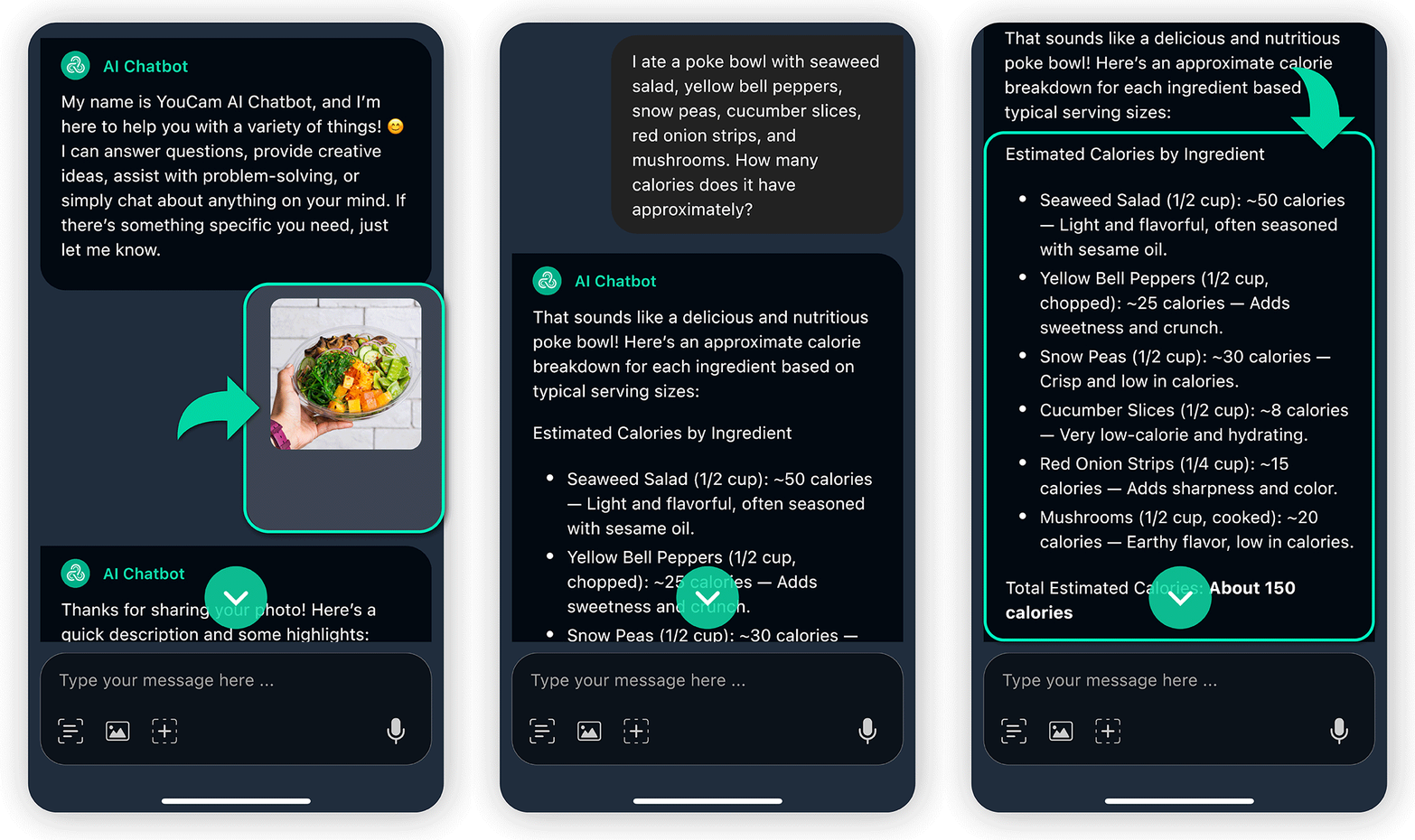 Unlike traditional calorie-tracking apps that rely on manual input or barcode scanning, YouCam AI Chat offers a natural, conversational experience. It’s like having a knowledgeable nutrition coach in your pocket.
Here’s what sets it apart:
Talk to AI Like a Friend
With YouCam AI Chat, you don’t need to wrestle with complicated menus. Simply describe your meal in plain language - whether it’s “a chicken salad with olive oil dressing” or “two slices of pepperoni pizza” and the AI will estimate the calories for you.
Get Personalized Nutrition Advice
Beyond calorie counting, the app can suggest healthy eating tips, portion sizes, and even snack alternatives.
For example, if you tell the app you had a high-calorie lunch, it might recommend a lighter dinner or a more nutrient-dense snack.
Interactive and Flexible
You can ask follow-up questions, clarify your food descriptions, or even inquire about recommended daily calorie intake based on your goals. It’s a dynamic, two-way conversation rather than a one-sided data entry.
How to Use YouCam AI Chat for Calorie Counting: Step by Step
Getting started is easy, even if you’re new to calorie tracking. Here’s a simple guide to using YouCam AI Chat effectively:
Step 1: Download the App
YouCam AI Chat is available for iOS. Once installed, open the app and create a free account to start your calorie-counting journey.
Step 2: Take a Photo of Your Meal

Say goodbye to guesswork and hello to smarter eating!
Step 3: Optional - Describe Your Meal

- “I had a bowl of standard oatmeal with blueberries and almonds. How many calories was that?”
The AI will then provide an estimated calorie count along with suggestions for balancing your meal.
Step 4: Ask Further Questions

- “How many more calories can I eat today?”
- “What’s a healthier alternative to a burger?”
The AI responds in real-time, making it easy to adjust your choices without stress.
Step 5: Explore Health Tips

- “What are some low-calorie snacks?”
- “How can I increase protein without adding too many calories?”
The app provides practical, friendly advice that you can implement immediately.
Tips for Maximizing Your Calorie Calculator App Experience

- Be specific with your meal descriptions for the most accurate estimates.
- Use follow-up questions to clarify portion sizes or ingredient types.
- Check trends regularly to understand your eating habits.
- Pair with other healthy habits like staying active and drinking plenty of water.
Even small adjustments, guided by accurate calorie estimates, can add up to noticeable improvements in your overall health.
YouCam AI Chat: Your Pocket Nutrition Coach
If you’re serious about tracking your calories without turning it into a chore, YouCam AI Chat is hands-down one of the best calorie calculator apps available today. Its intuitive, conversational interface makes counting calories feel natural, while its smart advice helps you make healthier decisions.
Whether you’re trying to lose weight, maintain a healthy lifestyle, or simply understand your daily intake better, this app turns a traditionally tedious task into something approachable and even enjoyable. Stop stressing over spreadsheets and complicated food logs.
Download the app, have a chat with your AI nutrition assistant, and take control of your health in a way that actually feels good.